Most creators don't have a video problem. They have a system problem.
The symptoms look familiar. Footage sits on a desktop labeled “final-final-2.” Thumbnails live in three different folders. A sponsor mention gets added too late, captions are forgotten, and upload day turns into a scramble for a description, title, and tags. The video eventually goes live, but nobody on the team can say which version was approved, what changed in revision two, or why the last three uploads underperformed.
That chaos used to be survivable when competition was lighter. It isn't now. Over 20 million new videos are uploaded to YouTube every day in 2026, according to Global Media Insight's YouTube statistics roundup. In that environment, sloppy management doesn't just waste time. It buries otherwise good content.
The channels that publish consistently without burning out rarely rely on talent alone. They run on repeatable operations. Topic selection feeds scripting. Scripting feeds production. Production feeds editing. Editing feeds packaging. Packaging feeds analytics review. Then the next video starts with better inputs than the last one.
That's what YouTube video management is. Not a pile of disconnected tasks, and not just “editing faster.” It's an integrated production system that keeps the work moving, protects quality, and turns performance data into better decisions on the next upload.
Table of Contents
- Introduction The End of YouTube Chaos
- The Content Blueprint Planning and Organization
- The Assembly Line Mastering Your Editorial Workflow
- The Publishing Playbook SEO Scheduling and Repurposing
- Closing the Loop Feedback and Performance Analysis
- Scaling Your Production When to Outsource Video Management
- Building Your Management System
Introduction The End of YouTube Chaos
A creator records a strong episode on Monday. By Wednesday, they can't find the latest B-roll. By Thursday, the editor is asking which intro version is current. Friday turns into a thread of scattered notes across email, text messages, and comments that say things like “tighten this section” with no timestamp. The video goes live late, the thumbnail feels rushed, and the team is already behind on the next upload.
That's normal for channels that grow faster than their workflow.
The fix isn't another plugin or a prettier checklist. It's a management system that starts before the camera turns on and keeps running after the video is published. Good YouTube video management ties together planning, assets, editing, review, metadata, publishing, and analysis so each step reduces friction for the next one.
Practical rule: If your team has to ask “Where is the latest file?” or “Which version are we using?” more than once a week, the problem isn't effort. It's process.
I've seen the same pattern across solo creators, podcasts, course businesses, and brand channels. They often think the pain sits in editing because that's where the hours pile up. But the actual drag usually starts earlier. Weak topic planning creates bloated cuts. Poor file naming causes revision mistakes. Missing brand assets lead to inconsistent graphics. Last-minute publishing kills good SEO habits.
The channels that feel calm on the surface aren't magically less busy. They've just turned content production into an operational loop. That loop is what keeps creative work from collapsing into admin work.
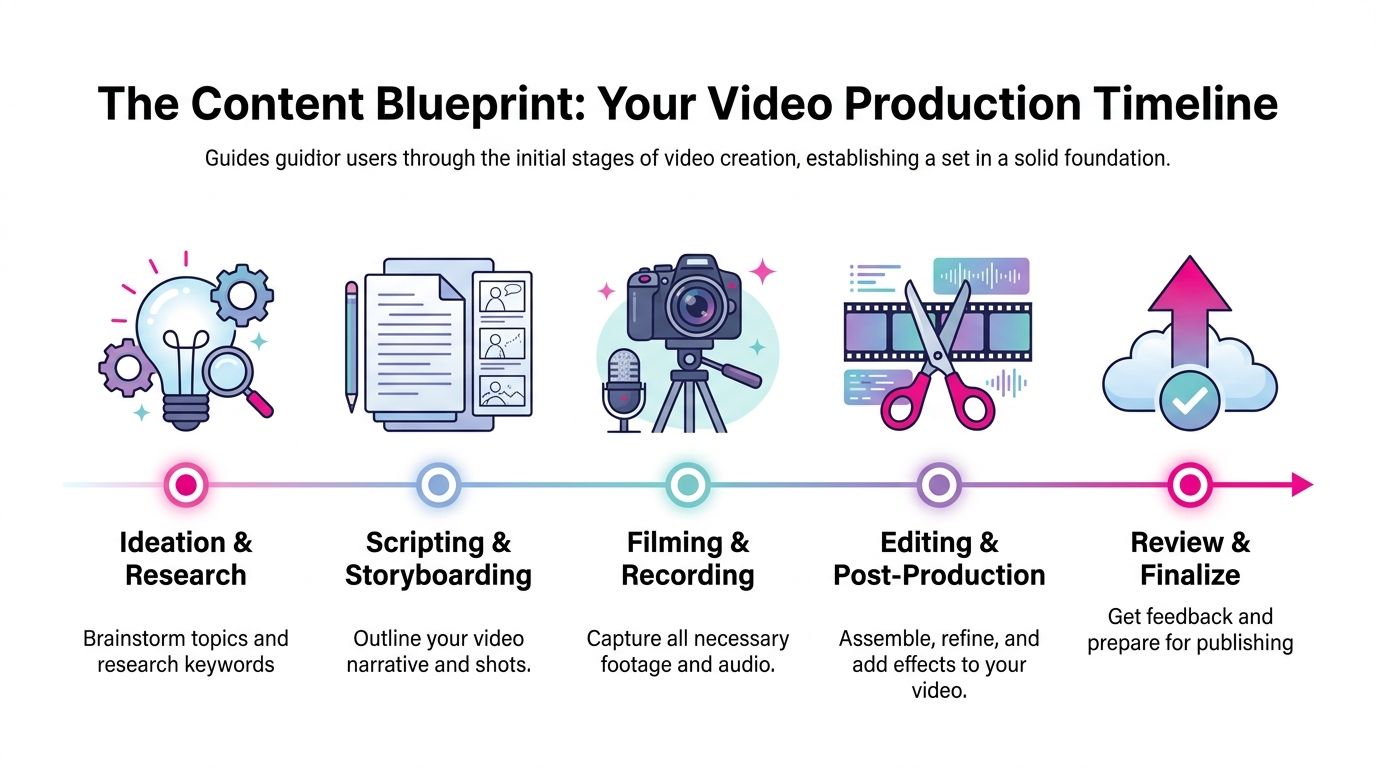
The Content Blueprint Planning and Organization
Strong channels don't start with editing software. They start with a content blueprint.
Start with a channel operating model
A content calendar works best when it answers three questions before any script gets written.
Who is the channel for
Generic niche thinking creates generic videos. One of the best planning moves is to focus on an underserved demographic instead of another broad category. A cited example is targeting audiences such as “midlife aging with strength,” where demand is high and supply is low, discussed in this YouTube strategy video about underserved demographics.What formats repeat
Pick a small set of recurring formats. Tutorials, reactions, interviews, breakdowns, weekly commentary, shorts cutdowns. Repetition lowers production friction because everyone knows the structure before the project starts.What the video must achieve
Not every upload has the same job. Some videos are built for search. Others deepen trust. Others feed clips into Shorts. If you don't define the job early, the edit gets muddy.
A useful planning board usually includes topic, target viewer, format, filming needs, CTA, repurposing notes, and publish window. That sounds basic, but it prevents the common mistake of deciding everything at the edit stage, which is the most expensive stage to improvise in.
Here's the planning sequence I trust most:
- Topic first: Pick a clear subject with a defined audience promise.
- Angle second: Decide why this version deserves attention now.
- Assets third: List footage, graphics, examples, references, and brand elements before recording.
- Distribution note: Mark whether the video should also generate Shorts, clips, or playlist placement.
- Approval path: Decide who signs off on script, cut, thumbnail, and metadata.
The video below shows a practical example mindset for managing the production path from idea to release.
Build a folder structure before you need it
Most messy edits come from messy inputs.
Create a master folder for every upload with the same subfolders every time. Raw footage, audio, project files, graphics, exports, thumbnails, captions, and approvals. Don't get clever with names. Consistency beats creativity here.
A simple naming pattern helps more than most creators expect:
| Folder or file | Naming approach | Why it helps |
|---|---|---|
| Main project | ChannelName_EpisodeTopic_Date | Makes search easy |
| Camera files | CamA_001, CamB_001 | Avoids multicam confusion |
| Exports | Topic_CutV1, CutV2, FinalUpload | Prevents accidental overwrite |
| Thumbnails | Thumb_A, Thumb_B | Supports testing and review |
The editor shouldn't be the archivist, detective, and graphics coordinator at the same time. Planning should remove those jobs before the timeline opens.
Keep brand assets in a separate central library rather than copying them into each project from scratch. Logos, lower-thirds, font files, LUTs, intro stings, music beds, sound effects, end screens, and CTA templates should all live in one controlled location. That's how channels stay visually consistent even when multiple people touch the work.
Good organization feels boring at first. Then it saves a production week.
The Assembly Line Mastering Your Editorial Workflow
Editing gets easier when you stop treating it like one long creative blur.
Treat post-production like staged manufacturing
A reliable editorial workflow has distinct gates. You don't color grade before the story works. You don't animate lower-thirds before the timing is stable. You don't mix final audio on a cut that still has structural changes coming.
My preferred sequence looks like this:
Ingest and verify
Copy footage into the project structure, confirm nothing is corrupt, and label everything before editing starts.Sync and organize
For multicam shoots, sync cameras and external audio immediately. Build bins for A-roll, B-roll, graphics, music, and selects.Rough cut
Focus only on structure. Remove dead starts, repeated thoughts, and sections that don't serve the viewer. Pacing is built during this phase.Fine cut
Add B-roll, text callouts, punch-ins, reframes, and transitions only after the structure holds.Audio pass
Clean dialogue, reduce distracting noise, level speakers, and shape music so it supports instead of fights the voice.Color pass
Correct exposure and white balance first. Grade second. Too many creators jump straight to a look before fixing consistency.Graphics and compliance
Insert lower-thirds, chapter cards, disclaimers, end screens, and anything promised in the script.
That assembly-line mindset matters even more when AI enters the process. A lot of creators now use AI for scripts, voice, research, or rough visuals. The hidden risk isn't speed. It's skipping quality control. If most of the input is AI-assisted, someone still needs to review factual clarity, pacing, tone, audio realism, and whether the video feels human enough to keep trust.
A practical QC pass usually checks these questions:
- Does the first section hook clearly
- Do visual changes happen often enough to support retention
- Does the audio sound natural
- Do graphics match the brand
- Does the video answer the title
If a video is technically polished but emotionally flat, viewers still leave. Quality control has to check for usefulness and authenticity, not just errors.
Export settings and delivery checks
YouTube doesn't reward careless exports. For compatibility and quality, export with H.264, 48kHz audio, and at least 1920×1080 resolution, based on YouTube's recommended upload encoding settings.
Before uploading, run a final delivery checklist:
- Watch the render through: Check for black frames, broken transitions, caption issues, and graphics that animate off-center.
- Confirm accessibility: Closed captions aren't optional busywork. They help viewers who watch without sound and improve usability.
- Prepare chapters: Add video chapters in the description using the HH:MM:SS format so viewers can jump to different parts of long-form content more easily.
- Check thumbnail handoff: Make sure the title direction and visual promise match the actual opening of the video.
Channels either preserve quality or accidentally undo weeks of work at this stage.
The Publishing Playbook SEO Scheduling and Repurposing
Launch day goes wrong in predictable ways. The video is exported, but the title is still a placeholder, the thumbnail says one thing while the intro says another, nobody clipped Shorts during the edit, and the upload gets rushed out with weak metadata. Then the team calls the result a distribution problem.
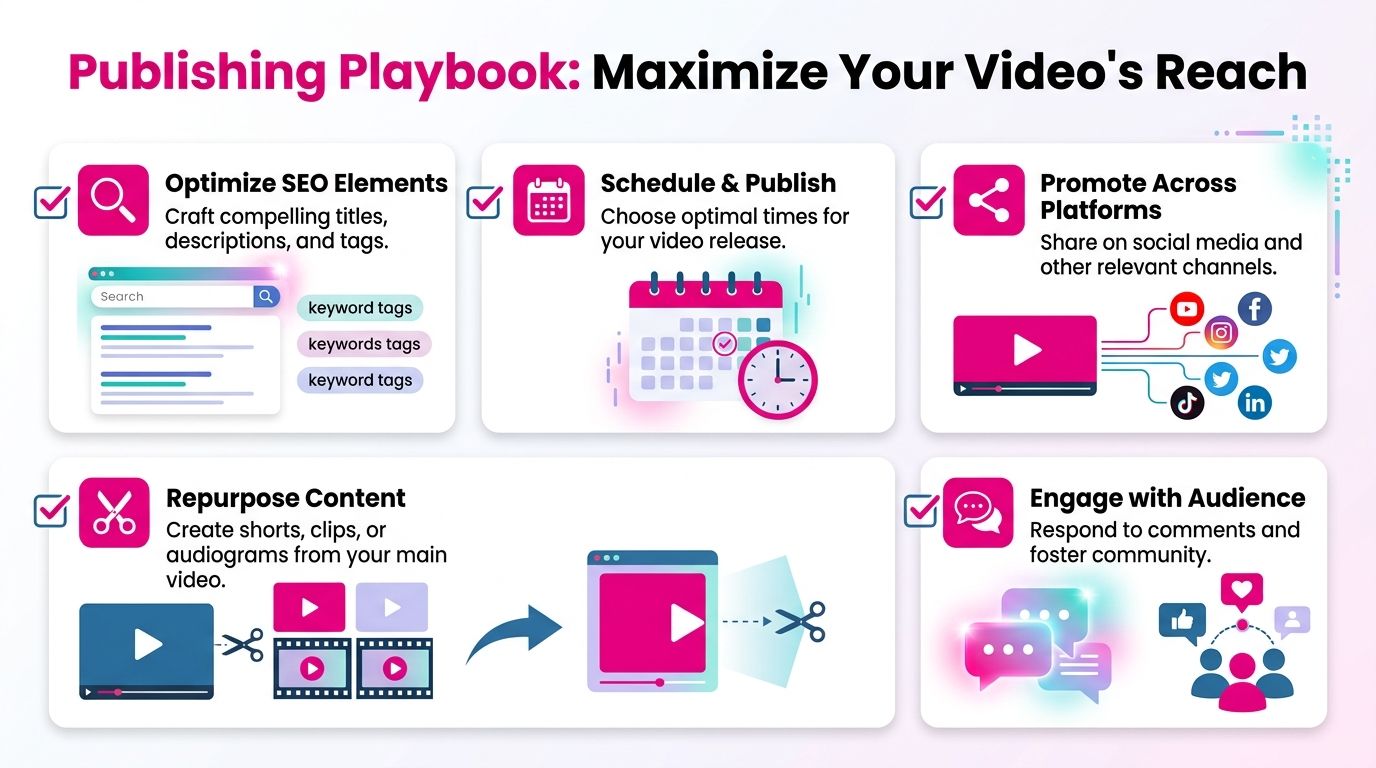
Publishing works best when it is treated as the final production stage, not a separate marketing task. The same decisions made in pre-production and editing should carry through the title, thumbnail, description, playlists, release timing, and repurposed assets. That continuity is what keeps the promise clear from click to watch time.
Packaging is part of the edit
Strong packaging starts before upload. If the working title, audience angle, and core promise are already clear in the brief, SEO becomes much easier because the metadata is reflecting editorial intent instead of trying to rescue a vague video.
For YouTube search, put the main keyword near the front of the title and description, keep the wording readable, and cut anything that sounds stuffed or repetitive. Organizing videos into clear topic playlists also helps viewers and the channel structure, and this YouTube best-practice checklist covers the basics. For a closer look at how titles, thumbnails, metadata, and watch intent fit together, this guide to YouTube SEO workflows is a useful companion.
The channels I see perform well usually get one thing right. The thumbnail, title, opening, and expected payoff all match. If the thumbnail promises a fast answer but the first 30 seconds wander, the packaging did not fail on design. It failed on alignment.
A solid pre-publish check covers:
- Title fit: The main keyword appears early, but the title still sounds natural.
- Description fit: The first lines explain the topic and give YouTube clean context.
- Thumbnail fit: One focal point, readable contrast, and a clear visual claim.
- Playlist fit: The video is added to the right content cluster on day one.
- CTA fit: The spoken CTA, end screen, and description links point to the same next step.
Scheduling should reduce stress, not create it
A publishing calendar only works if the dates connect back to production reality.
Set the release date first. Then build backward through approvals, metadata lock, thumbnail delivery, exports, and final upload checks. I prefer deadlines with a buffer because thumbnails change, titles get revised, and uploads can still fail at the worst possible time. Teams that publish consistently are rarely faster at every task. They are better at deciding when each task must be finished.
Consistency matters more than ambition here. One video every week on a stable system will beat an erratic burst schedule that burns out the editor, the channel manager, and the audience.
Repurposing works when it starts in the edit
Repurposing usually breaks because it gets treated like cleanup work after the main video is already done. By then, the editor has moved on, the best moments were never marked, and every short-form asset feels like a rushed copy.
The fix is simple. Tag clip candidates while cutting the long-form video.
Look for moments that can stand alone:
| Asset | Derived from | Best use |
|---|---|---|
| Shorts clip | Hook, reveal, or payoff moment | Reach and discovery |
| Vertical teaser | Strong claim or result | Cross-platform promotion |
| Audiogram or quote card | Podcast or talking-head segment | Community and social posting |
| Playlist update | Main upload plus related back catalog | More session depth |
Not every long-form upload needs Shorts or off-platform teasers. Some topics are better as a single search-driven asset. Others have obvious cut points that can feed discovery for weeks. The decision should be made before publish day, based on the goal of the video, the format, and the effort required to make the repurposed version feel native instead of recycled.
That is the playbook. Publish with search intent, package with editorial discipline, schedule with enough margin, and repurpose from the same source system. Channels stay organized when publishing is connected to everything upstream.
Closing the Loop Feedback and Performance Analysis
Publishing is not the finish line. It's where the next planning cycle starts.
Feedback has to be precise or it slows everything down
Most review cycles break because feedback arrives in the wrong format.
An email that says “make this tighter” isn't useful unless the editor knows the exact second, the reason, and the intended fix. A comment like “change the music vibe around the product demo” is much better when attached to a timestamp. That's why portal-based review systems with tracked comments are more than a convenience. They reduce interpretation errors, duplicate revisions, and approval drift.
When I set up feedback workflows, I want every review note to answer four things:
- Where is the issue
- What exactly feels wrong
- What outcome is wanted
- Who has final approval
Without that discipline, revision rounds sprawl. Teams end up debating taste instead of solving communication problems.
A lean review loop usually works best:
- Editor submits one clear draft.
- Reviewer leaves timestamped notes in one place.
- Decision-maker consolidates conflicting feedback.
- Editor completes a focused revision.
- Final approval locks the version for export and upload.
Fast teams aren't the ones that skip revisions. They're the ones that keep feedback specific, centralized, and final.
Read performance like an editor not just a marketer
YouTube is too large and too valuable to treat analytics casually. The platform generated $40 billion in ad revenue in 2025 and served 2.6 billion monthly users, according to Hootsuite's YouTube statistics. On top of that, engagement rates peak for channels with 100K to 1M subscribers in that same source, which is a useful reminder that strong packaging and strong editing compound as channels mature.
For ongoing review, I care less about vanity reactions and more about signals that connect back to creative decisions. This practical resource on YouTube analytics review helps frame that mindset.
The three metrics I watch most closely are:
Click-through rate
This reflects packaging quality. If impressions arrive but clicks lag, the title and thumbnail likely need better alignment or a stronger visual promise.Audience retention
This shows whether the video delivers after the click. Sharp early drop-offs often point to weak hooks, slow intros, or a mismatch between title and opening.Watch time patterns
If viewers consistently leave at the same type of segment, that's an editorial clue. Long sponsor reads, repetitive setups, or buried payoffs usually reveal themselves here.
Use qualitative feedback alongside platform data. Comments often expose confusion that retention graphs can't name directly. If viewers keep asking the same question, the video may have skipped an explanation or framed the topic poorly.
A healthy management loop looks like this in practice:
| Signal | Likely issue | Next action |
|---|---|---|
| Low CTR | Weak title-thumbnail pairing | Test new thumbnail direction |
| Early retention drop | Slow opening or mismatched promise | Rewrite first section structure |
| Mid-video exits | Pacing dip or unnecessary segment | Tighten future scripts and cuts |
| Repeated viewer confusion | Clarity gap | Add stronger setup and on-screen guidance |
That's where YouTube video management becomes strategic. Analysis isn't a report card. It's production input for the next cycle.
Scaling Your Production When to Outsource Video Management
Most creators don't outsource because they suddenly hate editing. They outsource because the channel hits a point where doing everything personally starts lowering quality.
The decision usually comes down to bottlenecks
If your upload schedule slips because editing always overruns, that's a bottleneck. If you're avoiding more ambitious formats because post-production is too heavy, that's another one. If every video looks slightly different because freelancers rotate in and out without a real system, the problem isn't talent. It's capacity and consistency.
Outsourcing makes sense when one or more of these conditions are true:
- Strategy is getting crowded out: You spend so much time cutting footage that planning, scripting, and audience research suffer.
- Quality has plateaued: The channel needs stronger sound, graphics, multicam work, or color consistency than you can reliably produce alone.
- Turnaround matters: Posting windows keep slipping because the workflow depends on one person doing every task.
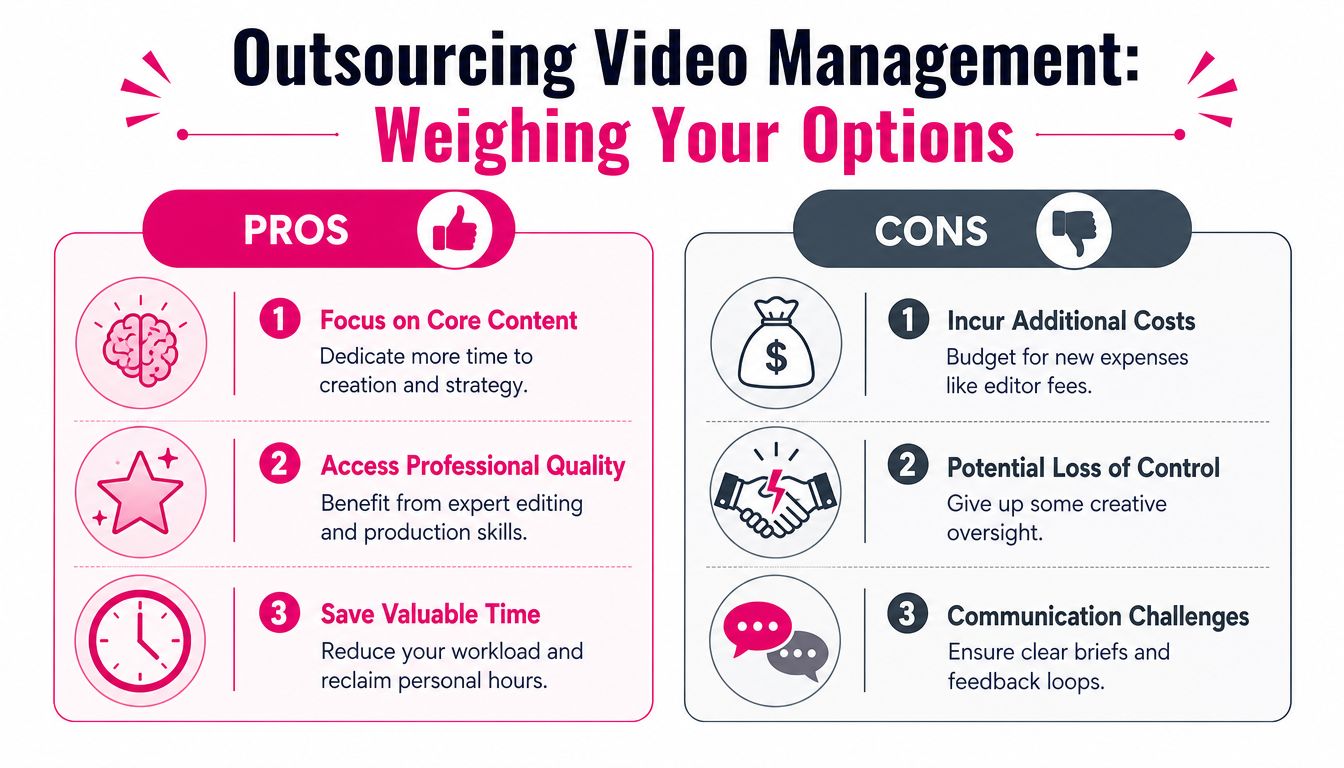
The trade-off is real. Outsourcing adds cost and requires clearer briefs. You also give up some direct control over the timeline. But that control is often imaginary if you're already late, inconsistent, and overloaded.
For many channels, the smarter move is not full delegation at once. It's staged delegation.
What to hand off first
Start by outsourcing the work that is both repeatable and time-heavy.
That often means:
- Long-form editing: Assembly, pacing, cleanup, and graphics implementation.
- Short-form cutdowns: Vertical clips from each main upload.
- Thumbnail production: Especially when the editor and thumbnail designer can coordinate around the same promise.
- Revision management: Centralized notes, version tracking, and delivery handling.
Ask operational questions before hiring, not just creative ones. What is the turnaround? How are revisions handled? Is pricing per video or retainer-based? Who owns communication? Can the same editor stay on the account for brand consistency? If you're evaluating options, this overview of outsourcing YouTube editing covers the key handoff considerations.
A good outsourcing relationship should make your process more stable, not more mysterious. If a vendor can't explain their revision flow, file delivery method, and approval path in plain language, expect friction later.
Building Your Management System
Effective YouTube video management works when each stage feeds the next one cleanly.
Planning decides what gets made and for whom. Organization makes production easier before the first edit starts. Editorial workflow turns raw material into a coherent viewing experience. Publishing translates that work into discoverable packaging. Feedback and analytics show what to change before the next cycle begins. Scaling decisions protect that system when the workload grows.
That integrated view is what keeps channels from living in permanent catch-up mode.
Structure doesn't kill creativity. It protects it. When folders are clean, briefs are sharp, review notes are timestamped, and publishing steps are standardized, the team gets more room to make better creative choices. They spend less energy searching, clarifying, and fixing preventable mistakes.
If your current workflow feels chaotic, don't try to overhaul everything at once. Start with one repeatable chain. Topic brief, file structure, rough-cut review, packaging checklist, performance review. Run it for a few uploads. Tighten what breaks. Keep what works.
That's how a channel stops “managing videos” and starts operating a content system.
If you want help building that system without carrying the full editing load yourself, Your Video Editor offers professional support for long-form and short-form editing, thumbnails, branded assets, and revision workflows through a client portal with timestamped feedback. It's a practical option for creators and teams that want cleaner operations, steadier publishing, and polished output without adding in-house complexity.