You don't usually notice video asset management until something breaks. A freelancer asks for the “latest cut,” and there are three versions in email, two in Drive, and one sitting on a desktop you can't access. The thumbnail file is named something vague, the intro sting is missing, and your editor is waiting on notes that were left at two different timestamps in two different places.
That mess isn't a talent problem. It's a systems problem.
Video Asset Management for Creators is the layer that keeps raw footage, edits, brand files, approvals, and final exports organized enough that you can outsource editing without losing control. Industry guides describe video asset management as the bridge between storage and creative tools, built for large files, multiple formats, version control, transcoding, streaming preview, timecode preservation, metadata management, and frame-accurate review (fast.io's implementation guide on video asset management). For creators, that matters less as theory and more as a way to stop re-explaining the same project over and over.
Table of Contents
- Why Video Asset Management Matters for Modern Creators
- Core Components of a Video Asset Management System
- Benefits for Creators and Outsourced Editing Teams
- Implementation Steps and Migration Guidance
- Choosing the Right Approach for Your Workflow
- Governance and Scale Considerations
- Your Video Asset Management Checklist
Why Video Asset Management Matters for Modern Creators
A creator who outsources editing usually doesn't lose time because the edit itself is hard. The time disappears in the handoff. Footage gets uploaded one way, notes come back another way, and the editor is forced to guess which file is final, which one is approved, and which one still needs brand graphics.
That's exactly where video asset management earns its keep. It's the operational layer between raw storage and creative tools, built to handle version control, transcoding, streaming preview, timecode preservation, metadata management, and frame-accurate review (fast.io). In other words, it's not just a place to park files. It's how you keep the project understandable after the first revision.
Practical rule: if a teammate can't tell what an asset is from its metadata and filename alone, the library isn't managed yet.
Creators feel this most when their folders become a mix of final exports, selects, B-roll, thumbnails, and branded assets. A generic cloud drive can store them, but it doesn't tell anyone what's current, what belongs together, or what should be reused next time. That's why creator workflows built around video management tend to outperform loose file-sharing setups when editing is outsourced.
Where generic storage falls apart
Generic storage treats every file as equal. Video work doesn't. A 4K master, a proxy, a caption file, and a lower-third template all serve different jobs, and they need different rules for access and review. When those rules aren't explicit, editors end up downloading masters they don't need, clients leave notes in the wrong place, and version confusion starts to look normal.
The bigger issue is that video is collaborative by nature. A creator, editor, thumbnail designer, and account manager all need different views of the same project. Video asset management makes that possible without turning every handoff into a scavenger hunt.
Core Components of a Video Asset Management System
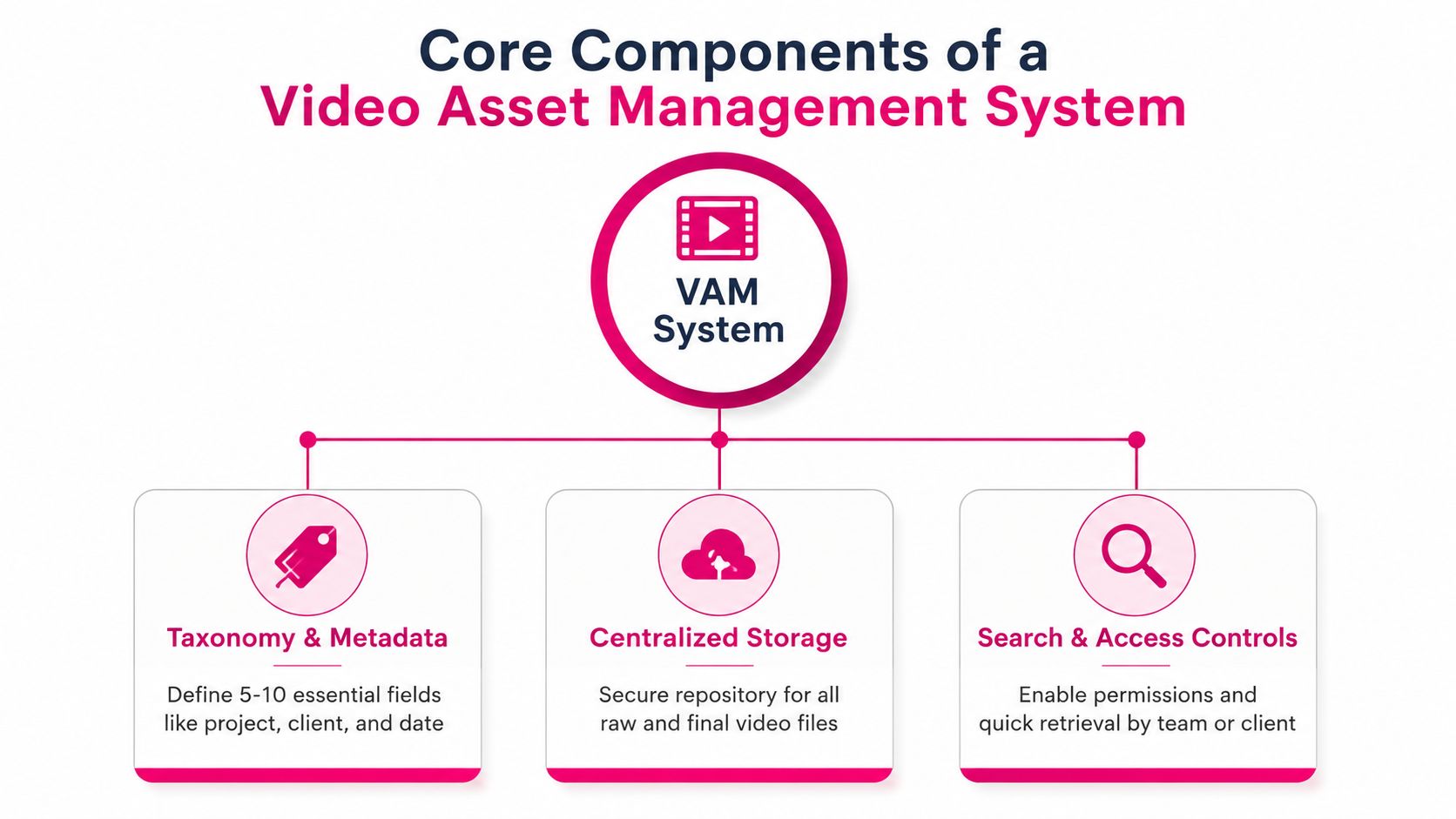
A video asset system breaks down fast when structure is an afterthought. Folders alone do not tell an outsourced editor which cut is current, which files are approved, or which assets are safe to reuse. The first thing to get right is the taxonomy, because if the project labels are inconsistent, search becomes guesswork. Practical guidance from Shotai's 2026 guide recommends starting with only 5 to 10 required metadata fields and letting real usage shape the rest.
Taxonomy and metadata first
For creators, the fields that matter are usually plain and operational, like project, client, date, asset type, version, and status. The goal is not to build an archive catalog that nobody wants to maintain. The goal is to let an editor find the right clip without sending three follow-up messages.
Searchable metadata matters even more once revisions start moving between a creator, an editor, and a client portal. Avid's guidance on searchable metadata for video DAM recommends fields such as creator, creation date, format, resolution, usage rights, and version information (Avid's guidance on searchable metadata for video DAM). That matters because the right asset is more than the right frame. It is the one that is approved, usable, and attached to the current version.
Storage, ingest, and search
Storage is only one part of the system, and the wrong storage setup creates extra work for everyone. A platform should be judged on chunked resumable uploads, multi-codec ABR ladder generation, transcript-aware search, lifecycle tiering and deduplication, and audit trails for governance (videoassetmanagement.com's selection guide). Those capabilities are what keep a shared library usable when multiple people are uploading, reviewing, and archiving at the same time.
When editors can preview and search without downloading a master file, review moves faster and mistakes tend to show up earlier.
Search also needs to reflect how video is used. Transcript search helps, but only if it sits alongside access controls and version history. Otherwise you can find the right moment and still attach the wrong cut. That is one reason tools built for outsourced YouTube editing tend to work better than generic file-sharing setups once the workflow includes handoffs, approvals, and client comments.
A resource worth bookmarking
If you want a broader asset-management lens that maps well to product and content operations, the overview on dam benefits for product teams is a useful comparison point. The vocabulary is broader than video, but the organizing logic is familiar.
Why transcoding and proxies matter
Creators often lose time when editors are forced to work from full-resolution masters. Systems without automated transcoding or proxy generation make every review heavier than it needs to be, because people end up downloading large files just to check a cut. Proxy access and preview without downloads keep the review loop moving and reduce the number of mistakes that survive to the next round.
Benefits for Creators and Outsourced Editing Teams
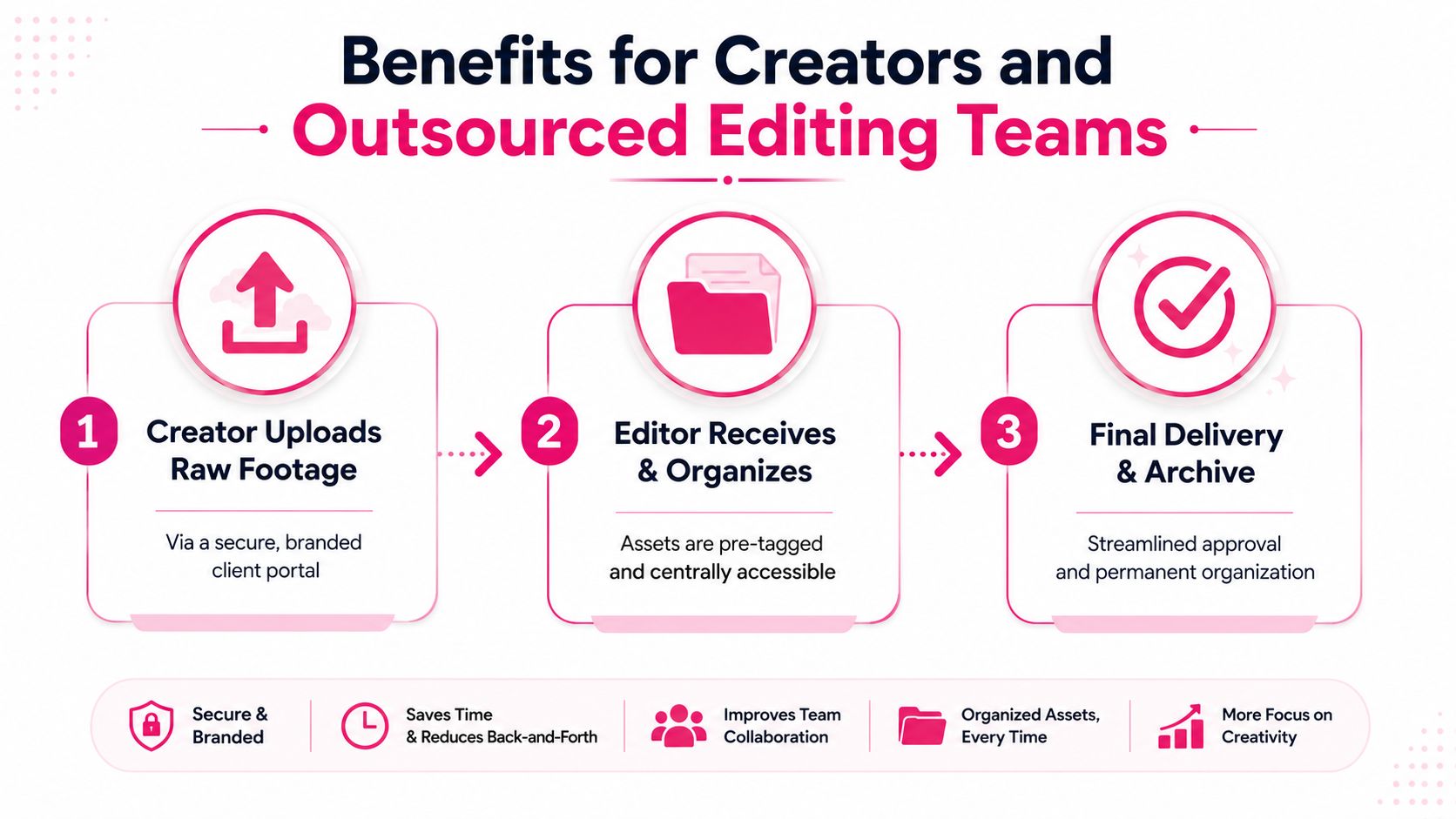
The best creator-facing systems don't feel like enterprise software. They feel like a calmer handoff. Raw footage goes in, the editor knows what's what, and feedback stays attached to the right moment instead of floating around in email threads.
Client portals replace scattered handoffs
A branded portal changes the rhythm of a project. Instead of sending attachments in one place and approval notes somewhere else, creators can centralize uploads, review, and final delivery in a single workflow. That's especially valuable when the same project includes raw footage, reference clips, intros, outros, and thumbnail assets.
This is also where outsourced editing starts to feel manageable. The editor doesn't have to ask for every asset separately, and the creator doesn't have to remember which version was sent where. The library becomes the source of truth.
Timestamped feedback changes revision quality
Generic comments are where good edits get bogged down. “Make it smoother” is too vague, and “change the intro” is too late to be useful. Frame-accurate review tools solve that by keeping notes tied to a moment in the timeline, which is exactly what motion content needs (MTM's review-workflow article).
What works: timestamped notes, side-by-side comparison, and external review links.
What doesn't: screenshots pasted into chat and approval decisions buried in email.
Organized asset libraries protect brand consistency
Creators who publish often need the same pieces repeatedly, intros, outros, lower thirds, watermark files, and thumbnail templates. When those assets live in a structured library, the editor can grab the right branded material without waiting for a reminder. That keeps the channel or brand visually consistent even when multiple editors touch the work.
For teams that want a service model instead of building software around the workflow themselves, outsourced editing with timestamped feedback can absorb a lot of the operational strain. The important part is not the vendor name. It's whether the process keeps assets, comments, and approvals connected.
Implementation Steps and Migration Guidance
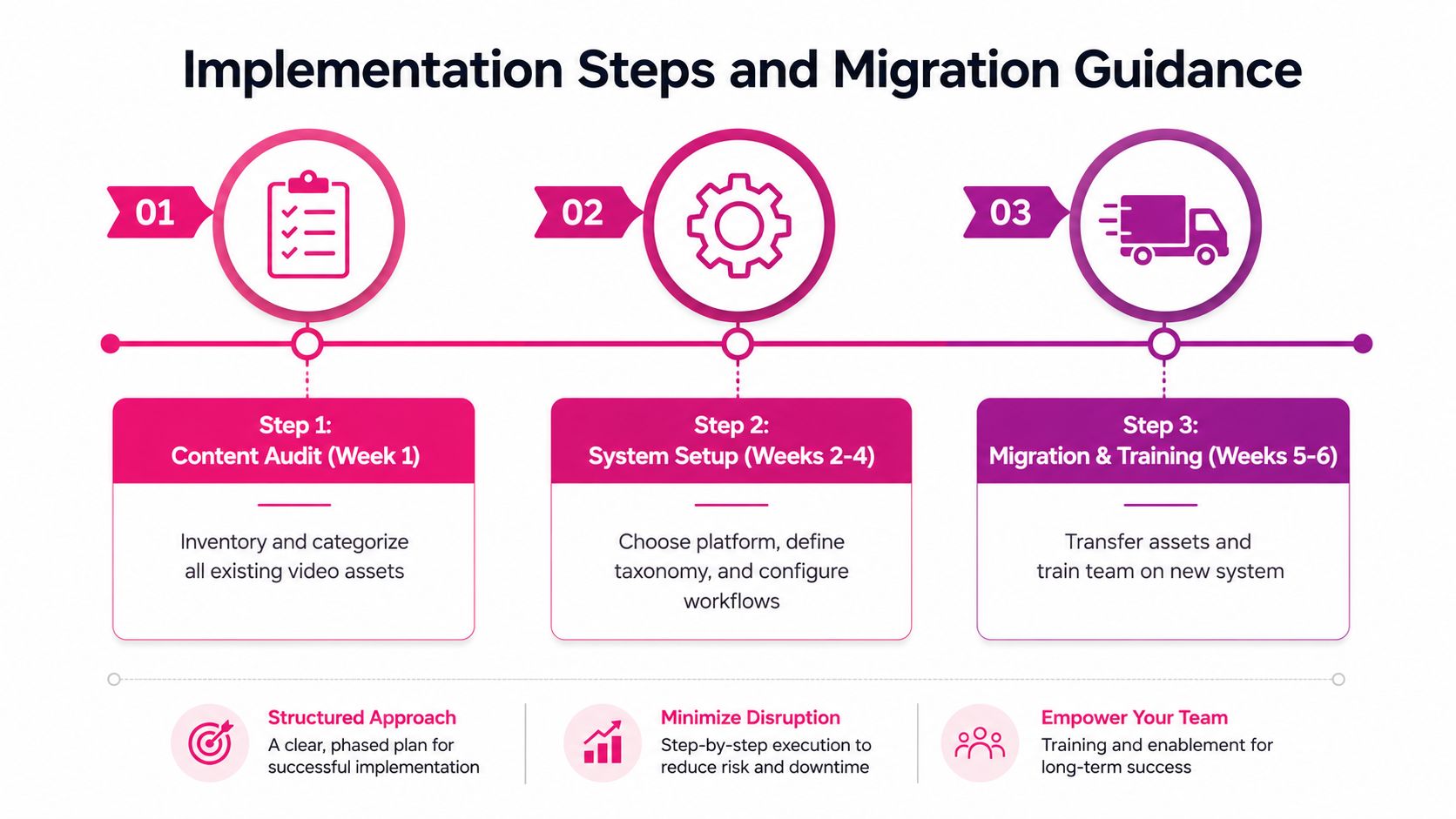
A creator with five client edits in flight, a scattered drive full of exports, and a reviewer waiting on the latest cut cannot afford a theoretical rollout. The right migration starts with the files already in use, then tightens the process around the way outsourced editors work.
Start with a content audit
Before touching tools, inventory what is active, what is archived, and what gets reused again and again. Separate current client projects from older deliverables, then flag the files that repeatedly come back into edits, trailers, cutdowns, thumbnails, intro packs, and brand graphics. That gives you a migration target you can realistically finish, instead of spending time tagging assets that never matter again.
Recent guidance recommends starting with active and recent assets and keeping the metadata set small enough that editors will keep using it. That advice works because the hardest part usually is not software setup, it is getting people to change habits. If your process adds friction at upload, editors will route around it and your library will drift back into chaos.
Build a small metadata system people will use
A useful taxonomy is one the editor can apply without stopping the cut. Start with the smallest set of fields that still answers the core questions: who owns the asset, what project it belongs to, what version it is, and whether it is approved. That is enough to keep search usable without turning every upload into admin work.
The best systems usually support the way editors already annotate work, not the way an internal operations team wishes they would. If your review process depends on timestamped comments, naming conventions, and clear handoff status, the metadata should reflect that. A practical editing workflow guide is useful here because it shows the kind of structure that keeps client notes, versions, and approvals aligned without forcing people into a clumsy process.
Plan migration around real workload
Migration timing depends on library size, and recent guidance says the move can take 1 to 4 weeks depending on that size. The mistake is trying to move everything at once. Bring over the work that is active first, then backfill the archive after the team has already adjusted to the new routine.
Use this sequence:
- Audit current assets. Identify what is live, what is reusable, and what is obsolete.
- Define the minimum fields. Keep the taxonomy tight so editors can comply.
- Train on one recurring workflow. Start with uploads, timestamped notes, and approvals before layering in more complexity.
That sequence works because most rollout failures are habit failures. Editors will follow a process that makes review faster, keeps feedback tied to the right frame, and gives clients a cleaner way to approve work through a shared portal or library. Once that is stable, you can expand the system without forcing the whole team to relearn everything at once.
Choosing the Right Approach for Your Workflow
Not every creator needs a full platform on day one. Some get by with disciplined cloud folders, strong naming conventions, and a shared review process. Others need a dedicated video system because the library is bigger, the revision cycle is messier, or the team includes several outside editors.
Light setup versus dedicated platform
A lightweight setup works best when the library is small, projects are isolated, and only a few people touch the files. The limitation is that every extra editor, client, or deliverable type adds friction. Eventually the folder structure becomes a shadow system that only the founder understands.
A dedicated platform makes more sense once review, permissions, and archive behavior start to matter as much as storage. Enterprise tools also come with hard limits that shape what they're good at. For example, Adobe Experience Manager Dynamic Media supports videos up to 15 GB per file, a maximum input resolution of 16,384 by 16,384, and a maximum length of 30 minutes for its primary short-form workflow (Adobe documentation). That's a reminder that system design has to match the type of content you produce.
| VAM Approach | Best For | Key Limitation |
|---|---|---|
| Organized cloud storage | Solo creators and small teams with simple review cycles | Search, version control, and approvals stay manual |
| Dedicated VAM platform | Teams with frequent revisions, multiple editors, or large libraries | More setup and more process discipline |
| Outsourced editing service with portal | Creators who want built-in review and asset handling without running software | Less direct control over internal infrastructure |
What to optimize for
If you outsource editing, the biggest question is whether your workflow keeps feedback and files connected. If it does, the tool matters less. If it doesn't, even the most expensive platform won't stop confusion.
Use library size, revision frequency, and team complexity as the core decision criteria. The right approach is the one your editors will use every week.
Governance and Scale Considerations
A library becomes harder to manage the moment more people can touch it. Upload rights, approval rights, and deletion rights need to be clear from the start, or the archive starts to drift into confusion. That matters even more when external editors are involved, because access is no longer limited to one laptop and a single shared drive.
Metadata and permissions evolve with the library
Governance matters because growth changes the job. A file can be easy to find in a small folder tree and still be a mess once several editors, clients, and reviewers are all adding their own versions, comments, and exports. The metadata standard has to support that reality, not just make the library look organized.
That approach scales because larger libraries need accountability, not just organization. Each upload should carry enough context for someone else to understand who owns it, who can approve it, and whether it is still safe to reuse. Without that structure, editors spend time hunting for the latest version, and clients end up questioning whether the right cut was ever reviewed.
Retention policy matters too. Keep too little, and you lose footage you could have repurposed later. Keep too much without a clear system, and people stop trusting the archive because they cannot tell what is current, what is reference-only, and what can be retired without breaking future work.
Measure what actually improves
The cleanest signs are practical. Search should get faster. Revision loops should get cleaner. Reused assets should be easier to pull into a new edit. If those changes do not show up, the system is probably too complex for the team using it, or nobody has adopted the workflow consistently.
The shift is from loose file storage to governed libraries that support review, permissions, and version control. Video stops behaving like a pile of scattered exports and starts acting like a shared production record. Creators feel that difference most when they hand work to outside editors, because the portal, the feedback trail, and the asset library all need to stay connected or version confusion comes back fast.
Your Video Asset Management Checklist
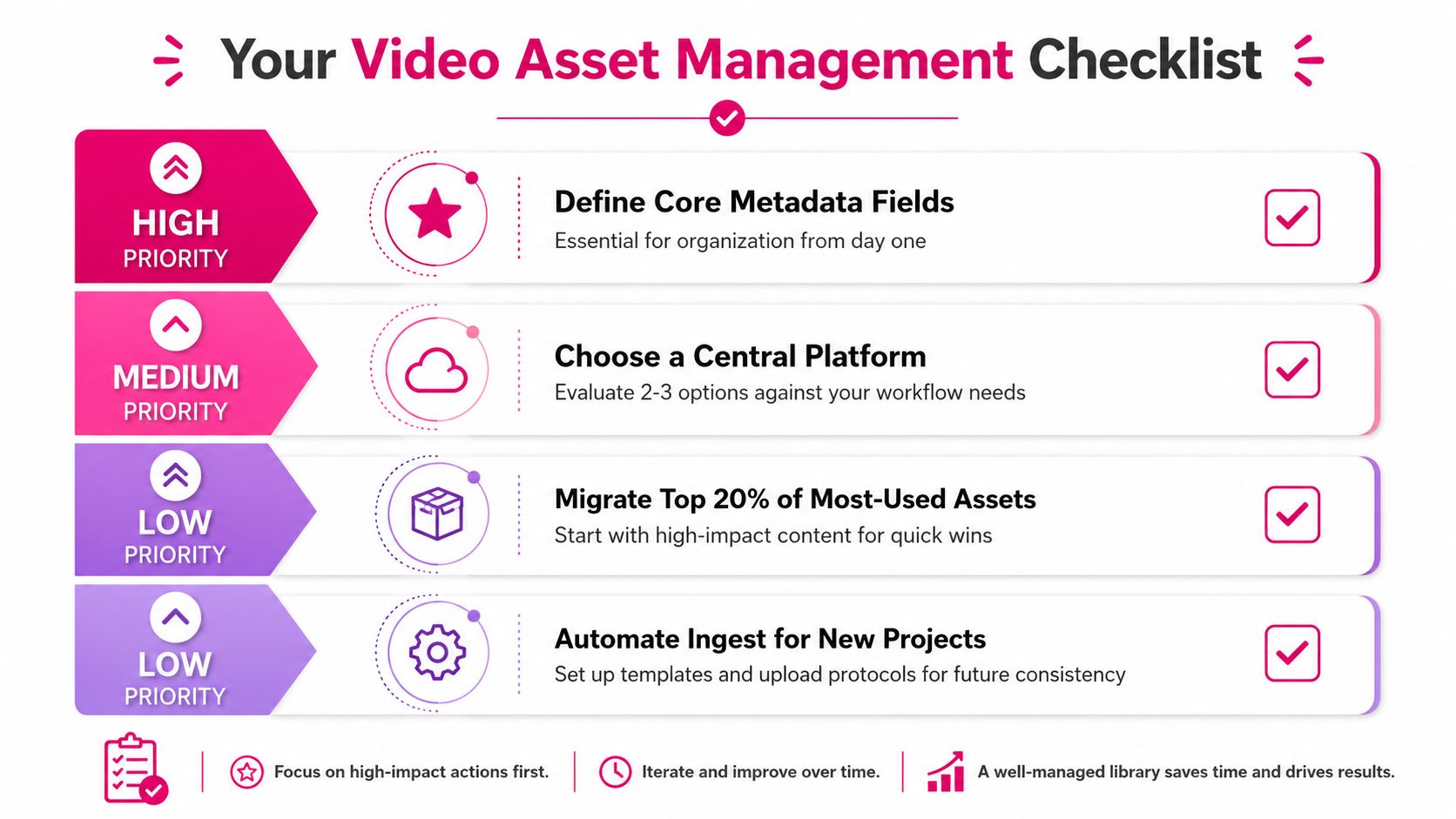
Use this as a practical audit of your current setup.
- Define core metadata fields. Keep the list small, because too many fields kill adoption.
- Choose a central platform. Compare a few options against how your editors, clients, and reviewers work.
- Migrate your most-used assets first. Start with the files you touch every week, not the archive nobody opens.
- Set up upload and review rules. Make timestamped feedback and version naming part of the process, not an afterthought.
- Automate ingest for new projects. Templates and upload protocols prevent the same cleanup job from repeating forever.
Best next step: fix the handoff first, then tune the archive.
If you want outsourced editing that keeps uploads, timestamped notes, and approvals in one place, contact Your Video Editor today and set up a workflow that stops version chaos before it starts.