You finish a video, export it, upload it, and YouTube hits you with a copyright claim. The song sounded perfect in your edit. You even paid for it. Now the video is limited, demonetized, or blocked, and you're stuck wondering what you did wrong.
That moment is where most creators first realize that music licensing for YouTube isn't just about buying a track. It's about clearing rights in a system that uses automated matching, global distribution rules, and paperwork that has to line up after upload, not just before it.
If you're in that spot right now, don't panic. A claim doesn't always mean you broke the rules, and it doesn't always mean you have to scrap the video. It usually means you need to understand how the rights work, what Content ID is doing, and how to prove your permission in the right format. Even practical editing tasks like syncing audio with video cleanly matter more once music rights enter the picture, because timing, timestamps, and track identification all become part of the recovery workflow.
Table of Contents
- The Hidden Landmines in Your Timeline
- The Two Halves of a Song You Must License
- Meet Content ID YouTube's Automated Copyright Bot
- Your Three Legal Paths to Finding Great Music
- The Real Cost of Music Licensing in 2026
- Common Licensing Myths That Will Get You Strikes
- When to Outsource Your Music Headaches
The Hidden Landmines in Your Timeline
The trouble usually starts long before upload. It starts when you drag a great song into your timeline and treat it like any other asset.
That's understandable. If you can buy footage, fonts, LUTs, and sound effects online, it feels natural to assume music works the same way. But music is the asset most likely to punish a wrong assumption after the work is already done.
A creator will often do everything right from a production standpoint. They cut the pacing well, hit emotional beats, maybe even build the whole edit around the chorus. Then YouTube scans the file, detects the music, and applies the rights holder's policy. Suddenly the issue isn't creative anymore. It's legal and procedural.
Practical rule: A payment receipt proves you bought something. It doesn't automatically prove YouTube recognizes that your video is cleared.
That's the part many guides skip. They focus on “what music can I use?” when the actual creator problem is usually “my uploaded video got claimed, what do I do now?”
To stay safe, you need one mental model first. Every song is really two separate rights bundles. If you don't understand that split, the rest of music licensing for YouTube will keep feeling random.
The Two Halves of a Song You Must License
A song sounds like one thing to a viewer. Legally, it usually isn't.
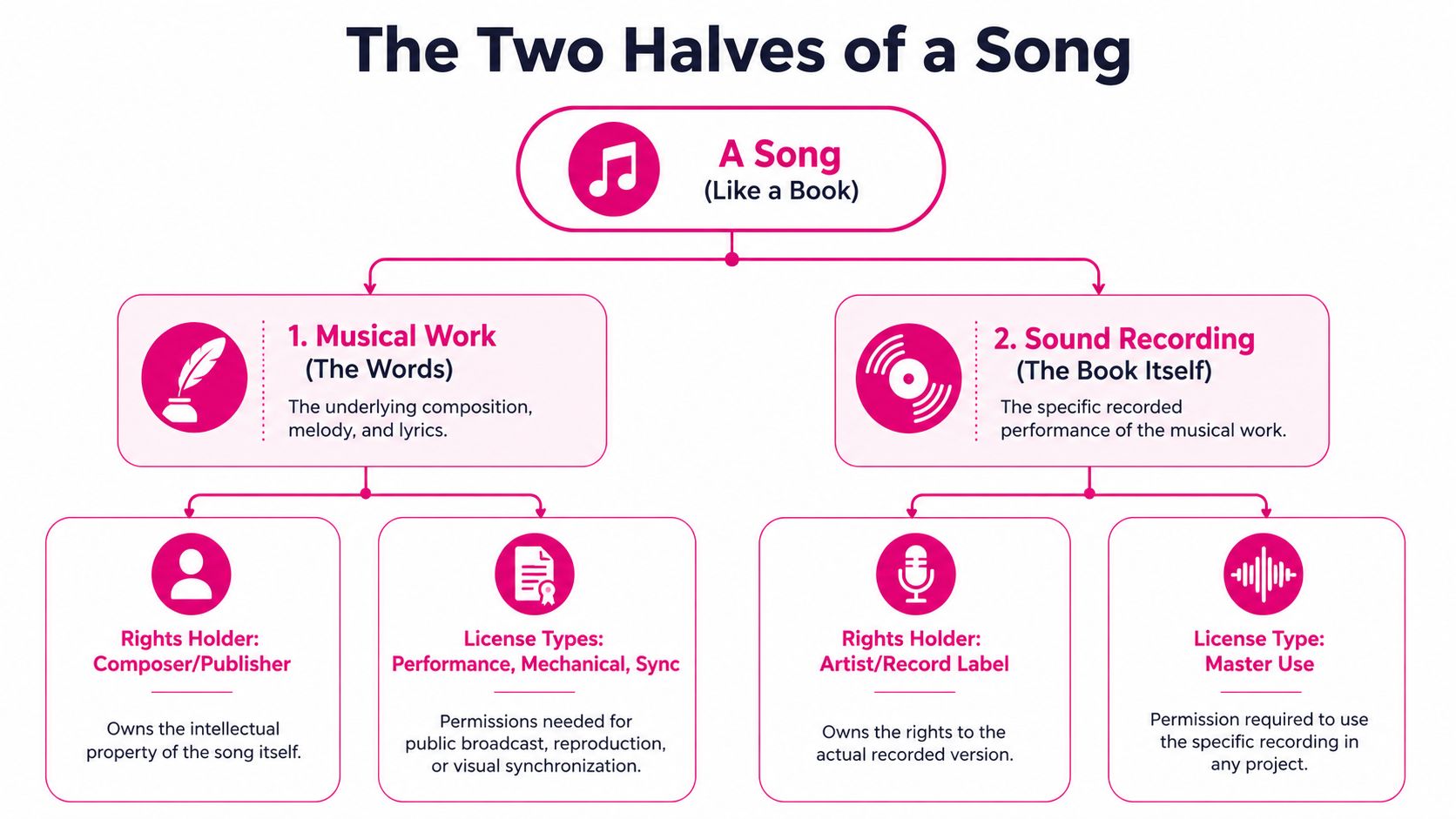
Think recipe and finished dish
Use this analogy. The composition is the recipe. It includes the melody and lyrics. The recording is the finished dish served on the plate, meaning the specific performed and recorded version of that song.
If you use music in a YouTube video, you're often touching both rights at once.
Legally including copyrighted music in a YouTube video requires obtaining a synchronization license from the music publisher, and often a master use license from the record label as well, as explained in Track Club's guide to licensing music for YouTube.
That one sentence clears up a lot of confusion. Buying a song from iTunes or streaming it legally doesn't grant sync rights. It gives you listening access, not permission to pair the music with video.
You're not licensing “a song” in the casual sense. You're licensing the right to attach a composition and often a specific recording to visual content.
If you want a deeper primer on ownership, this music publishing rights guide helps connect the dots between songwriters, publishers, and the rights they control.
Who grants each permission
The sync license usually comes from the publisher or composition rights holder. This is the permission that says you may synchronize the underlying song with video.
The master license covers the actual recording. If you want the well-known recorded version by a specific artist, the label or recording owner usually controls that side.
Here's the simplest way to understand it:
| Right you need | What it covers | Who usually controls it |
|---|---|---|
| Sync license | The underlying song, melody, lyrics, composition | Publisher or songwriter rights holder |
| Master use license | The specific recorded performance | Record label or recording owner |
Where creators get tripped up is “royalty-free” language. A site may sell access to a recording under certain terms, but if the deal doesn't clearly include the sync rights needed for YouTube use, you can still run into claims later.
Another common snag is territory. YouTube is global by default. If a license isn't built for worldwide use, your video can run into restrictions in places you never thought about because your upload reaches those places automatically.
For a new creator, the takeaway is simple. Don't ask only, “Can I buy this track?” Ask, “Do I have the right to sync this composition and this recording to a YouTube video in the way I plan to use it?”
Meet Content ID YouTube's Automated Copyright Bot
Once your video is live, YouTube doesn't evaluate it the way a human editor would. It runs the file through Content ID, which is the platform's automated matching system.
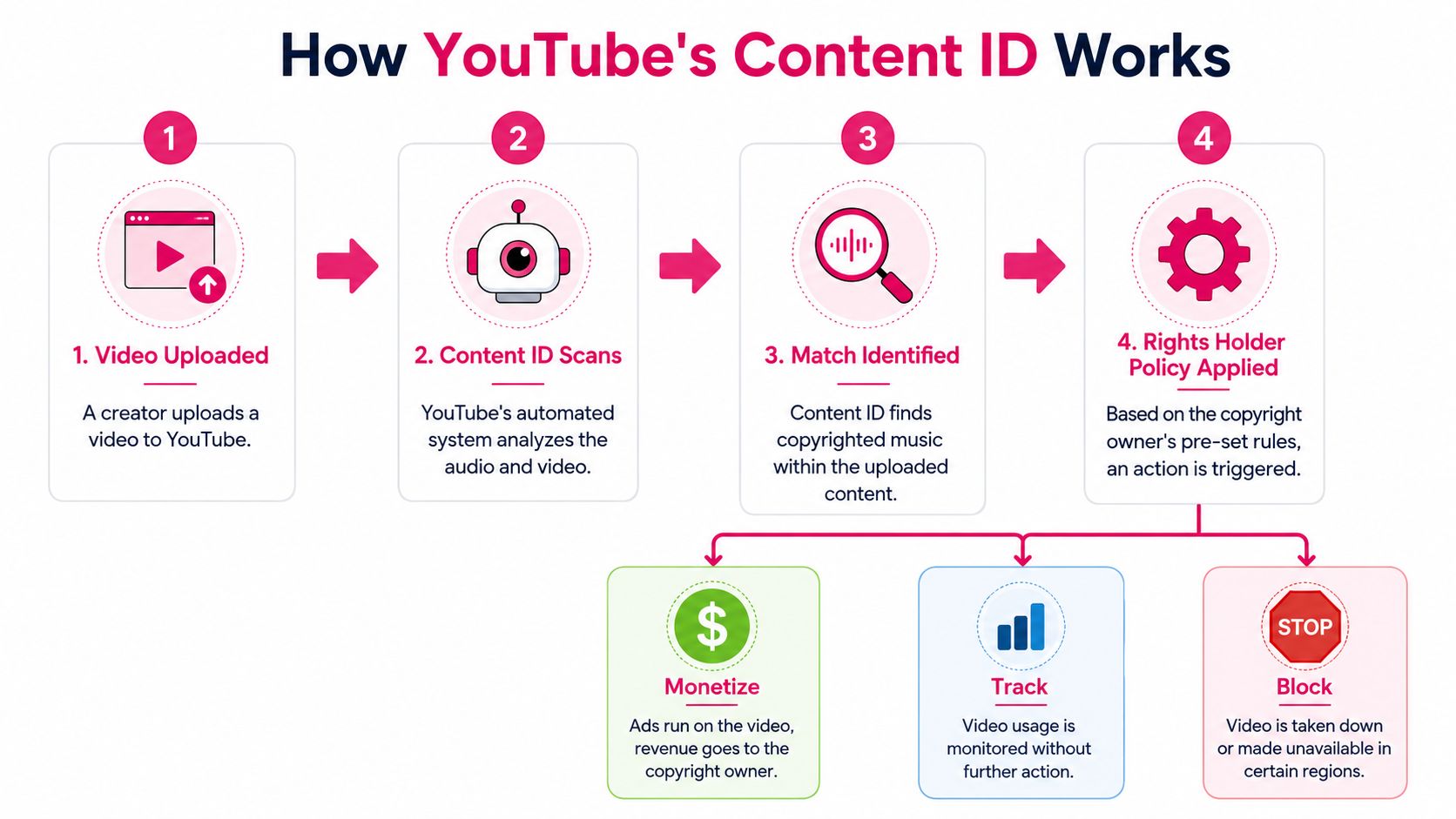
Think of Content ID as a security desk. It checks whether your uploaded audio matches reference files provided by rights holders. It's fast, consistent, and not very thoughtful. It doesn't know your intent, and it doesn't understand that you emailed a label last week and paid an invoice yesterday.
For a closer look at how rights holders earn from claims and how the system works on their side, this breakdown of Content ID royalties is useful context.
Why licensed music still gets flagged
This is the most frustrating part for creators. You can hold a valid license and still get a claim because the system matches audio first and asks paperwork questions later.
When a Content ID claim happens despite a valid license, the dispute process requires timestamped evidence packages that include the signed license agreement, payment receipts, and specific metadata, submitted within 30 days, according to the source material in this YouTube video reference.
That explains why “but I paid for it” rarely solves the problem by itself. The platform needs documents that connect your exact video, your exact track, and your exact permission.
A lot of creators also damage their own proof without realizing it. They rename files casually, strip metadata during export, or lose the original download. Then a valid license becomes harder to verify.
If your channel format includes commentary, remixes, or responses, it also helps to understand the broader policy environment around reaction videos and copyright risk.
What usually happens after a match
A Content ID match is not always a strike. Often it's a claim with one of a few outcomes set by the rights holder.
- Monetize: The rights holder collects revenue from the video.
- Track: The video stays up, and the rights holder monitors usage.
- Block: The video is restricted or unavailable.
That's why you should read the notice carefully inside YouTube Studio. “Claim” and “strike” are not the same event.
A claim is often a rights management issue. A strike is a channel risk issue. Treat them differently.
The practical lesson is calm, not panic. If the music was properly licensed, your job is to prepare a clean dispute file. If it wasn't, your job is to use YouTube's recovery tools or replace the music quickly.
Your Three Legal Paths to Finding Great Music
Creators usually have three workable routes. None is perfect for everyone. The right one depends on your budget, your channel stage, and how attached you are to a specific song.
Path one stock music libraries
This is the most common route for active YouTubers. You use a platform that offers pre-cleared tracks under a subscription or per-track model.
The advantage is convenience. Libraries are built for video use, and they're usually the fastest way to find music that fits a YouTube workflow. They also tend to be easier to manage across multiple videos, especially when you publish regularly.
Still, don't stop at the checkout page. Read the actual license terms. Check platform coverage, monetized use, client work, and whether the license language clearly supports YouTube use. Keep the downloaded license file, invoice, and original audio asset together in one folder.
Path two YouTube Creator Music
YouTube's own marketplace is increasingly important because it connects licensing and platform workflow more directly.
Official YouTube documentation says creators can click “Buy license” or “Add license” for certain tracks after upload through the Video Elements page, and 60% of claims are resolvable through this in-platform licensing feature according to YouTube's help documentation.
That post-upload option holds great practical importance. A creator might upload first, get a claim, then realize the track is eligible for in-platform resolution. Instead of rebuilding and re-uploading the video, they can sometimes clear the issue inside Studio.
Here's the practical workflow:
- Open the Copyright area in YouTube Studio.
- Review the claim details carefully. Confirm which track triggered it.
- Check whether the track offers “Buy license” or “Add license.”
- Complete the purchase or attach the relevant license.
- Wait for the policy update and monitor monetization status.
If a track is supported inside Creator Music, post-upload recovery can be faster than the old remove-and-reupload routine.
This is one of the biggest changes newer creators should know. Plenty of older tutorials still assume every claim means a full re-edit.
Path three direct licensing
Direct licensing is the custom route. You identify the publisher and recording owner, contact them, negotiate terms, and get a written agreement.
This path makes sense when the song is creatively indispensable. Maybe the video depends on a specific recognizable track, or a brand campaign requires a known song.
It's also the most demanding route. You may need approvals from multiple rights holders, and if even one says no, you can't lawfully use the track. The paperwork also needs to match how the video will be used, including monetization and distribution scope.
A simple decision guide helps:
| If your priority is… | Best path |
|---|---|
| Speed and repeatable workflow | Stock library |
| Platform-native licensing and post-upload fixes | Creator Music |
| One exact commercial song | Direct licensing |
For most newer channels, the smartest move is to build a repeatable music system, not chase one perfect song at the expense of publishing momentum.
The Real Cost of Music Licensing in 2026
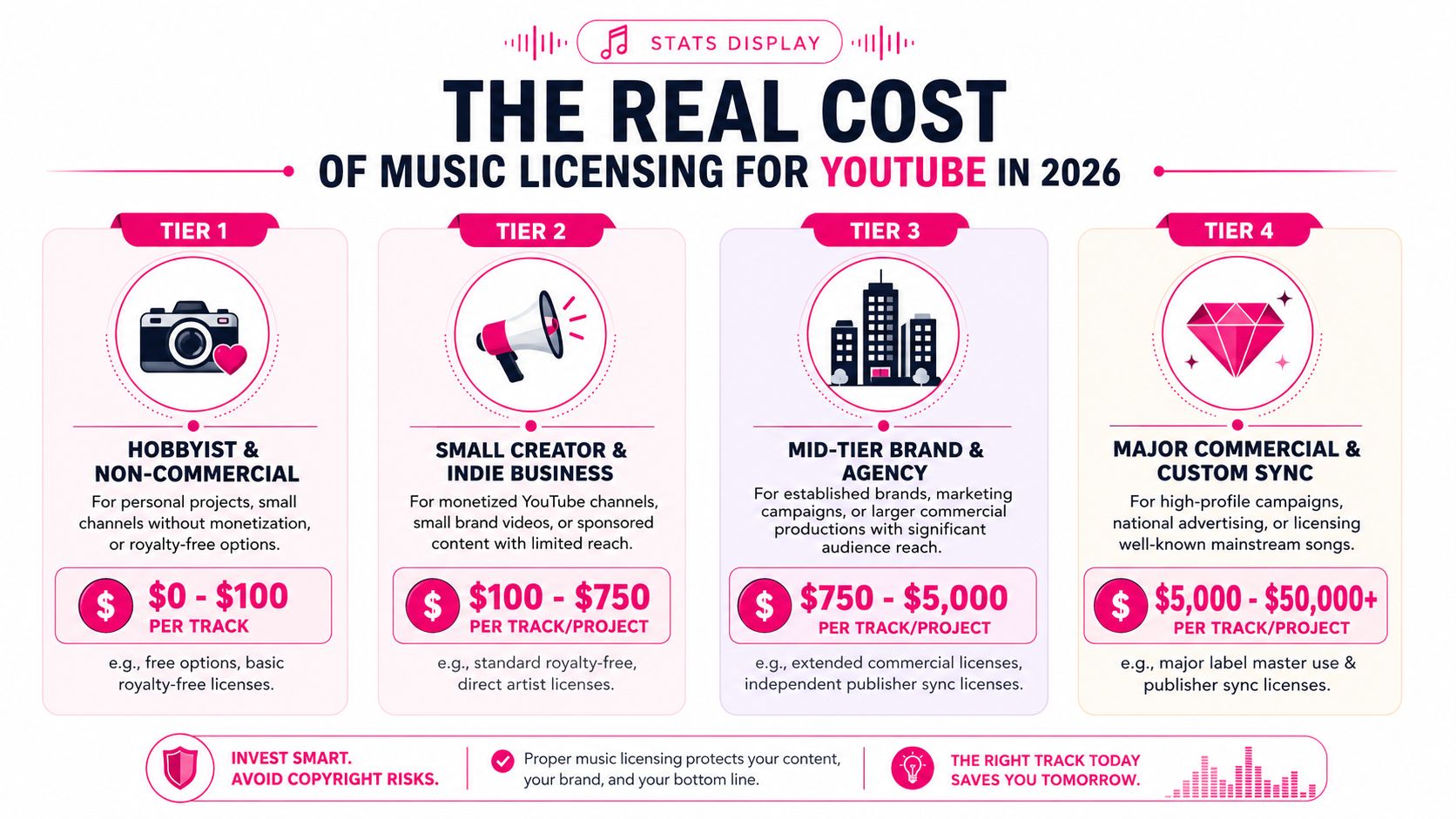
Music licensing costs swing wildly because the price depends on what you're licensing and how the rights holder values the use. A small creator using library music and a brand licensing a current hit are operating in different universes.
Low cost options and scalable pricing
According to Foximusic's licensing cost breakdown, music licensing fees for YouTube can range from $0 for royalty-free or library music to over $500,000 for iconic or current hit songs. The same source notes that basic online or personal use typically falls between $10 and $30 per track, while standard commercial use often costs $29 to $100 per track.
That huge range is why generic advice about “average music licensing cost” isn't very helpful.
Creator Music also shows how audience size affects pricing. The same Foximusic source reports these Creator Music tiers:
- 1,000 to 100,000 subscribers: $9.99 per track
- 100,000 to 500,000 subscribers: $24.99 per track
- 500,000 to 5 million subscribers: $39.99 per track
- Over 5 million subscribers: $74.99 per track
That model is useful because it reflects a real industry mindset. Rights holders don't price only by the song. They price by exposure, monetization potential, and commercial value.
What expensive music usually means
Directly clearing a recognizable commercial track is where costs climb fast. The same Foximusic source says traditional clearance for a major label catalog song has historically cost $10,000 to $50,000, while current hit songs can command $25,000 to $500,000+.
That doesn't mean creators should give up on quality music. It means you should match your source to your business stage.
A realistic budgeting approach looks like this:
- New or testing channel: Use library music or platform-native options.
- Growing monetized channel: Consider per-track licenses when a video needs a more customized sound.
- Brand deal or tentpole campaign: Budget for custom clearance early, before editing begins.
- Must-have famous song: Assume the answer may be no, expensive, or slow.
There's also a revenue-share option inside Creator Music, where the creator pays nothing upfront and gives part of ad revenue to the rights holder, as noted in the same Foximusic source. That can work well when cash flow matters more than keeping all monetization on a single upload.
Common Licensing Myths That Will Get You Strikes
Bad copyright advice spreads fast in creator circles because it sounds simple. Real music licensing for YouTube usually isn't simple.
The myths creators repeat to each other
The first myth is “I gave credit, so it's okay.” Credit is polite. It is not a substitute for permission.
The second is “It's only a short clip.” A short snippet can still trigger a claim. The system matches recognizable audio, not your personal definition of harmless use.
The third is “My video isn't monetized, so I don't need a license.” That's another trap. Permission is about use, not just whether ads are on today.
People confuse etiquette, editing choices, and good intentions with legal clearance. They aren't the same thing.
The royalty free misunderstanding
Well-meaning creators often get blindsided. They buy a track labeled “royalty-free,” assume the problem is solved, upload, and then face a claim anyway.
Many guides fail to explain that a royalty-free track may not automatically include the publisher's sync rights for worldwide distribution, and that gap causes demonetization for 15% to 20% of new creators who assume a one-time fee equals full clearance for YouTube's Content ID system, according to the material referenced in this YouTube source.
What should you do instead?
- Read the scope: Check whether the license explicitly allows YouTube video synchronization.
- Check geography: Make sure it supports worldwide use if your video is publicly available on YouTube.
- Look for Content ID language: If the platform mentions exclusions, claims, or whitelisting, don't skip that section.
- Save proof immediately: Store the license PDF, invoice, asset file, and order confirmation together.
The safest mindset is this. “Royalty-free” describes a payment model or reuse structure. It doesn't automatically mean “claim-proof on YouTube.”
When to Outsource Your Music Headaches
At a certain point, licensing stops being a knowledge problem and becomes a workload problem.
If you publish occasionally, you can manage music review, license storage, claim responses, and Studio checks yourself. If you publish often, work with sponsors, or juggle long-form and Shorts, the admin starts eating time that should go into scripting, shooting, and publishing.
When admin starts stealing creative time
The hidden cost isn't just money. It's interruption.
A music issue can force you to stop mid-launch and hunt through downloads, receipts, and old emails. It can delay sponsor approvals. It can create duplicate edits because one version is clean for YouTube and another is safe for short-form reposting.
That kind of friction is why many creators eventually hand off parts of the workflow.
What a managed workflow solves
A good editing workflow doesn't just cut footage. It keeps assets organized, preserves proof, and reduces the chance that you're scrambling after upload.
If you're evaluating help, look for a service that handles licensed assets, organized project files, audio cleanup, and revision tracking in one place. That kind of setup is often more valuable than a flashy edit style because it protects your publishing schedule.
You can see what that looks like when you hire a video editor for ongoing YouTube production. A major win isn't just saving edit time. It's reducing the number of avoidable copyright and asset-management problems that appear after upload.
When your channel grows, peace of mind becomes part of the production stack.
If you want a team that can help manage editing, licensed assets, audio polish, and the day-to-day workflow around publishing, Your Video Editor is worth a look. It's a practical option for creators who'd rather spend their time making videos than chasing receipts, organizing music files, and cleaning up preventable post-upload issues.