You've edited the story, tightened the pacing, cleaned the audio, and added music that feels right. Then you watch the final cut and something still feels off. Skin tones shift between shots. The interview looks a little green. The b-roll looks flat. Nothing is “wrong” enough to name quickly, but it doesn't feel finished.
That's usually the moment people start looking for a color grading service.
Most new clients assume grading is a cosmetic extra, like adding a filter at the end. In practice, it's closer to finishing a dish in a restaurant kitchen. The ingredients may be good and the recipe may work, but the final result still depends on balance, consistency, and presentation. Color is where a video often stops looking homemade and starts looking intentional.
Table of Contents
- What Is a Color Grading Service and Why Does It Matter
- The Critical Difference Between Color Correction and Grading
- Key Benefits of Professional Color Grading for Creators
- The Typical Color Grading Workflow from Start to Finish
- Understanding Pricing Models and Turnaround Times
- How to Choose the Right Color Grading Provider
- Preparing Footage and Giving Feedback That Gets Results
- Frequently Asked Questions About Color Grading
What Is a Color Grading Service and Why Does It Matter
A color grading service takes your edited footage and shapes how it feels on screen. That includes the obvious things, like making an image richer or more cinematic, but also the less obvious ones. It can guide the eye toward a face, make a product feel premium, soften a harsh location, or create consistency across shots that were filmed on different days.
The concept is akin to painting a room. The furniture may already be in place, but the color of the walls changes how everything inside the room is perceived. The same sofa can feel warm, clinical, calm, or expensive depending on the surrounding color. Video works the same way.
What the service actually changes
A professional colorist usually adjusts elements like these:
- Exposure balance: Making sure highlights, midtones, and shadows feel controlled.
- White balance: Removing unwanted blue, green, or orange casts.
- Contrast and saturation: Deciding how soft, bold, muted, or punchy the image should be.
- Shot matching: Helping one angle sit naturally beside another.
- Mood and style: Giving the whole project a visual identity.
These choices matter because viewers don't experience color as a technical setting. They experience it as trust, polish, energy, clarity, or emotion.
Practical rule: If your edit is strong but still doesn't feel “professional,” color is often the missing layer.
This isn't a niche finishing step anymore. The global Color Correction Postproduction Service Market is projected to reach $4.5 billion by 2035, driven by demand for high-quality visual content across film, streaming, and online production, according to Wise Guy Reports on the color correction postproduction service market. That projection matters because it shows where production teams are placing value. They're not treating color as decoration. They're treating it as part of the product.
Why creators should care
If you publish regularly, color affects more than looks.
A strong grade can make your videos feel consistent from week to week. That consistency becomes part of your brand, especially on YouTube, courses, interviews, and product-led content. Viewers may never say, “Great color work,” but they will feel when your videos look coherent and when they don't.
For creators, then, a color grading service isn't just post-production cleanup. It's a workflow decision that affects quality, speed, revisions, and how finished your work feels once it reaches an audience.
The Critical Difference Between Color Correction and Grading
Clients mix these up all the time, and I understand why. Both involve color. Both happen late in post. Both can happen inside the same software. But they are not the same job.
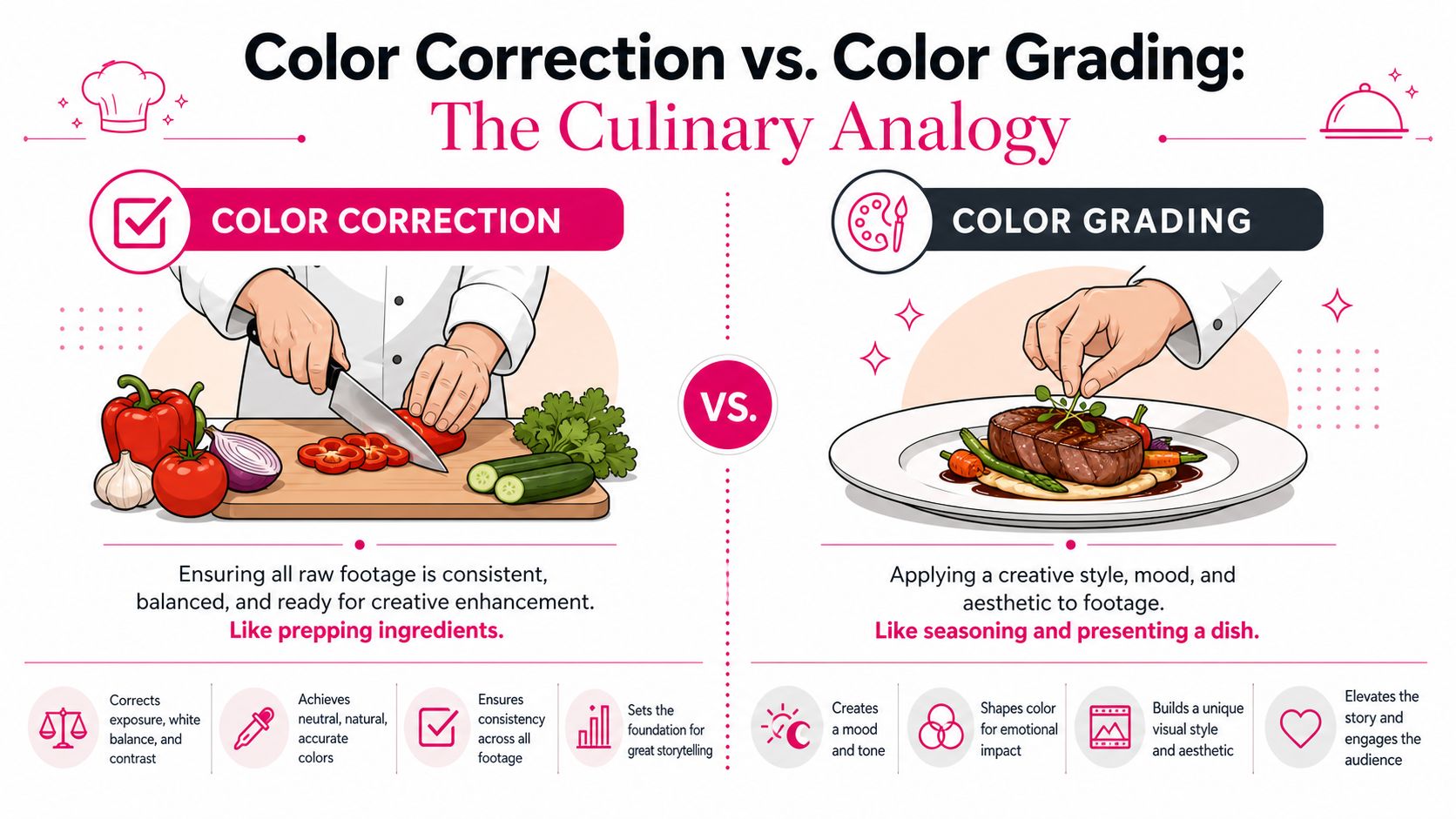
The simplest way to think about it is cooking.
Correction is prep work
Color correction is the kitchen prep. You wash the vegetables, trim the meat, measure the ingredients, and make sure everything is usable before you start building flavor.
In footage, that means fixing the technical baseline:
- Balancing exposure
- Neutralizing white balance
- Matching cameras and lighting conditions
- Making skin tones look believable
- Creating consistency from shot to shot
Correction is about getting the footage into a stable, trustworthy state. If one camera is cooler than the other, correction brings them closer together. If a face is too magenta under mixed lighting, correction fixes that first.
Grading is the creative finish
Grading is the seasoning and plating. It's where the neutral, corrected image becomes expressive.
You might warm the highlights to make a scene feel nostalgic. You might cool the shadows to create tension. You might mute the background so the subject stands out more clearly. The image then begins to communicate emotionally, rather than solely technically.
A grade is not meant to rescue broken footage. It's meant to shape already-corrected footage into a deliberate look.
If correction makes the ingredients clean and usable, grading makes the meal memorable.
Why the distinction matters for your budget
A lot of frustration starts when a client says, “I need grading,” but the footage requires heavy correction first. That changes time, scope, and expectations.
Industry data indicates that 60 to 70% of client complaints about color grading come from poor input footage that wasn't properly color corrected first, according to FilmSupply's discussion of cinematic color grading. That's a revealing number because it points to the underlying problem. People often think they're buying style when they first need repair.
Here's what that confusion looks like in practice:
You expect a cinematic look.
The footage arrives with clipped highlights, inconsistent white balance, or mismatched cameras.The colorist spends time on repair.
Hours go into making the footage usable before any creative look can be built.The revision round feels disappointing.
The client says, “It still doesn't feel cinematic,” because most of the labor went into correction.
The language to use when hiring
If you want better results, ask these questions early:
- Does this footage need correction before grading?
- Are skin tones and exposure already consistent?
- Is the quoted price based on finished edits with normalized footage, or on raw mixed-camera material?
Those questions save a lot of friction. They also help you buy the right service instead of buying the right label.
Key Benefits of Professional Color Grading for Creators
For creators, color grading pays off in three places at once. It improves how the video looks, how the brand feels, and how the audience reads the content.
That's why I don't describe grading as polish alone. Good color changes perception. It can make a simple talking-head video feel more authoritative. It can make a travel montage feel more immersive. It can make a course lesson feel cleaner and easier to trust.

It gives your brand a visual signature
Many creators obsess over fonts, thumbnails, and intros but ignore color consistency. That's a mistake. Color is one of the fastest signals the viewer processes.
If your videos always lean clean and neutral, warm and inviting, or bold and contrasty, that look starts to become part of your identity. It works the same way a brand palette works on a website. You may not consciously describe it, but you recognize it.
It supports emotion without calling attention to itself
Color can push a scene gently. It doesn't need to shout.
A warmer grade can make a testimonial feel human and approachable. A cooler palette can make a tech tutorial feel sleek and precise. A softer contrast curve can make a personal vlog feel more intimate. These are storytelling decisions, not filter choices.
For creators who also use layered finishing work such as visual effects for videos, color becomes even more important because effects and composites only feel believable when they sit inside the same visual world as the original footage.
A viewer may not notice the grade directly. They will notice when the video feels expensive, cohesive, and easy to watch.
It rescues inconsistency
Most creator footage isn't captured on a controlled set. It's filmed in home offices, hotel rooms, event spaces, outdoors, and borrowed studios. Lighting shifts. Cameras differ. Window light changes halfway through an interview.
A professional grade helps unify that mess.
Here's where that becomes valuable:
- Multi-camera shoots: One angle may lean greener or flatter than the other.
- Batch filming days: Morning and afternoon footage often don't match naturally.
- Mixed content types: Screen inserts, b-roll, interviews, and product shots need to live together.
- Brand-led production: Repeated visual inconsistency makes a channel feel fragmented.
It raises perceived production value
This is the part clients feel immediately. Sharp editing and strong writing matter, but if the image looks thin, washed out, or mismatched, the whole production feels cheaper than it is.
Color grading helps your work compete visually in a crowded feed. It tells the viewer you cared enough to finish the piece properly. For creators selling expertise, products, or trust, that signal matters.
The Typical Color Grading Workflow from Start to Finish
To a new client, color work can feel like a black box. You send files in, a better-looking video comes back, and the middle stays mysterious. The process is very structured when it's handled well.
A professional workflow starts before anyone touches a color wheel.
Here's the broad journey at a glance.
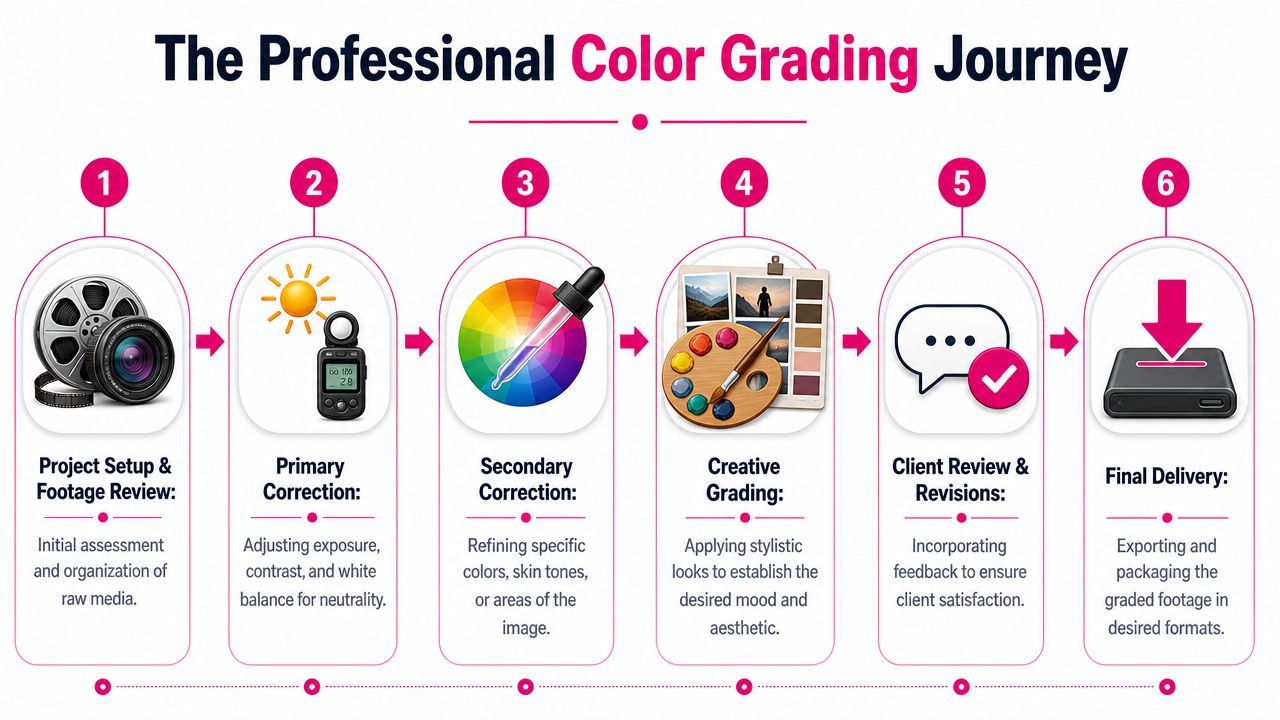
Step one through three
First comes the handoff. The colorist needs the locked edit, source media, and clear direction on what version is final. If cuts are still changing, the grade will keep chasing a moving target.
Then comes a technical review. The colorist checks camera formats, looks for missing media, and identifies problem shots before grading begins. If the project came through a larger video editing workflow, this stage is often smoother because the edit timeline, relinks, and creative intent are already organized.
After that, the first real pass begins with correction. Exposure gets balanced, white balance gets cleaned up, and shots are matched so the sequence stops feeling patchy.
The cleanest color sessions happen when the edit is locked and the files are organized. Most delays happen before the first grade, not during it.
A short visual example helps here:
Step four through six
Once the baseline is solid, the colorist moves into creative grading. During this phase, the mood is developed. In DaVinci Resolve, that often means shaping contrast, isolating skin tones, controlling problem colors, and building scene-level consistency with node-based adjustments.
That node-based approach matters because it allows the colorist to separate tasks cleanly. One node might handle basic balance. Another might refine skin. Another might shape the background. It's closer to painting in layers than dragging one master slider.
The next step is review. Good review rounds are specific. “Frame 01:12, the background is too green” is useful. “Can you make it pop?” is harder to translate into a repeatable change.
Finally, delivery happens. Depending on the project, the client may receive:
- A final graded master ready for upload or finishing
- Project relink files so the grade can reconnect to the main edit
- Versioned exports for different platforms or aspect ratios
- Look references or notes for future consistency
What clients often misunderstand
The grade doesn't exist separately from the edit. Timing, shot choice, transition rhythm, motion graphics, and even music all influence how color should behave. A fast, high-energy cut usually wants different contrast and saturation decisions than a slow, reflective interview.
That's one reason integrated workflows tend to be more efficient. The colorist isn't guessing what the editor intended. They can read the pace, emphasis, and narrative shape directly from the timeline.
Understanding Pricing Models and Turnaround Times
Pricing for a color grading service varies because projects vary. A single-camera studio interview is not the same job as a mixed-light documentary or a commercial with product beauty shots. The fairest quotes usually reflect complexity, not just duration.
Still, a few patterns show up often enough that clients should know them before asking for estimates.
What industry budgets tell us
In the United States, independent films typically budget $5,000 to $15,000 for color grading, while commercial projects often allocate $2,000 to $8,000, according to ORWO Studio's guide to what color grading is. Those figures are useful not because every creator project should cost that much, but because they show how seriously professional productions treat color. It's not usually a throw-in. It's a line item.
That same source also notes that a basic professional grading suite costs about $4,000 to set up, which helps explain why many teams outsource instead of building an in-house environment. You're not only paying for software. You're paying for calibrated viewing, technical judgment, and a repeatable process.
Comparing common pricing structures
Different providers package that work in different ways.
| Pricing Model | Best For | Pros | Cons |
|---|---|---|---|
| Hourly | Unpredictable projects, partial fixes, one-off consults | Flexible when scope is unclear | Harder to forecast final cost |
| Per-project flat fee | Defined edits with stable scope | Easier budgeting, clearer deliverables | Scope creep can create friction |
| Bundled with editing | Ongoing content production, channels, repeat formats | Fewer handoffs, simpler communication, more predictable workflow | Less ideal if you only need isolated finishing work |
What affects the quote
Two projects with the same runtime can price very differently. These factors usually matter more than minutes alone:
- Camera consistency: One camera is easier than three mismatched sources.
- Lighting quality: Controlled light grades faster than mixed practicals and daylight.
- Footage condition: Heavy correction adds labor before style can begin.
- Revision style: Vague or evolving feedback stretches a job.
- Delivery needs: Multiple versions and relinks add finishing time.
Turnaround isn't just about speed
Clients often ask, “How long will grading take?” The honest answer is that turnaround depends on the health of the workflow around the grade.
A well-prepped project with a locked edit can move quickly. A project that keeps changing after color starts will slow down because every editorial change can affect shot matching, rhythm, and versioning. This is why bundled workflows often feel faster in practice. Fewer separate vendors means fewer handoffs, fewer exports, and fewer opportunities for something to break between stages.
Fast turnaround comes from clear decisions upstream. Color moves fastest when the timeline is stable and the feedback is precise.
If budget predictability matters to you, ask for a quote that defines scope in plain language. “Includes correction, creative grade, and revision rounds for the locked cut” is much safer than “color work included.”
How to Choose the Right Color Grading Provider
A provider choice often shapes the whole post-production process.
Picture a common creator problem in practical terms. The edit is approved, the video goes out for color, notes come back by email, a few shots get replaced, and now someone has to relink media, rebuild versions, and explain the same creative intent twice. Color can still turn out well, but the workflow has already started wasting time. That is why a good provider should be judged on two levels. Can they make images look better, and can they help the project move cleanly from cut to final delivery?
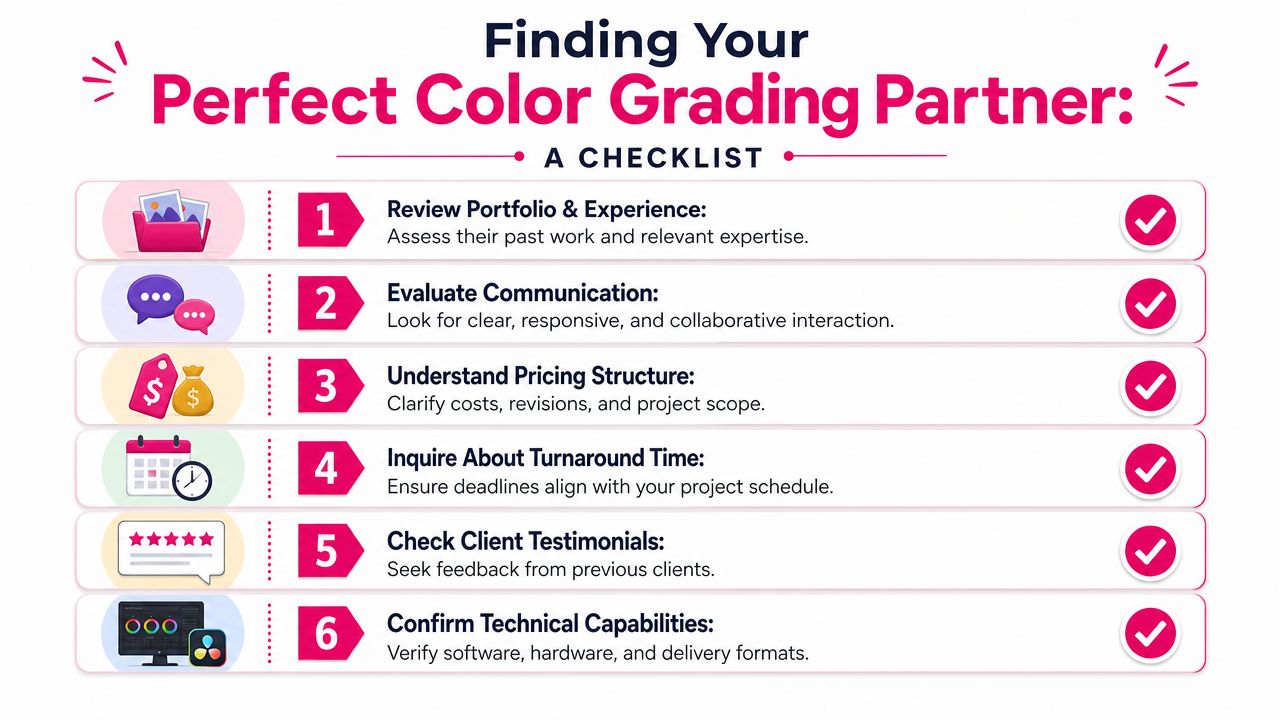
A portfolio still matters. So does process. Color grading works a lot like seasoning in cooking. Great taste helps, but consistency comes from method. The right provider should understand your footage technically, read your creative brief accurately, and fit the way your editor, graphics, and delivery pipeline already work.
Questions worth asking before you hire
Start with questions that reveal how they work under real production conditions.
- Can they show projects similar to yours? A stylish commercial reel does not automatically mean they are the right fit for tutorials, talking-head videos, product demos, or documentary interviews.
- How do they handle LOG, RAW, or mixed-camera footage? You want someone who can explain normalization, matching, and exposure recovery in plain language.
- What does their revision process look like? Clear rounds, written notes, and visual references usually lead to better results than vague back-and-forth.
- How do they receive timelines from the editor? Ask whether they prefer XMLs, project files, original media, reference exports, or all of the above. Their answer tells you how much friction to expect.
- What software do they grade in? DaVinci Resolve is widely used because it gives colorists precise control over balancing, secondaries, and shot matching, as described earlier in Block Reel DAO's article on color grading mastery.
- Have they worked on footage that needs extra post support? If your shoot includes compositing or keyed shots, experience with projects prepared using practices like green screen filming techniques that reduce cleanup in post can save time later.
One more useful question is simple. Ask them what usually slows a color job down. An experienced provider will have a clear answer, and it will usually involve edit changes, missing media, unclear references, or weak handoff materials. That answer tells you they understand the whole chain, not just the grading panel.
Red flags that show up early
Weak providers often reveal themselves in the sales conversation.
A few warning signs deserve attention:
- They talk mainly about LUTs. LUTs can be a starting point, but they do not replace shot-by-shot correction and custom creative decisions.
- They never ask about the edit. That usually means they treat color like a coating added at the end, instead of part of finishing.
- They dodge technical details. If they cannot explain how they would handle mixed white balance, noisy shadows, or skin tone consistency, the project may become guesswork.
- They show only extreme looks. Dramatic grades are easy to market. Clean neutrals, believable skin, and scene-to-scene consistency are harder, and often more valuable.
- They promise speed without asking for materials. Fast work is possible, but only when the timeline, media, and brief are clear.
Why workflow fit matters as much as visual taste
Clients often focus on the reel because it is easy to judge at a glance. Workflow fit takes a little more thought, but it affects budget, revisions, and delivery just as much.
Painting offers a good comparison. A beautiful paint color will still disappoint if the wall was not prepped, the edges are messy, and the second coat never matches the first. Color grading works the same way. The best-looking provider on Instagram may still create delays if they rely on clumsy handoffs or work far away from the edit.
For many creator projects, the strongest option is a provider who can work closely with editing, or handle both under one roof. That setup reduces avoidable friction. The editor can flag problem shots early. The colorist can read pacing and emphasis from the actual timeline. Revisions stay in one conversation instead of bouncing between vendors. Final delivery stays cleaner because one team owns the path from rough cut to export.
That is why choosing a color grading service is really a workflow decision with a visual result attached. Good color changes how the video feels. Good workflow changes how efficiently the video gets finished. The best providers do both.
Preparing Footage and Giving Feedback That Gets Results
The quality of a grade depends partly on the colorist, but partly on what you hand over. Good footage doesn't need to be perfect. It needs to be organized, complete, and honest about its limitations.
If you want the best result, make the handoff easy to understand.
How to prepare footage well
Start by sending the final cut, not a still-evolving version. If scenes are likely to change, say so before the grade begins.
Then make sure the project includes what the colorist needs:
- Original camera files: Not just compressed exports from the timeline
- A locked edit reference: So timing and shot order are clear
- Project notes: Brand preferences, mood references, and any known problem shots
- Graphics context: Lower-thirds, overlays, or compositing elements that affect image balance
If you're shooting setups that require extra post work, such as chroma key footage, planning ahead helps. Background separation, edge quality, and lighting all affect how well the final image grades together. Practical shooting habits like those used when filming on a green screen can save a lot of correction later.
Better footage preparation doesn't just make the grade cleaner. It makes the quote and timeline more accurate.
How to give feedback a colorist can use
Most bad feedback isn't wrong. It's just too vague.
Saying “make it pop” could mean more contrast, more saturation, brighter skin, darker shadows, cleaner whites, or a stronger separation between subject and background. A colorist has to guess which one you mean.
Better feedback is anchored to a visible part of the frame.
Try notes like these instead:
- “At 00:42, skin looks too red.”
- “The kitchen b-roll feels too dark compared with the interview.”
- “Can we keep the background cooler but leave the face natural?”
- “The greens outside the window are pulling too much attention.”
A simple feedback framework
When you review a graded cut, structure comments in this order:
Point to the moment
Use a timestamp.Name the issue
Too warm, too flat, too saturated, not matching, skin off, highlights harsh.Describe the intention
More natural, more premium, softer, moodier, cleaner, more brand-consistent.
That approach shortens revisions because it tells the colorist both what's bothering you and what result you want instead.
What to avoid
Avoid giving notes based only on memory from the shoot. Cameras don't record scenes exactly as your eyes experienced them.
Also avoid stacking too many references that conflict with each other. If one reference is bright and airy and another is moody and desaturated, the colorist has to decide which direction matters more. A few focused examples beat a mood board full of contradictions.
Frequently Asked Questions About Color Grading
Does every video need color grading
No. Every video benefits from some level of color attention, but not every video needs a heavily stylized grade. Some projects only need clean correction and basic consistency. Others need a more deliberate look because brand image, storytelling, or premium positioning matter more.
What's the difference between a LUT and a custom grade
A LUT is a starting point or transformation tool. A custom grade is designed for your footage, your lighting, your skin tones, and your edit. Applying the same LUT to five different cameras is like using the same seasoning on every dish regardless of ingredients. Sometimes it helps. It doesn't replace judgment.
Can AI do color grading for me
AI tools can speed up parts of the process, especially first-pass balancing or matching. They still struggle with taste, nuance, and context. Good color decisions depend on knowing what the scene should feel like, not just what looks statistically neutral.
Should grading happen before or after editing
After the edit is locked, or very close to locked. Color depends on final shot order and timing. If the edit keeps changing, the grade becomes less efficient and more expensive to manage.
What should I send to a color grading service
Send the locked cut, original media when possible, and clear creative references. If your project includes graphics, VFX, or titles that influence the image, include those too.
If you're producing content regularly, the most effective setup is usually one where editing and color live in the same integrated workflow. Your Video Editor handles editing, color correction and grading, revision management, and timestamped feedback in one place, which helps creators reduce handoff friction and keep videos moving toward publish-ready delivery.