Your footage is probably fine. The problem is that it doesn't yet look finished.
You filmed a talking-head video in your office or bedroom. The window light changed halfway through. The background is messy. You want text to feel attached to the scene instead of floating on top of it. Maybe you tried a glow, a zoom, or a template pack, and the result felt more “edited” than cinematic. That's where visual effects for videos become useful.
Most creators think VFX means superheroes, explosions, or giant creatures. In practice, a lot of the best VFX is invisible. It removes distractions, fixes what wasn't possible on set, and helps the viewer believe the shot. If you make YouTube videos, courses, product demos, Reels, or Shorts, that matters more than any flashy effect.
Table of Contents
- What Are Visual Effects and Why They Matter in 2026
- Understanding the Core Types of Visual Effects
- The Standard VFX Workflow for Video Creators
- Essential Tools and Software for Creating Visual Effects
- Practical VFX Techniques for Realistic Results
- The Hidden Costs of DIY Visual Effects
- Integrating Visual Effects into Your Creative Vision
What Are Visual Effects and Why They Matter in 2026
A creator usually notices VFX only after hitting a ceiling. The cuts are tighter. The color is better. The audio is clean. But the videos still don't feel premium. They don't hold attention the way stronger productions do, even when the ideas are good.
That's because visual effects for videos aren't just decoration. They're problem-solving tools. You use them to replace a dull background, add a screen insert, clean up a bad edge, simulate atmosphere, attach graphics to motion, or blend different visual elements into one believable shot.
Think of VFX like set design after filming. Sometimes you're building something spectacular. More often, you're fixing what the camera captured imperfectly.
The field isn't niche anymore. The global visual effects market reached USD 10.60 billion in 2024 and is projected to reach USD 20.29 billion by 2034, growing at a 6.83% CAGR, according to Precedence Research's visual effects market analysis. That matters because it reflects where video is going. VFX now sits inside film, television, gaming, advertising, and the digital content creators publish every day.
Practical rule: If an effect makes the viewer understand, feel, or believe the shot faster, it's doing its job.
For creators, this changes the question. Instead of asking, “How do I add cool effects?” ask, “What's missing from this shot, and can VFX supply it?” That mindset leads to stronger work. It also keeps you from over-editing footage that only needed subtle help.
Understanding the Core Types of Visual Effects
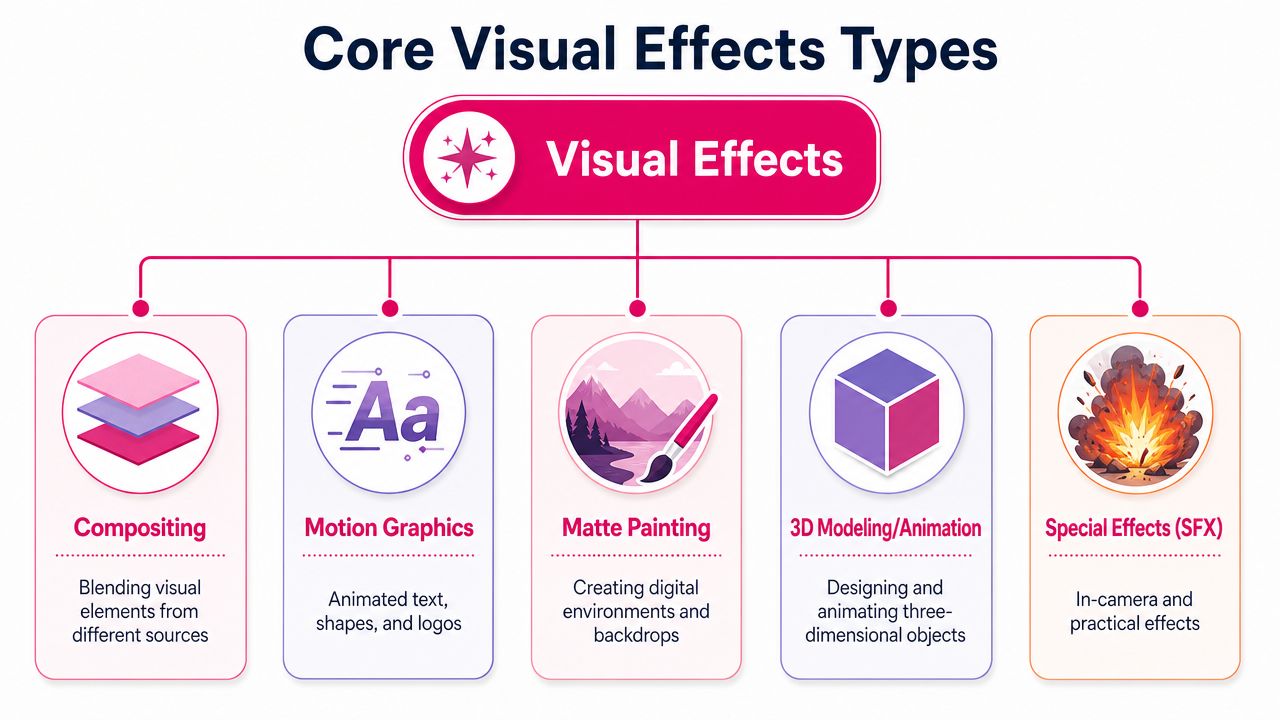
When people say “VFX,” they often mean five or six different techniques mashed together. It helps to separate them. Once you can name the type of effect, you can choose the right tool and avoid wasting time.
Compositing
Compositing is the art of combining multiple visual elements into one finished image. The simplest way to think about it is a moving digital collage. A background plate, a subject, some light wrap, a screen replacement, and a shadow pass can all become one unified shot.
For creators, compositing shows up everywhere. You might replace what's on a laptop screen, add a product mockup into a shot, blur and rebuild part of a background, or place a title behind a person's shoulder so it feels embedded in the scene.
Why it works is simple. Real images contain layers of depth, light, and overlap. Compositing gives you control over those layers.
Motion Tracking and Rotoscoping
Motion tracking tells software how something moves through a shot. Rotoscoping is manually isolating a subject, often frame by frame, so you can affect one part of the image without affecting another.
A common creator example is attaching text to a moving wall, desk, or shirt. Another is cutting a speaker out from the background so you can dim the room behind them while keeping their face natural. That second task often becomes rotoscoping.
Professional workflows take this seriously because weak isolation creates fake-looking results. In Film Editing Pro's breakdown of editor VFX techniques, improper rotoscoping can increase compositing time by 40 to 60 percent because artists have to fix edge artifacts and motion mismatches later. That's why experienced editors don't rush masking. They know cleanup work usually takes longer than careful setup.
Bad rotoscoping doesn't just look rough at the edges. It makes the whole shot feel fake, even when the viewer can't explain why.
If you've ever seen a subject look “stuck” to the background after stabilization or masking, that's usually the issue. The motion relationship broke.
Chroma Keying
Chroma keying removes a solid background color, usually green, so you can replace it with something else. This is the classic green screen workflow, but the good version isn't just one click.
The challenge is spill, edge detail, and transparency. Hair, glasses, motion blur, and reflective surfaces all make a key harder. Professional keying often stacks tools: a main keyer, edge cleanup, and spill suppression.
One useful benchmark comes from a Key Light workflow demonstration on YouTube. It notes that Adobe's Key Light, when tuned properly, can reduce the “green halo” artifact by 85 percent compared with default settings. That matters because the green halo is one of the fastest ways to make keyed footage look cheap.
If your key looks wrong, it usually isn't because green screens don't work. It's because the edge treatment didn't match the shot.
Particle Simulations
Particle simulations create things made of many small moving elements, such as smoke, dust, rain, sparks, embers, fog, or debris. Hollywood uses them for large-scale destruction and fantasy scenes, but creators can use them in much more subtle ways.
A subtle dust pass in a beam of light can make a room feel atmospheric. A little smoke behind a product reveal can add depth. Rain on a window insert can make B-roll feel moody without changing the whole setup.
The reason particle work helps is that empty digital images often feel too clean. Real environments contain chaos. Particles reintroduce some of that natural imperfection.
Motion Graphics
Motion graphics sits close to VFX but serves a different purpose. It's less about realism and more about communication. Animated titles, icons, callouts, lower-thirds, timelines, and UI overlays all belong here.
Many creators often start with motion graphics, as its learning curve feels friendlier than compositing or simulation. But motion graphics still benefits from VFX thinking. The best on-screen text respects perspective, timing, and depth. It belongs to the shot instead of covering it.
A logo animation is motion graphics. A title that slides behind a speaker's head because you rotoscoped the subject is motion graphics plus compositing. That blend is where videos often start to feel polished.
The Standard VFX Workflow for Video Creators
Most VFX problems are workflow problems in disguise. The shot failed earlier than you think. A tracking marker was missing. The camera moved in a way that made masking harder. The lighting changed when it shouldn't have.
That's why experienced artists treat visual effects for videos as a sequence of decisions, not a rescue mission.
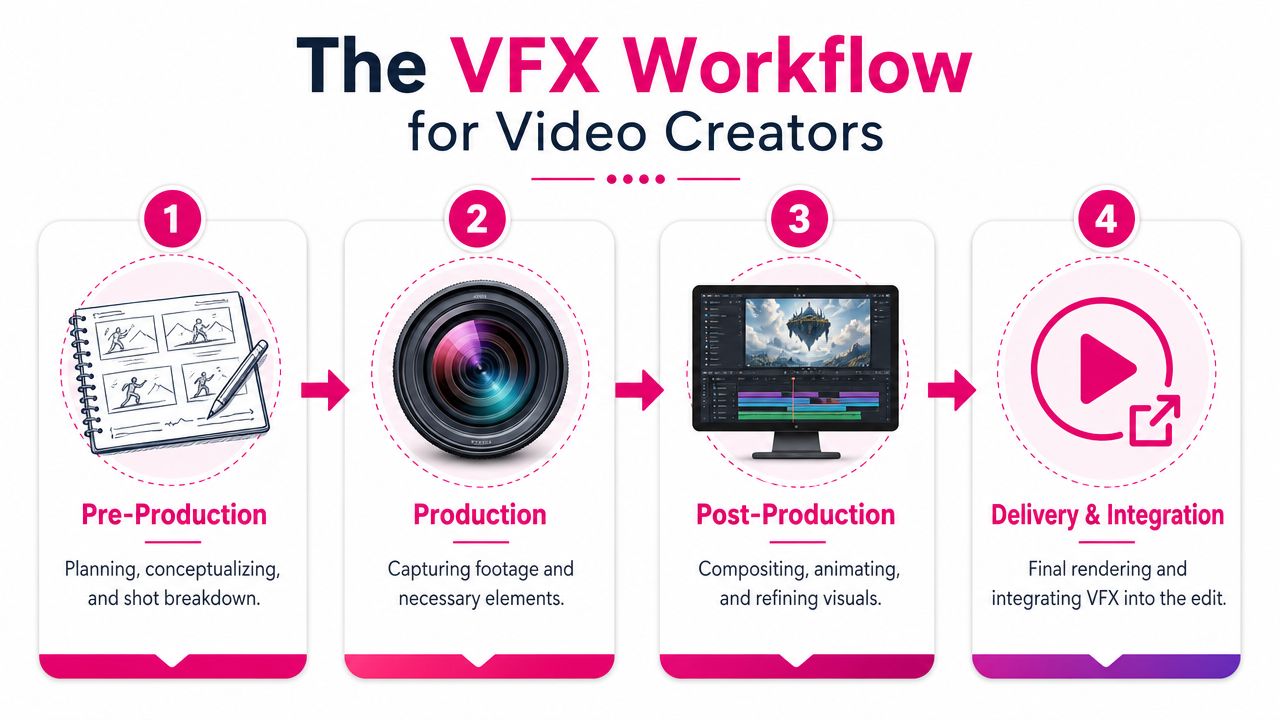
Pre-production
Before you film, decide what the effect needs from the camera. If text must stick to a wall, shoot that wall with enough detail to track. If you want a screen replacement, avoid heavy reflections and blown highlights. If you plan to isolate the subject, make sure wardrobe doesn't blend into the background.
A quick shot list helps more than fancy software here. Write down what must stay consistent: lens choice, room lighting, camera movement, eyeline, and empty background plates if needed.
Production
When you're filming, you're collecting raw material for post. That means steady exposure, clean separation between subject and background, and enough room in frame for the effect to breathe.
You don't need a cinema rig. You do need intention. A locked-off camera is easier to composite than a handheld one. Soft, even light is easier to key than mixed lighting. Clean edges save hours later.
On-set habit: If a shot will need VFX, record a few extra seconds before and after the action. Those handles make tracking, cleanup, and transitions easier.
Post-production
This is the part people think of as “doing VFX,” but it's really assembly and refinement. You track. Mask. Composite. Key. Animate. Color match. Add blur, grain, and shadows so the new element sits naturally inside the shot.
The order matters. If you add a graphic before you know the track is solid, you'll redo work. If you color-correct after compositing without checking the inserted element, the shot can split visually.
Delivery and Integration
A VFX shot still has to live inside a full edit. That means checking whether the effect matches adjacent shots, whether the pacing supports it, and whether compression harms fine details like keyed hair or small graphic lines.
A technically good effect can still feel wrong if it arrives at the wrong beat. Integration is where storytelling wins or loses. The best effect is often the one the viewer accepts immediately and then forgets.
Essential Tools and Software for Creating Visual Effects
The software question gets too much attention and not enough context. Tools matter, but only after you know what kind of work you need to do. A creator adding animated titles, screen replacements, and occasional cleanup has different needs than a studio artist building CG-heavy shots.
What creators usually need first
Most creators need four capabilities before anything else:
- Layer-based compositing: You need to stack footage, graphics, masks, and adjustment layers in one place.
- Tracking and masking: If you can't isolate a subject or follow movement, your effects won't stick.
- Keying and cleanup: Green screen work, edge fixes, and spill control come up fast.
- Rendering that fits your machine: Heavy VFX software on weak hardware turns every experiment into a waiting game.
If your work involves isolating subjects often, pay attention to rotoscoping tools and workflow quality. As noted earlier, sloppy roto creates expensive rework. That's one reason creators should choose software based on the jobs they do, not just what a famous artist uses.
VFX Software Comparison for Creators
| Software | Typical Cost | Learning Curve | Best For |
|---|---|---|---|
| Adobe After Effects | Subscription-based | Medium to high | Motion graphics, compositing, screen replacements, title animation |
| DaVinci Resolve with Fusion | Free version available, paid Studio version | High | Editors who want strong color, editing, and node-based compositing in one app |
| Blender | Free | High | 3D modeling, animation, simulation, camera tracking |
| HitFilm | Varies by plan and version | Medium | Beginner-to-intermediate creators who want editing plus effects tools |
| Apple Motion | One-time purchase | Medium | Mac users creating graphics and template-based animations for Final Cut workflows |
| Nuke | Professional pricing | Very high | Advanced compositing and studio-level VFX work |
Adobe After Effects remains the most familiar starting point for many creators because tutorials are abundant and the layer-based interface makes sense for titles, masks, and composites. DaVinci Resolve is attractive if you want editing, color, audio, and Fusion in one environment. Blender is harder to learn, but it opens the door to real 3D work without a software subscription.
If you're still comparing editor ecosystems, this guide to professional video editing software options helps place VFX tools in the larger editing workflow.
A simple rule helps here. Choose the tool that shortens the path between your footage and the exact effect you need. Don't buy complexity just because it looks professional.
Practical VFX Techniques for Realistic Results
Most creators often find themselves stuck. The internet is full of tutorials for flashy effects, but much thinner on the effects that fix ordinary footage. That gap matters because a lot of creator work is filmed in bedrooms, offices, garages, conference rooms, and rented spaces that weren't built for production.
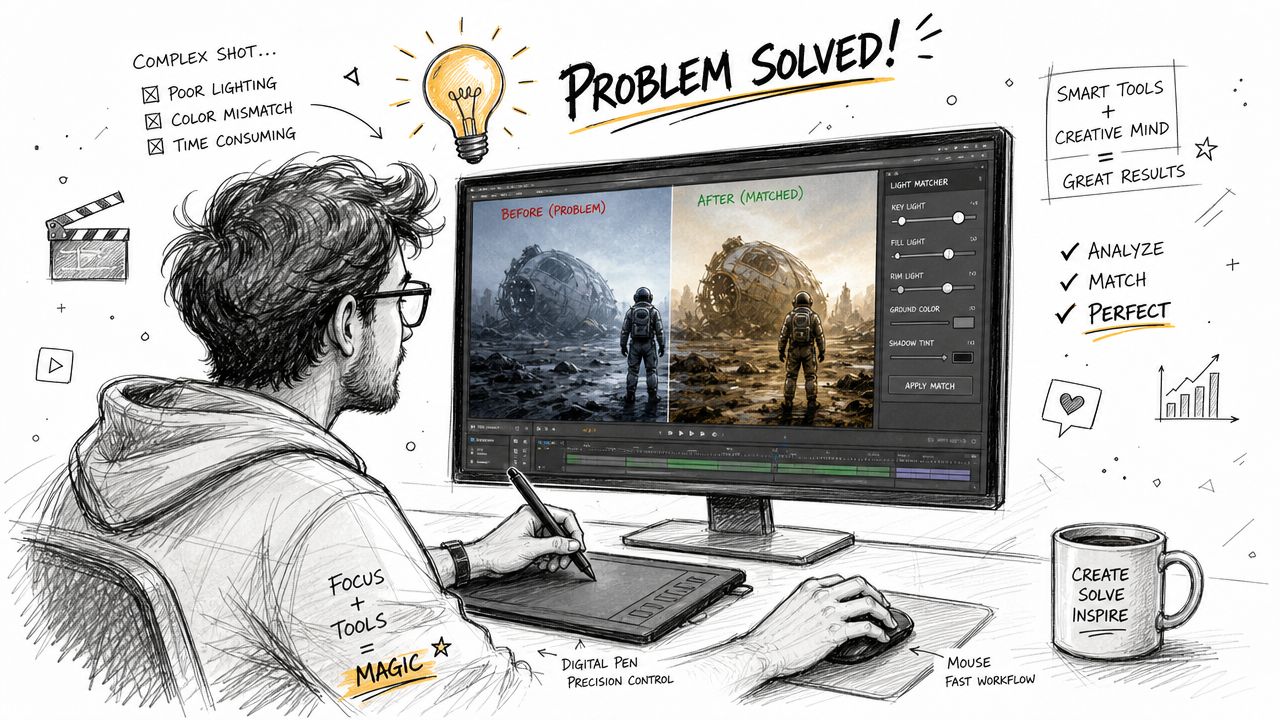
Invisible VFX for bad rooms and imperfect footage
A useful idea here is the Placeholder Illusion. In Kestum Bilt's discussion of visual effects in video, a major gap in VFX education is described this way: most teaching focuses on adding effects, not on replacing or fixing missing elements in amateur footage. This is the practical everyday need.
Say you shot a strong piece to camera, but the room behind you is cluttered and the wall color makes the image feel flat. You don't always need a reshoot. You can:
- Isolate yourself from the background with masking or roto.
- Darken, blur, or simplify the room behind you so the eye returns to your face.
- Add a practical-looking light effect such as a soft gradient or window glow that matches the existing direction of light.
- Rebuild depth with subtle shadow, vignette control, or a graphic layer that sits behind your shoulder rather than over your face.
None of that screams “VFX.” That's why it works.
If you do have a green screen setup, careful setup still matters. This guide on filming on a green screen is useful because the shot quality starts before keying does.
The fastest way to make a shot look expensive is often to remove one cheap-looking thing from the frame.
Another overlooked fix is selective cleanup. A doorframe that pulls focus, a bright lamp hotspot, or a distracting monitor can often be toned down through masking and localized correction. You're not creating fantasy. You're directing attention.
Vertical-first VFX that reads on a phone
Vertical video changes the design logic. In a wide frame, you have room for side graphics, environmental storytelling, and slower reveals. In a 9:16 frame, every element competes for limited space, and the viewer is often watching on a small screen while scrolling.
That means your VFX choices need to be tighter.
- Use bigger shapes, fewer words: Tiny labels vanish on phones. One bold phrase usually reads better than a paragraph.
- Anchor graphics near the subject: In vertical formats, distance feels larger. If text is too far from the face or object it refers to, the connection weakens.
- Favor depth over width: Layered foreground and background effects work better than wide compositions that need breathing room.
- Design for quick recognition: A tracked arrow, highlight ring, or reactive subtitle often lands faster than a complex animation.
This example is worth watching because it shows how motion, layering, and timing can make effects feel integrated instead of pasted on:
A practical test helps. Shrink your preview until it roughly matches a phone screen. If the effect becomes unreadable, it isn't ready for Shorts, Reels, or TikTok. Vertical-first VFX isn't just widescreen VFX cropped taller. It needs different composition choices from the start.
The Hidden Costs of DIY Visual Effects
DIY VFX looks cheaper until you count your own time. That's the part creators often skip.
You don't just pay for software. You pay in testing, failed renders, plugin decisions, version confusion, edge cleanup, and all the time spent learning techniques that only matter for one or two moments in a video. If publishing consistency matters to your channel or business, that time has a real cost.
Where the real cost shows up
The biggest expense is usually interruption. You planned to script, shoot, and publish. Instead, you spend a day trying to get a clean key, another trying to fix a track, and another waiting for exports while the next video slips.
The second cost is quality risk. VFX mistakes are unforgiving. A bad cutout, weak shadow, wrong blur, or mismatched color can make the entire production feel less credible. Viewers may not name the problem, but they feel it.
A third cost is equipment pressure. Once you move past simple edits, your computer matters more. Playback, caching, rendering, and storage all start affecting how fast you can work.
If you're budgeting this work as part of a broader editing process, it helps to compare video editing cost considerations before deciding whether to keep everything in-house.
When outsourcing makes more sense
Outsourcing becomes sensible when VFX is important to your output but not central to how you want to spend your week. That includes creators who need polished screen replacements, brand-consistent motion graphics, vertical edits with embedded effects, or regular cleanup on non-ideal footage.
You don't need to outsource because VFX is impossible. You outsource when the opportunity cost gets too high. If your strongest skill is writing, presenting, teaching, or selling, spending your best hours fixing matte edges may not be the smartest use of your energy.
Decision check: Keep DIY VFX for experiments and simple recurring tasks. Get help when the effect is mission-critical, deadline-sensitive, or tied to brand quality.
Integrating Visual Effects into Your Creative Vision
The best visual effects for videos don't announce themselves. They support the idea. They help the audience see what matters, feel the tone you intended, and stay inside the story or message.
Use effects to support the idea
A creator's real job isn't to master every plugin. It's to make choices. Should this shot feel cleaner, deeper, more focused, more dynamic, more believable? VFX is one way to answer those questions.
That's also why trends matter only when they serve the work. The direction of the field is moving toward real-time rendering with engines like Unreal Engine and Unity, plus deeper use of AI and machine learning for realistic character animation and environmental simulation, as described in this overview of current VFX trends. For creators, that means tools will keep getting faster and more accessible. The creative judgment still matters most.
Start small. Clean one background. Track one title properly. Build one vertical effect that reads clearly on a phone. Once you see how much stronger a shot becomes when the effect fits the footage, VFX stops feeling like Hollywood magic and starts feeling like part of normal video craft.
If you want polished videos without spending your week inside masking tools and render queues, Your Video Editor can help. Their team handles long-form and short-form editing, motion graphics, compositing, thumbnails, and brand-aligned deliverables with structured review workflows, defined turnaround times, and support for creators who need consistency across YouTube, TikTok, Instagram, courses, and client content.