You already know the feeling. The edit is solid, the talking points are clear, and the audio is clean, but the video still looks flat. The intro doesn't feel branded. Key points disappear because there are no callouts. Lesson transitions in your course feel abrupt. Shorts move fast, but nothing on screen helps the viewer track the message.
That's usually the moment creators start looking for a motion graphics animation service.
What's often needed isn't a cinematic animation studio. They need a reliable production partner that can build branded assets, fit them into a repeatable editing workflow, and deliver files that don't create more work for the editor. For YouTubers, educators, and personal brands, the key value isn't motion for motion's sake. It's clarity, consistency, and speed.
Table of Contents
- What Is a Motion Graphics Animation Service
- Common Motion Graphics Deliverables for Creators
- The Typical Motion Graphics Workflow
- Understanding Motion Graphics Pricing Models
- How to Evaluate a Provider and Their Portfolio
- Integrating Graphics into Your Video Post-Production
- Elevate Your Content with Professional Motion Graphics
What Is a Motion Graphics Animation Service
If your video is the stage, motion graphics are the set pieces, lighting cues, labels, and visual prompts that make the performance easier to follow. They don't replace the main content. They support it.
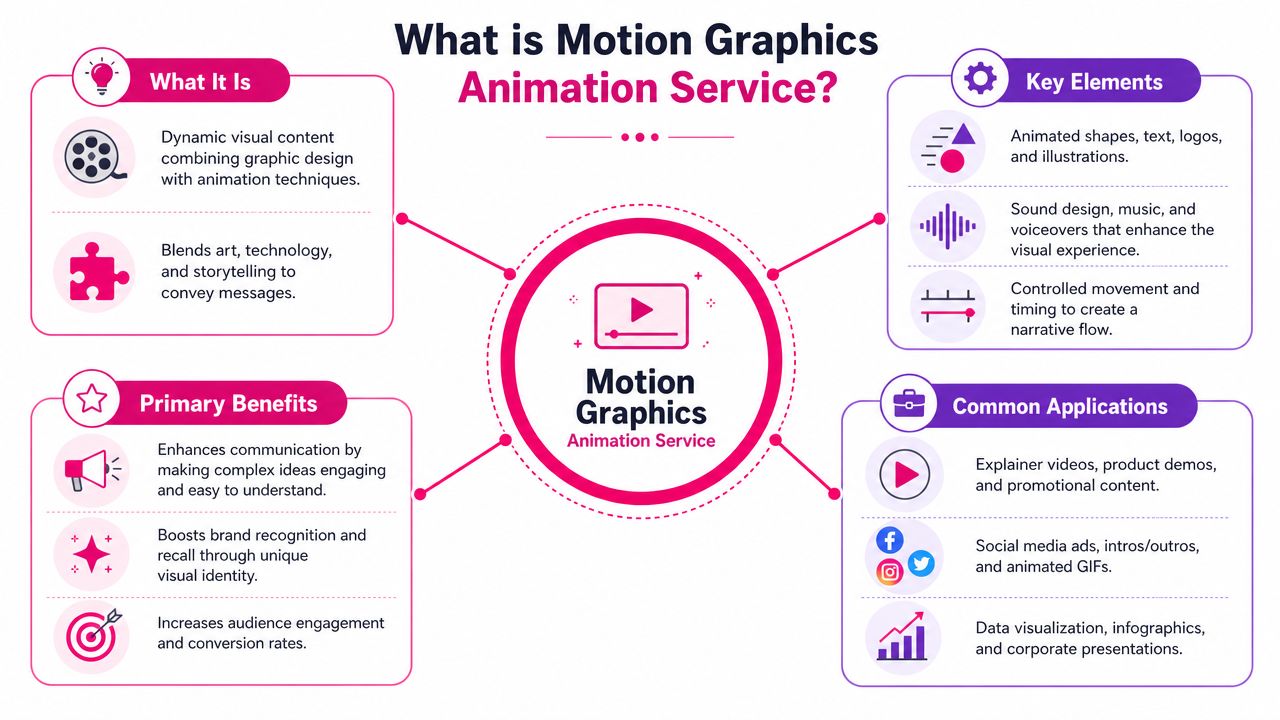
A motion graphics animation service creates moving visual elements such as animated titles, logo reveals, lower-thirds, charts, icon sequences, transitions, and on-screen callouts. These assets are built to explain, direct attention, reinforce brand identity, or make information easier to absorb. For creators, that usually means cleaner YouTube intros, sharper course lessons, and more watchable short-form edits.
What you're buying and what you're not
Clients often get confused. Motion graphics isn't the same as character animation, and it isn't the same as VFX.
| Type | Main job | Typical use |
|---|---|---|
| Motion graphics | Move graphic elements to communicate information | Titles, explainers, charts, branding assets |
| Character animation | Animate people, mascots, or illustrated characters | Storytelling, narrative ads, educational scenes |
| VFX | Blend or enhance footage with compositing and effects | Screen replacements, object removal, environment work |
If you want a polished title sequence, an animated lesson opener, or branded infographic overlays, you're in motion graphics territory. If you want a fully acted cartoon character teaching your audience, that's a different production path. If you need explosions, tracked screen graphics, or heavy compositing into live footage, that's closer to VFX.
Why creators rely on it now
The business case is straightforward. The broader animation industry generated USD 439.3 billion in 2024 and is forecast to reach nearly USD 905.4 billion by 2034, with 3D animation holding a 45.2% share by product type, according to Market.us coverage of the global animation market. That matters because motion graphics sits inside this larger category and remains especially useful in digital marketing and social content, where speed and clarity matter more than cinematic complexity.
Motion graphics works best when the viewer barely notices the craft and immediately understands the point.
For creators, that translates into practical gains. A viewer understands who is speaking because the lower-third appears on time. A lesson feels organized because modules open with a consistent title card. A Shorts edit feels intentional because captions, icons, and motion cues all follow one visual system.
The service mindset matters
A freelancer can make one nice animation. A good service builds assets that survive real production conditions.
That means they should think about:
- Brand reuse: Titles, lower-thirds, and transitions should work across multiple videos, not just one edit.
- Edit compatibility: Files need to drop cleanly into Premiere Pro, Final Cut Pro, DaVinci Resolve, or CapCut workflows.
- Revision practicality: You need text changes, versioning, and export options without rebuilding the entire asset.
- Platform fit: A YouTube lesson opener and a vertical Reel overlay shouldn't be designed the same way.
The best providers don't just animate. They build assets that make your publishing workflow easier.
Common Motion Graphics Deliverables for Creators
Most creators don't need "more animation." They need the right graphic assets in the right places.
In commercial production, 2D animation accounts for about 60% of all motion graphics work because it's efficient, and short-form assets often move on 24 to 72 hour turnarounds. The same source notes that brand-aligned elements such as animated titles and lower-thirds remain core deliverables, with 2D expected to represent 45% of total market revenue share in 2026 according to WiFiTalents reporting on motion graphics industry statistics. That's close to what most creator workflows need. Fast, readable, brand-safe graphics.
Branding assets that make the channel feel established
The first category is channel identity.
A creator usually starts with an intro, outro, logo sting, and end-screen package. These aren't just decorative. They signal production quality and create continuity between uploads. A good intro for YouTube is brief and memorable. A good course opener is quieter and more structured because it needs to support learning, not hype.
Typical branding deliverables include:
- Intro sequences: Best for opening a flagship series, podcast, or course module with a consistent branded feel.
- Outro cards: Useful when you want a clean handoff to a call to action, next lesson, or related video.
- Logo animations: Strong when used sparingly at open, close, or in sponsor segments.
- Transition packages: Helpful for recurring format changes like moving from A-roll to examples, slides, or B-roll.
Informational graphics that do the heavy lifting
In these instances, motion graphics usually earns its keep.
If you're teaching, reviewing software, breaking down a framework, or interviewing a guest, the viewer needs guidance. That's where lower-thirds, chapter cards, kinetic text, pointer callouts, and data visuals come in. These assets reduce friction. They help the audience process what they're hearing.
Practical rule: If the viewer has to rewind just to catch a name, term, or key step, the edit needed a graphic.
A few examples from creator workflows:
- Lower-thirds identify speakers, credentials, or segment titles without interrupting the pace.
- Animated titles introduce sections and make long-form videos simpler to understand.
- Callouts point to interface details in tutorials, especially for software demos and course recordings.
- Chart and stat animations help in business, finance, and educational content where a plain screenshot feels dead on screen.
Engagement graphics that keep energy up
Then there are the smaller assets that help pacing.
These include like and subscribe animations, notification bell prompts, emoji-style reactions, wipe transitions, and micro-interactions around captions or key words. Used well, they add rhythm. Used badly, they make the video feel cheap and crowded.
The deciding factor is restraint. Educational content needs cleaner timing and fewer novelty moves. Entertainment content can support more exaggerated motion and bolder transitions.
A smart shopping list for a creator often looks like this:
- Core brand pack for intros, outros, and end screens.
- Utility pack for lower-thirds, titles, lesson cards, and callouts.
- Short-form pack for vertical-safe captions, hooks, and engagement prompts.
That gives you a system, not a pile of disconnected animations.
The Typical Motion Graphics Workflow
Most bad client experiences happen because the workflow is fuzzy. The provider starts animating before the creative direction is approved, or the client gives feedback in scattered emails, or everyone realizes too late that the files won't fit the edit.
A clean process avoids that.
Start with the visual overview below, then think about each phase from your side as the client.
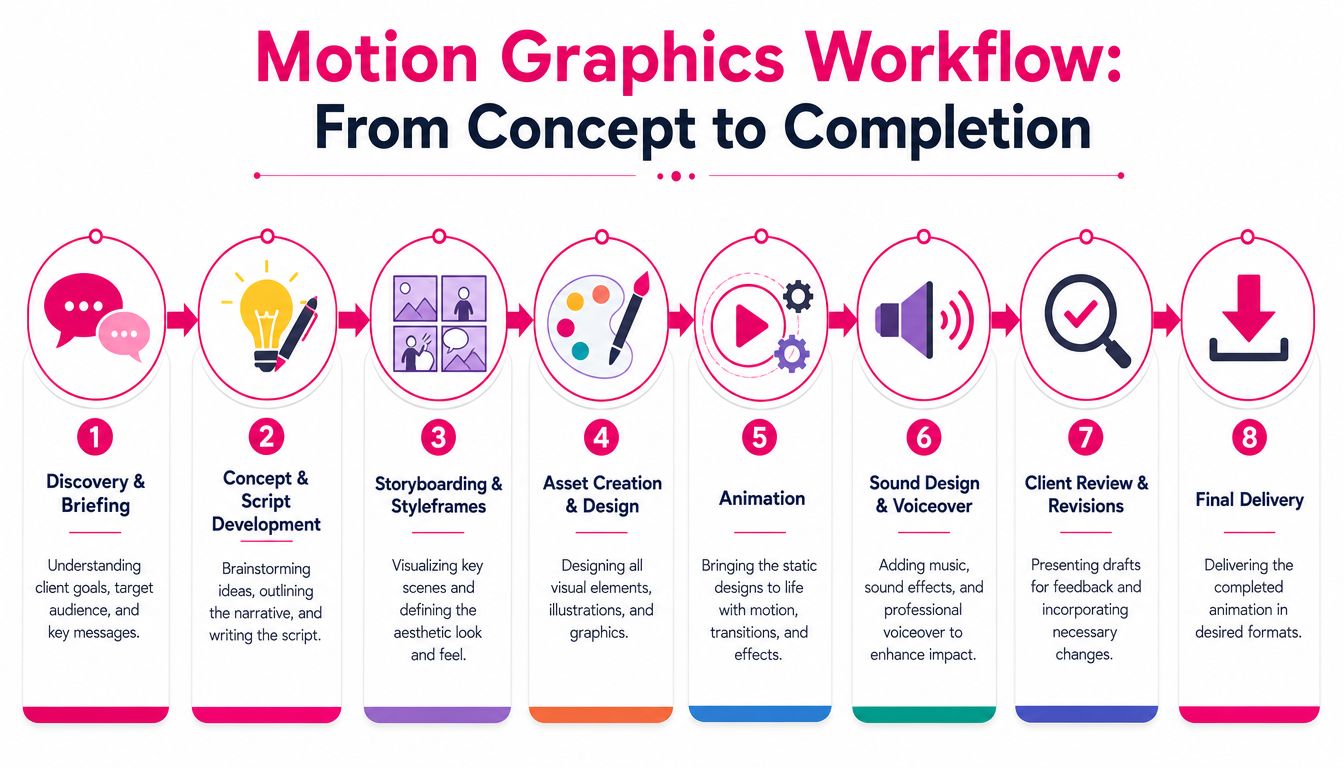
Discovery, brief, and style direction
The first conversation should answer plain questions. What kind of videos are you publishing? Where will the graphics appear? Are they for long-form YouTube, Shorts, course lessons, webinars, or all of the above? What existing brand assets already exist?
A useful brief usually includes:
- Brand references: logo files, fonts, color palette, and examples of past videos
- Use cases: intro package, lesson titles, lower-thirds, callouts, transitions
- Technical requirements: aspect ratios, delivery formats, software preferences
- Creative guardrails: minimal, premium, playful, bold, corporate, educational
This is also where good teams set expectations around uploads, communication, and review. If a provider has a client portal, use it. Keeping assets, comments, and approvals in one place saves rounds of confusion later.
Later in the process, the moving pieces should look like this:
Styleframes before animation saves money
One of the most practical checkpoints in motion graphics is the styleframe. That's a designed still image showing what the animation will look like before anyone spends time animating it.
Clients often want to jump straight to motion. That's usually a mistake. If the typography is wrong, the colors feel off, or the layout fights your brand, it's far cheaper to fix the still frame than to revise an animated sequence.
A solid review sequence looks like this:
- Approve visual direction first.
- Approve timing and motion behavior second.
- Tweak text, pacing, and exports last.
A revision made at the storyboard or styleframe stage is cheap. The same revision after full animation is not.
Production, review, and final handoff
Once visual direction is approved, the animator builds the asset set in tools such as Adobe After Effects, Illustrator, Photoshop, Cinema 4D, or Blender, depending on the project. For most creator work, After Effects plus Illustrator handles the majority of title, lower-third, and logo animation jobs.
Feedback should be timestamped. "The title feels too slow around 00:07" is useful. "Can you make it pop more?" usually isn't. The best revisions are specific about timing, text, hierarchy, and brand fit.
Final delivery usually includes a mix of files:
| File type | Best use |
|---|---|
| Alpha video file | Overlay graphics that need transparent backgrounds |
| Flat video export | Simple playback, review, or social posting |
| Project files when agreed | Internal teams that need future edits |
| Static companion assets | Thumbnail frames, fallback stills, or title cards |
A professional workflow shouldn't feel mysterious. You should know what decision is needed from you, when it's needed, and what you'll receive at the end.
Understanding Motion Graphics Pricing Models
Pricing confuses creators because the market mixes custom design work, editing labor, animation time, licensing, and revision handling into one quote. That's why a per-minute number can be misleading. One minute of simple lower-thirds isn't the same job as one minute of custom animated explainers.
Think of pricing like buying a car. Two vehicles can both get you from one place to another, but one has basic trim and the other has custom features, upgraded materials, and a different performance standard. Motion graphics works the same way.
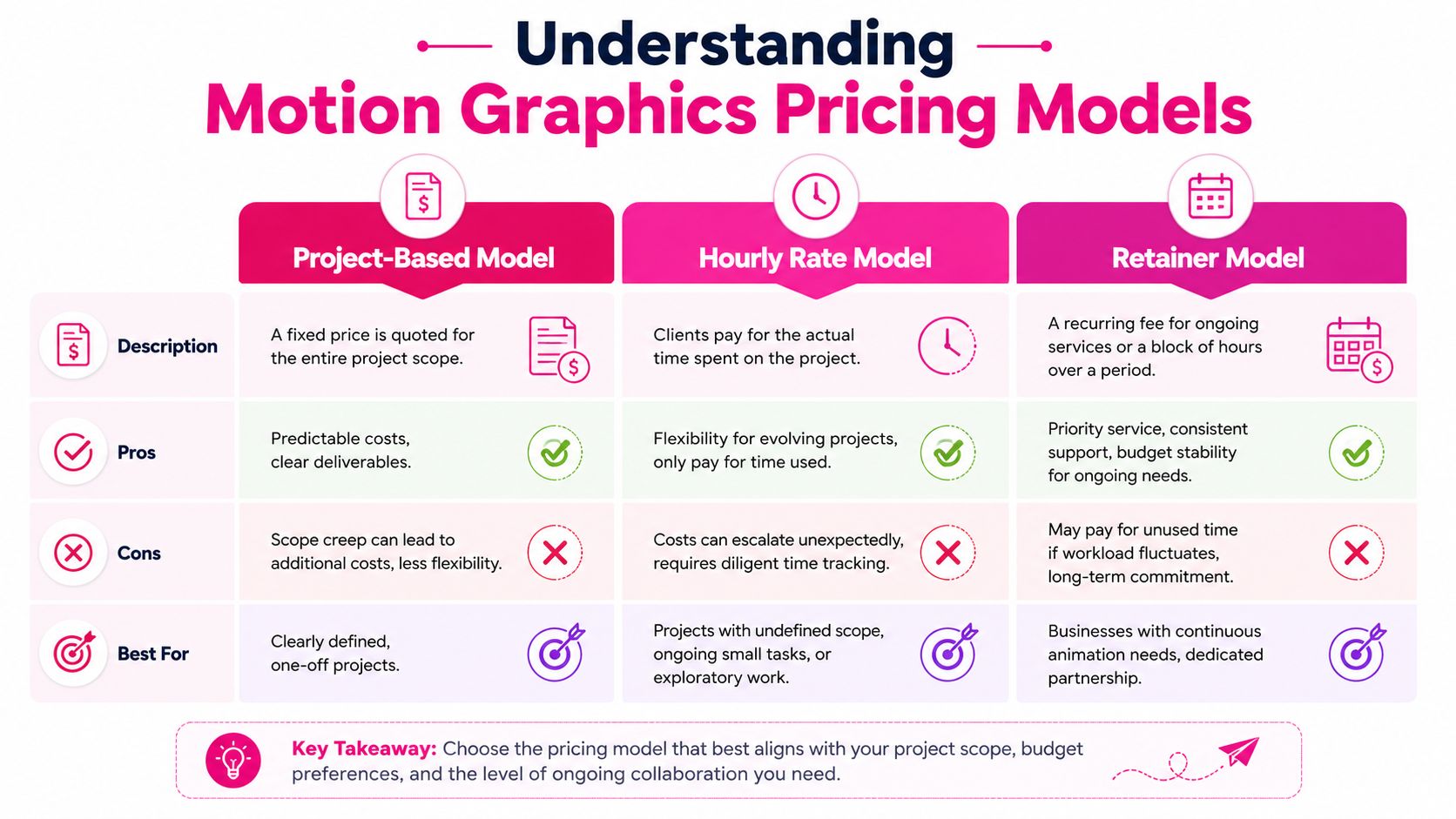
The three models clients see most often
| Model | How it works | Best fit |
|---|---|---|
| Project-based | Fixed quote for a defined scope | One-off branding pack or a specific explainer |
| Hourly | Pay for time used | Unclear scope, exploratory work, ongoing tweaks |
| Retainer | Recurring service block | Creators with continuous publishing needs |
Project-based pricing is easiest when the scope is stable. You know you need an intro, outro, lower-third pack, and a handful of callouts. The provider knows what they're building. That gives both sides cleaner boundaries.
Hourly pricing makes sense when you don't know what will be needed. The downside is predictability. If the feedback loop gets loose, the cost drifts.
Retainers fit teams that publish constantly and need motion graphics integrated into editing every week. In that setup, speed and consistency often matter as much as the animation itself. If you're comparing broader editing support, this guide to video editing cost structures and pricing approaches helps frame the trade-offs.
What actually drives the quote
A serious estimate should account for production variables, not just runtime.
The biggest cost drivers are usually:
- Complexity of motion: Simple title animation takes less time than layered scene builds with multiple moving elements.
- Custom design needs: Original illustrations, icon systems, or brand systems cost more than adapting a pre-existing visual language.
- Version count: One horizontal export is easier than separate YouTube, Shorts, course, and ad variants.
- Revision intensity: A team that signs off quickly costs less to serve than a team that rethinks the concept halfway through.
- 2D versus 3D: 3D often needs more setup, rendering, and technical oversight.
The AI pricing question clients should ask
One issue buyers should address directly is AI. According to BuzzFlick's review of motion graphics service pricing and AI workflows, AI tools can reduce production time for routine assets like animated titles and lower-thirds by 30% to 50%, while many agencies still quote $1,500 to $10,000 per minute without clearly showing how AI efficiency affects pricing.
That doesn't mean AI should automatically make every project cheap. It does mean you should ask whether the quote reflects a human-only process, a hybrid workflow, or mostly automated production.
Ask the provider what parts are custom, what parts are assisted, and whether faster production changes your price or only their margin.
How to Evaluate a Provider and Their Portfolio
A polished reel can hide a weak service operation. That's the risk. Many creators choose a provider based on style alone, then run into missed deadlines, messy revision cycles, or recycled assets that don't really belong to the brand.
Portfolio review is a risk-control exercise. You're not only checking whether the work looks good. You're checking whether this team can produce your kind of asset, in your kind of workflow, without surprises.
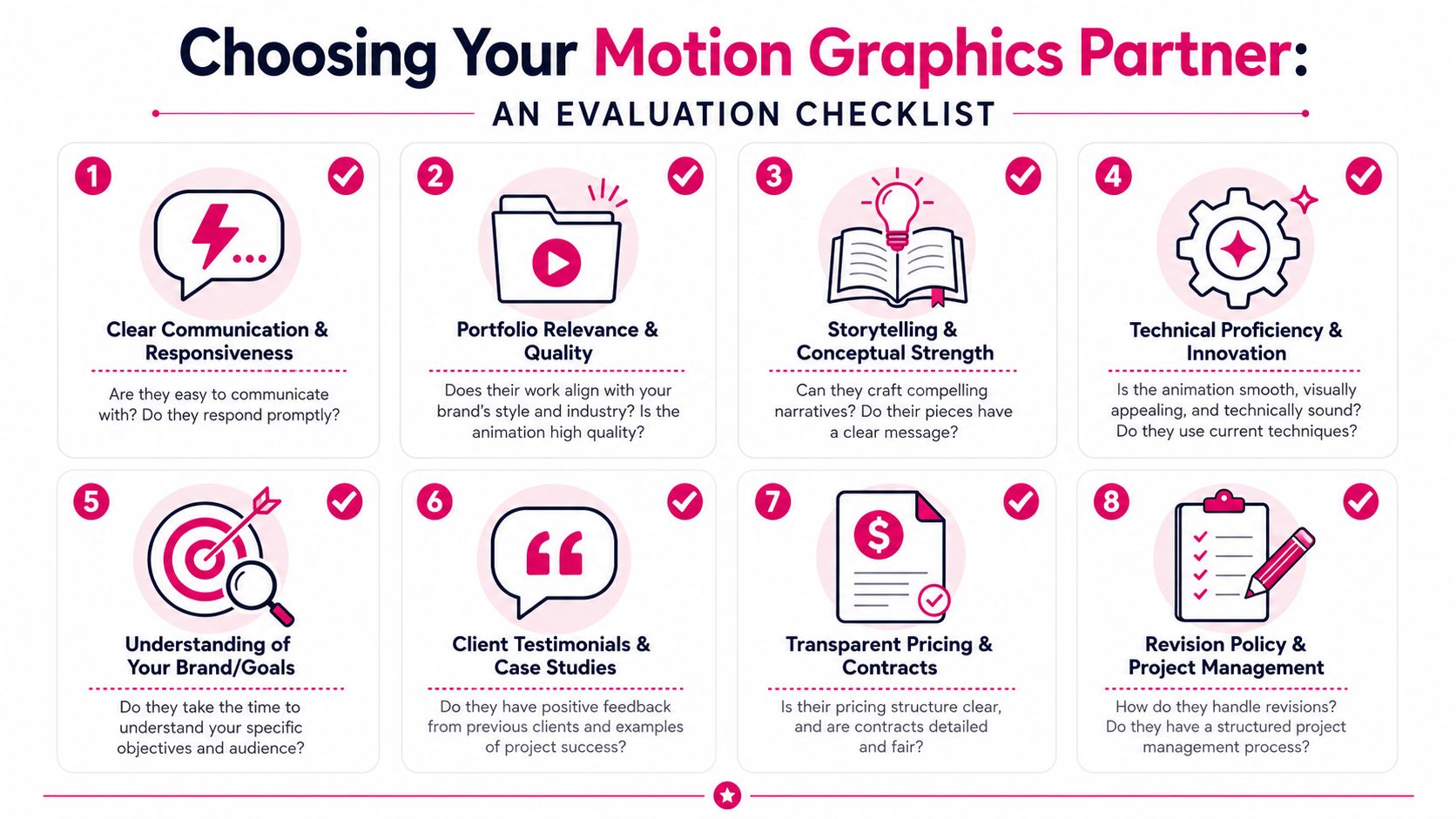
Look for fit, not just flash
A lot of portfolios are optimized to impress other designers. That's not the same as solving your production problems.
When reviewing a portfolio, check these points:
- Relevance to your format: A beautiful brand film doesn't prove they can build repeatable lower-thirds for a weekly YouTube show.
- Typography quality: Watch kerning, line breaks, safe margins, and text legibility on mobile.
- Motion discipline: Good animation has intention. Bad animation moves everything because it can.
- Brand consistency: Repeated assets should feel like a family, not a stack of disconnected styles.
If you're hiring support across your broader editing pipeline, compare providers the same way you'd hire a video editor for ongoing content production. The operational fit matters as much as the reel.
Ask direct questions about templates and ownership
This is one of the most important checks. According to Awesomic's analysis of motion design agency practices, 60% of budget motion graphics vendors rely on pre-made templates, and 78% of B2B buyers report branding inconsistencies tied to that practice.
Templates aren't automatically bad. They're bad when they're sold as custom work or when they lock you into someone else's visual system.
Ask these questions before signing:
- Are these assets built from scratch or adapted from templates?
- If templates are used, what licenses apply and what do I own?
- Will I receive editable project files, rendered outputs, or both?
- How are revisions handled if text or branding changes later?
- Can these graphics be versioned for vertical, horizontal, and course formats?
If a provider gets vague when you ask about source files, template use, or licensing, slow down.
Review the service layer, not only the art
Creators often underestimate project management until things go sideways. A strong provider should be able to explain how they collect files, where you leave feedback, how approvals are tracked, and what happens if deadlines move.
Use this quick screen when comparing options:
| What to check | Why it matters |
|---|---|
| Response speed | Slow communication usually becomes slow revision handling |
| Feedback process | Timestamped comments beat scattered messages |
| File delivery clarity | You need the right formats for your editor |
| Revision boundaries | Prevents endless subjective loops |
| Platform awareness | Graphics should suit YouTube, Shorts, and course delivery |
The right partner doesn't just show attractive samples. They reduce production risk.
Integrating Graphics into Your Video Post-Production
Many projects often break down at this stage. The graphics look good in the approval preview, but once they reach the editor, someone realizes the file has no transparency, the aspect ratio is wrong, or the animation timing doesn't match the cut.
A motion graphics asset isn't finished when it's approved. It's finished when it drops into the timeline cleanly.
Choose the right file type for the job
The most common delivery mistake is using a flat video export when the editor needs transparency. If your lower-third or title is meant to sit on top of footage, ask for a file with an alpha channel. If it's just a full-screen opener or transition, a standard compressed export may be enough.
A simple rule set works well:
- Use alpha video files for overlays such as lower-thirds, logos, bugs, and callouts.
- Use MP4-style review files for quick approvals and simple full-frame playback.
- Request editable files only when needed because project files can create compatibility issues if your team doesn't use the same fonts, plugins, or software versions.
- Ask for aspect-ratio variants early if you publish both horizontal and vertical content.
If your project also includes compositing work, tracked elements, or advanced finishing, it's helpful to understand where motion graphics ends and visual effects for videos begins. The workflow and file needs aren't always the same.
Give revision notes that editors and animators can act on
The fastest way to improve revisions is to stop giving aesthetic-only feedback. Notes like "make it cleaner" or "can you punch it up" force the team to guess. Good feedback points to a visible issue.
Use comments like these instead:
- Timing note: "The title appears too late. Bring it in earlier while the topic is first mentioned."
- Hierarchy note: "The subtitle is competing with the speaker name. Reduce its size."
- Brand note: "The accent color feels too saturated against the rest of the channel package."
- Platform note: "This sits too low for Shorts safe area. Raise it."
For creators handling their own final edit, timestamped feedback systems are the easiest way to keep this organized. The comment stays attached to the exact frame in question, which cuts out a lot of back-and-forth.
Apply graphics differently across formats
Not every asset belongs everywhere.
For YouTube long-form, use graphics to structure the experience. Section titles, subtle lower-thirds, pull quotes, and occasional callouts carry most of the load.
For Shorts and Reels, speed matters more. Hooks, captions, animated emphasis words, and punchier transitions do better than slow branded sequences.
For courses, consistency matters most. Reusable lesson openers, module dividers, on-screen terminology labels, and clean diagrams usually outperform flashy transitions.
The goal isn't to decorate every second. It's to place motion where it improves understanding.
Elevate Your Content with Professional Motion Graphics
Good motion graphics doesn't make weak content strong. It makes strong content easier to follow, easier to trust, and easier to remember.
That's why the category keeps growing. The global motion graphics market is projected at USD 110.0 billion in 2026 and forecast to reach USD 230.0 billion by 2033, with a projected 11.1% CAGR from 2026 to 2033. The same market analysis notes that over 38% of revenue share in 2026 is tied to advertising and marketing applications, according to Persistence Market Research on the motion graphics market. For creators, that signals something simple. Motion graphics isn't an extra anymore. It's part of how professional content gets packaged.
The practical side matters more than the label. You need assets that match your brand, fit your edit, survive revisions, and work across YouTube videos, courses, and short-form clips. That's what separates a useful motion graphics animation service from a portfolio full of pretty but impractical work.
If you're publishing regularly, think in systems. Build the intro package once. Standardize your lower-thirds. Create title cards that can be reused. Make your callouts fit both tutorials and promos. That approach saves more time than commissioning one-off graphics every time a new video goes live.
If you want motion graphics built into a smoother editing workflow, Your Video Editor is a practical option for creators and teams producing online content at scale. They handle long-form and short-form editing, branded graphics, thumbnails, and revision management through a client portal with timestamped feedback, which makes the whole process easier to run without juggling multiple vendors.