You open YouTube Studio, look at your last few uploads, and see the same pattern again. One week you posted twice. Then life got busy, editing dragged on, and two weeks passed with nothing. Your views slowed, your audience stopped expecting a new upload, and now you're asking the question almost every creator asks at some point: How often should you post on YouTube?
The hard part isn't just choosing a number. It's matching that number to reality. Filming takes time. Editing takes longer. Shorts seem easier until you need several every week. If you're trying to stay visible without burning out, scheduling starts to feel like a second job. That pressure is one reason many creators look at workflow tools and editing systems, including resources like BlitzReels' analysis of AI video editors, to figure out where production can be simplified.
A good posting schedule isn't the busiest one. It's the one you can repeat long enough for YouTube, and your viewers, to trust it.
Table of Contents
- Introduction to Posting Frequency Challenges
- Understanding Core Concepts of YouTube Frequency
- Identifying Key Factors for Your Optimal Frequency
- Recommended Cadences for Different Creator Types
- Experimenting and Measuring Your Posting Schedule
- Maintaining Consistency with Outsourced Editing
- Conclusion and Next Steps for Your YouTube Strategy
Introduction to Posting Frequency Challenges
A solo creator who makes educational videos often falls into the same cycle. Research takes a few days, filming happens late, editing stretches into the weekend, and the upload goes live whenever it's finally finished. Then the creator disappears for another stretch because making the next video requires the same scramble all over again.
That inconsistency creates two problems at once. Viewers stop building a habit around the channel, and the creator loses momentum because every upload starts from a cold stop instead of from a steady rhythm. It doesn't always look dramatic in the moment. It feels more like a slow stall.
Missing uploads rarely feels catastrophic on a single day. The damage usually shows up as weaker momentum, lower confidence, and a channel that never finds a reliable pace.
This is why the question how often should you post on YouTube matters so much. It isn't only about pushing out more videos. It's about building a schedule that fits your production load, your format, your audience, and your energy over months instead of days.
Some creators need one strong weekly upload. Others can support a mix of long-form videos and Shorts. The useful answer starts with understanding how YouTube responds to cadence, then turns that into a repeatable workflow.
Understanding Core Concepts of YouTube Frequency
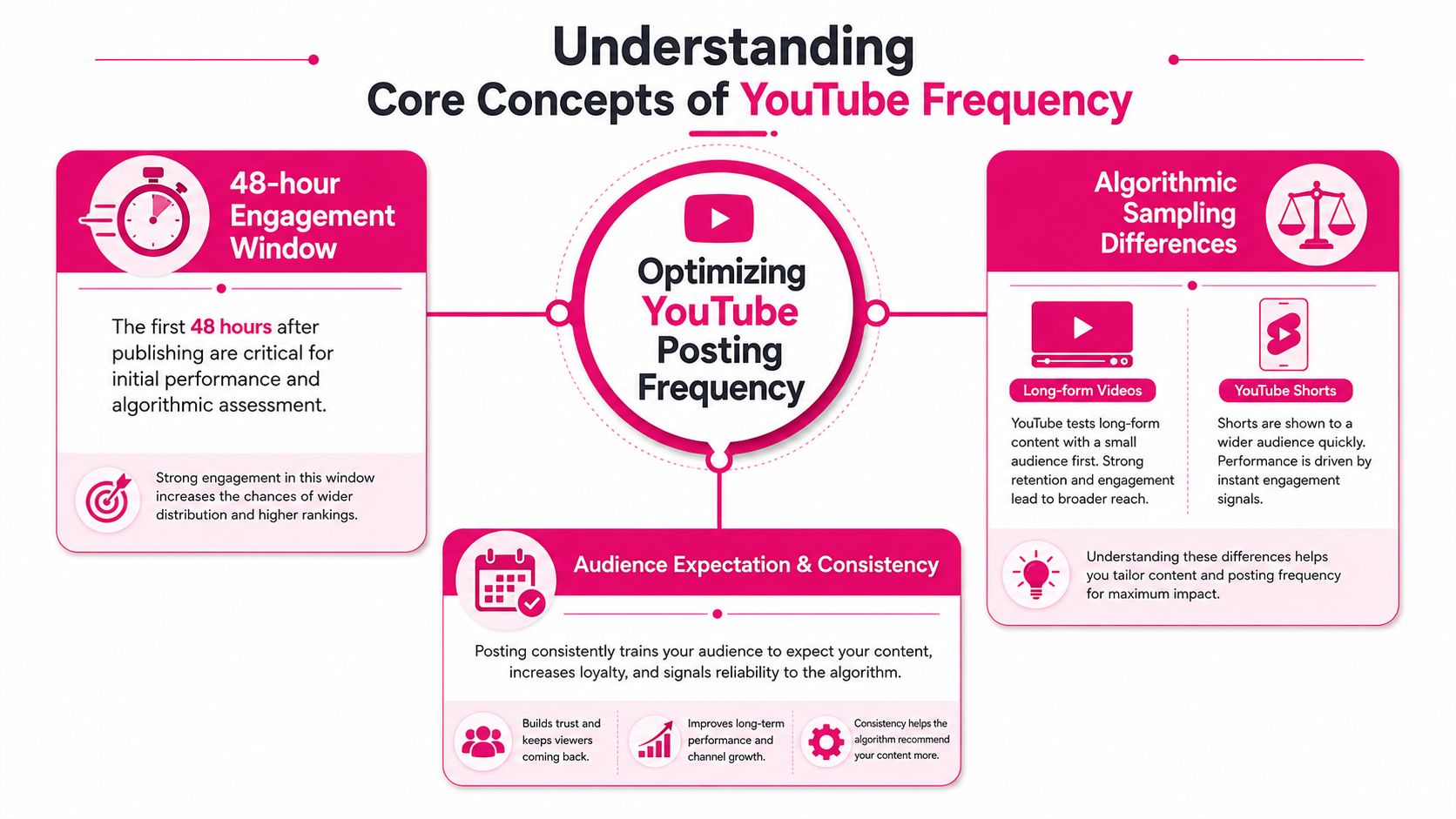
YouTube rewards performance, not busyness. That's an important starting point because many creators assume the platform expects more uploads at any cost. It doesn't work that way.
According to TubeAI's summary of YouTube's official growth guidance, upload frequency is not a direct algorithmic factor, which means YouTube doesn't penalize channels just for publishing less often if quality stays high. The practical lesson is simple. A predictable weekly or bi-weekly rhythm usually beats daily uploads that lower quality and exhaust the creator.
Why frequency feels important even when it is not a direct ranking factor
Think of YouTube like a store manager deciding which products to move to the front shelf. The manager doesn't care how often a brand ships boxes. The manager cares whether customers pick the product up, keep using it, and come back for more.
For creators, that means each upload needs room to prove itself. If your retention drops because you're rushing edits, more uploads can hurt your channel. If your titles get weaker, thumbnails become inconsistent, or pacing slips, the extra volume doesn't help.
A schedule still matters because creators need a system. Viewers like knowing when to expect content. Teams work better with deadlines. Analytics become easier to compare when uploads follow a pattern. If you're also trying to refine timing, this guide on the best time to post on YouTube is useful alongside frequency decisions.
Long form and Shorts play by different rules
Long-form videos and Shorts are not the same machine. Long-form depends more on deeper engagement. Shorts rely more on repeated activity and feed sampling.
One helpful analogy is a train versus a series of paper airplanes. A long-form video needs time to build speed and show YouTube that viewers are clicking and staying. Shorts move faster, get tested quickly, and can reach fresh viewers more often with a lighter production load.
Practical rule: Don't use the same posting logic for every format. Long-form needs breathing room. Shorts can support discovery between bigger uploads.
That difference is why creators get confused. They hear "post more" and apply it equally everywhere. In practice, each format has its own rhythm, and your schedule works best when those rhythms don't compete with each other.
Identifying Key Factors for Your Optimal Frequency
Your ideal schedule depends less on what another creator can do and more on what your channel can support without quality slipping. Two channels in the same niche can need very different calendars.
Start with your production reality
A commentary creator can react quickly. A tutorial creator may need scripts, screen recordings, retakes, graphics, and fact-checking. An interview channel has guest scheduling on top of editing. That's why the right posting frequency starts with workload, not ambition.
Ask yourself:
- How long does one long-form video really take: Count scripting, filming, editing, thumbnails, revisions, and upload prep. Most creators underestimate this.
- Which part always causes delays: Some people can film fast but get stuck in post. Others over-research and never reach the camera.
- What quality elements can't be rushed: That might be motion graphics, tighter storytelling, cleaner audio, or better examples.
A simple way to test this is to look at your last five uploads and write down what slowed each one. Patterns show up quickly. If editing is the repeat bottleneck, your posting problem isn't motivation. It's capacity.
Check audience behavior before you lock the calendar
Your schedule also needs to match when viewers are most likely to respond. According to TubeAI's data-driven timing guidance, you should publish 2 to 3 hours before the peak day and hour shown in the YouTube Studio "When Your Viewers Are on YouTube" heatmap so the video has time to index and start distribution.
That matters because a good schedule is not just weekly or twice weekly. It's also about landing at the right moment.
Use this quick profile:
Niche demand
A news-reactive niche may benefit from faster turnaround. Evergreen education can survive a slower pace if each video stays useful.Content depth
A ten-minute opinion piece and a heavily edited tutorial don't ask for the same calendar.Team size
One person editing at night shouldn't copy a multi-person channel with separate roles for scripting, filming, and post-production.Viewer habit
If your audience watches during predictable windows, consistency helps train both viewers and your internal process.
If your schedule only works during your best week, it isn't your real schedule.
The best frequency sits at the intersection of audience demand and production reality. Miss either side, and the plan breaks.
Recommended Cadences for Different Creator Types
There isn't one universal answer, but there is a strong baseline. Data analyzing over 27,000 creators' channels found that the optimal posting cadence for growth is 1 to 2 long-form videos per week and 3 to 5 YouTube Shorts per week according to SocialPilot's YouTube posting analysis. That mix supports momentum while helping creators protect quality.
A practical starting table
| Creator Type | Long Form Videos per Week | Shorts per Week |
|---|---|---|
| Long-form educator | 1 | 0 to 2 |
| Hybrid educator using clips | 1 to 2 | 3 to 5 |
| Shorts-first discovery channel | 0 to 1 | 3 to 5 |
| Interview or podcast repurposing channel | 1 | 3 to 5 |
This table is a starting point, not a command. The right choice depends on what role each format plays in your channel.
How to choose the right lane
A creator who makes deep tutorials usually does best with fewer, stronger uploads. For that channel, one reliable long-form video every week is often smarter than trying to force two and lowering production value.
A hybrid channel has more room to work. One long-form video gives depth. Shorts create more discovery chances and keep the channel active between larger uploads. This is often the most practical setup for creators who can repurpose moments from a main video.
For interview and podcast channels, clipping is the obvious advantage. One full episode can generate several Shorts without inventing new topics from scratch. The key is to make those clips feel native to Shorts rather than like random cutdowns.
Consider these checkpoints before increasing volume:
- Retention is holding steady: More uploads only help if viewers still watch.
- CTR is not slipping: A crowded schedule can weaken topic selection and thumbnail quality.
- Your process feels repeatable: If every upload still feels chaotic, add structure before adding volume.
- Formats support each other: Shorts should bring attention to the channel, not create a separate workflow that drains the main one.
The best cadence is the fastest one you can sustain without making each video worse.
To determine how often you should post on YouTube, start with the baseline above, then choose whether your channel needs more depth, more discovery, or a balanced mix of both.
Experimenting and Measuring Your Posting Schedule
A recommendation is useful. A channel-specific test is better. The smartest schedule is the one your own data supports.
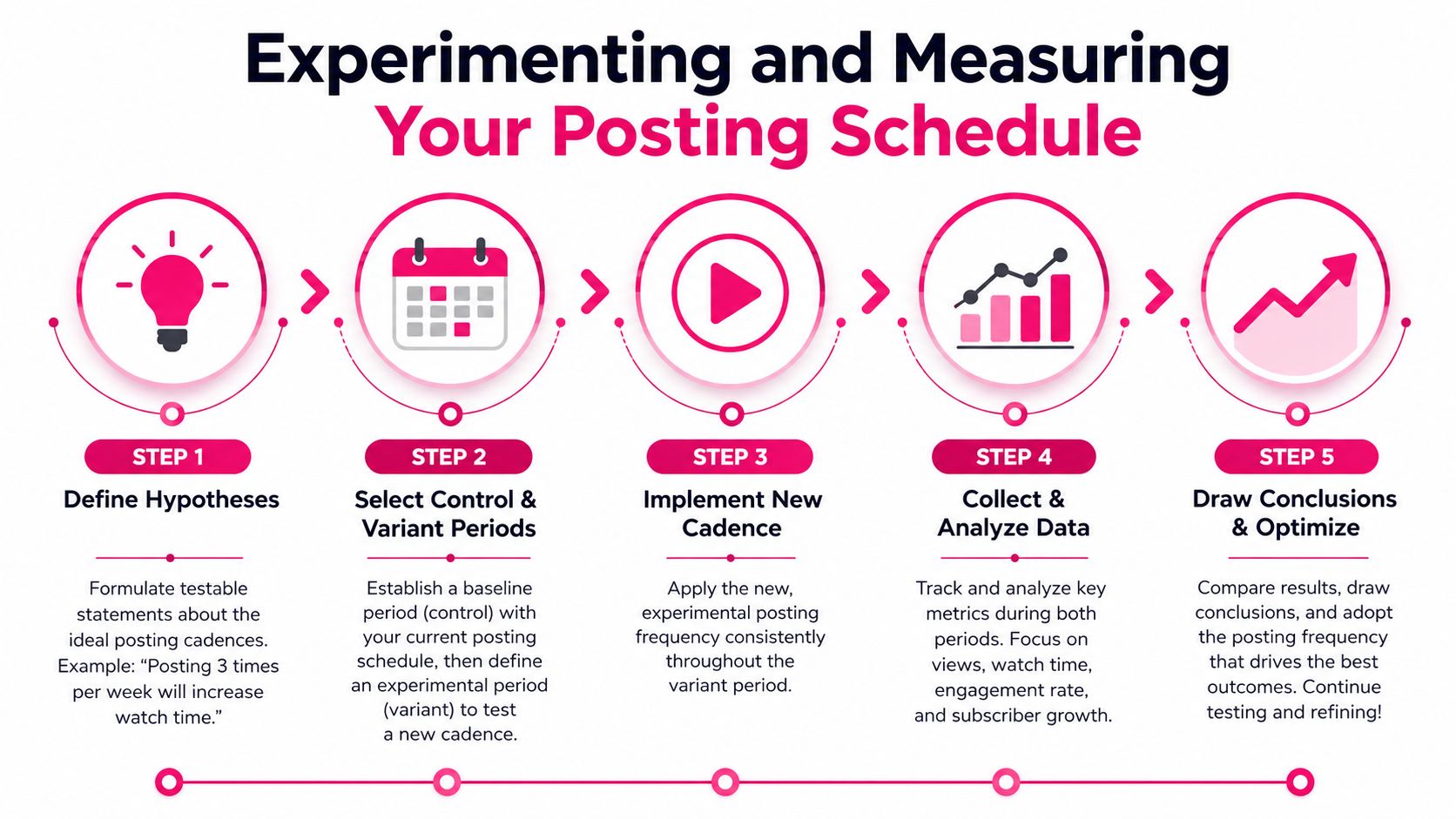
Build a simple test before you change everything
Don't overhaul your entire content calendar at once. Change one variable and keep the rest as stable as you can.
A strong example is testing one long-form upload per week against two long-form uploads per week. According to Alan Spicer's breakdown of upload frequency data, the minimum effective frequency for long-form momentum is one video per week, and moving to twice weekly can accelerate growth by approximately 3x compared with the weekly baseline, as long as per-video quality metrics such as Audience Retention and CTR don't decline by more than 20%.
That condition matters. If more output causes a quality drop, the test has already told you something important.
Use a basic framework:
Write a hypothesis
Example: "If I move from one long-form upload to two each week, my channel will gain momentum without lowering retention or CTR."Choose a control period
Use a stable period where your current schedule was followed consistently.Run a variant period
Apply the new schedule for long enough to collect meaningful comparisons from multiple uploads.Keep topics as comparable as possible
Don't compare a weak filler video against your best topic of the year and blame the schedule.
A good companion during this process is a solid analytics primer like this YouTube analytics guide, especially if you're still learning which dashboard signals deserve the most attention.
Later in your testing cycle, watching an outside breakdown can help you sanity-check your process.
What to measure and how to read the results
You don't need a giant spreadsheet. You need a short list of metrics that connect frequency to quality.
Track these:
View velocity
How quickly the video starts moving after upload. This tells you whether the schedule is helping early distribution.Audience Retention
If you post more often but viewers watch less of each video, the schedule may be too aggressive.Click-Through Rate
Frequent uploads can lead to weaker packaging. Watch for drops that suggest rushed titles or thumbnails.Subscriber movement
This won't explain everything by itself, but it helps confirm whether the extra output is attracting the right audience.Operational stress
This isn't in YouTube Studio, but it's real. If your process becomes frantic, quality usually follows.
A winning test doesn't always mean "post more." Sometimes it proves your current pace is already the best one.
When the results come in, ask a narrow question: did the new cadence improve momentum without damaging performance quality? If yes, keep it. If no, scale back or redesign the workflow before trying again.
The goal isn't to win an upload race. It's to find the fastest pace your channel can sustain.
Maintaining Consistency with Outsourced Editing
Many creators don't have a strategy problem. They have a throughput problem. They know what they want to post, but editing turns every upload into a bottleneck.
That matters because consistency depends on what happens after filming. If raw footage sits on a hard drive for too long, the best posting plan collapses.
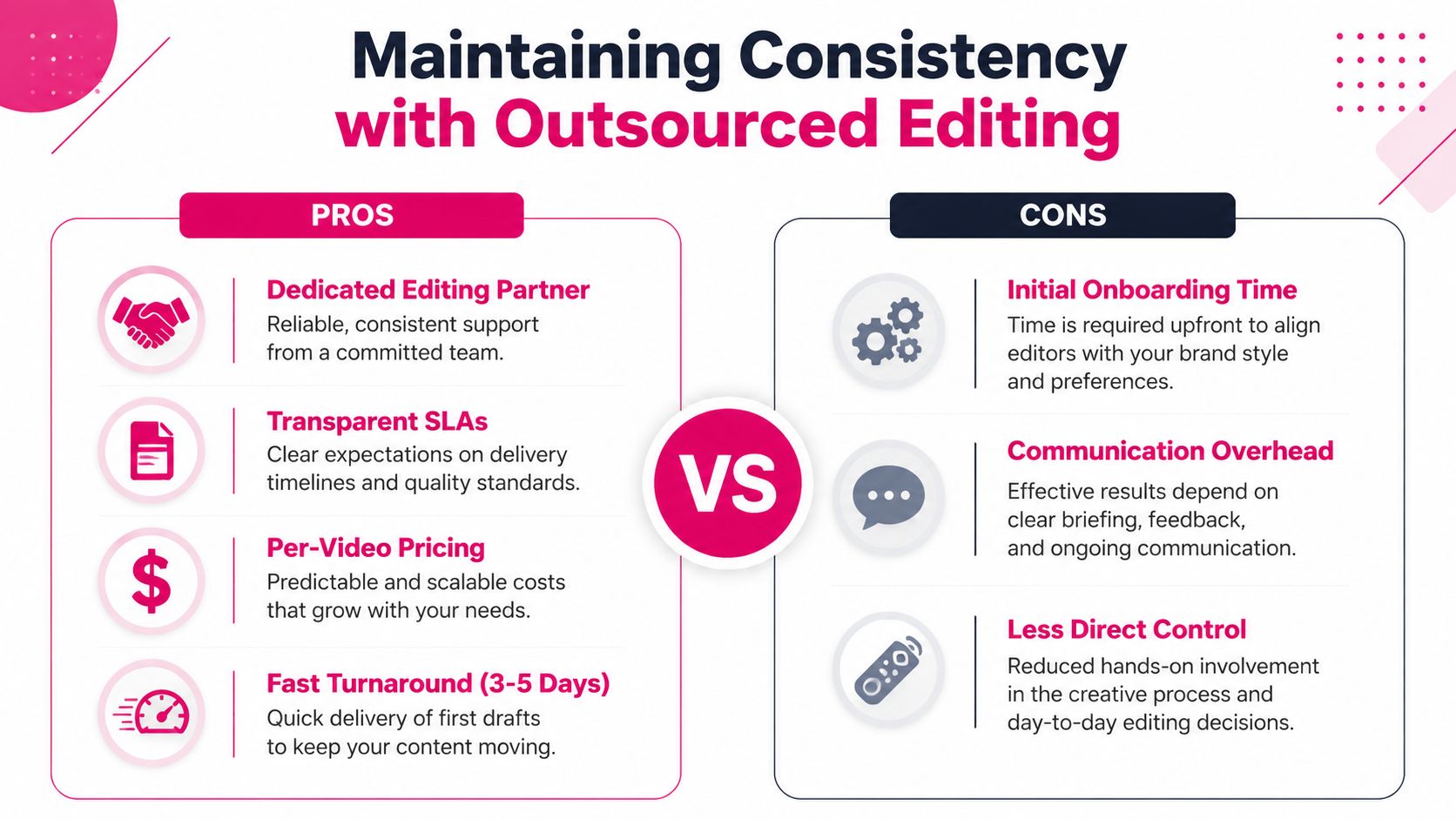
What outsourcing actually fixes
A structured editing partner can remove the delays that break cadence. The useful parts aren't abstract. They are operational.
- Defined turnaround times matter because the calendar needs predictable handoffs. The publisher information provided for this article describes first long-form drafts in 3 to 5 days and short-form drafts in 24 to 72 hours.
- Timestamped feedback shortens revisions because creators can comment on exact moments instead of writing vague notes in email threads.
- Per-video pricing helps with planning. You can match your upload schedule to a budget without the uncertainty of open-ended hourly work.
- Dedicated editors and brand libraries reduce style drift across uploads.
Creators exploring broader systems beyond editing often also discover content automation strategies to reduce repetitive work around clips, titles, and publishing workflows.
A sustainable handoff workflow
The best outsourcing setup is simple enough to repeat every week.
Try this model:
- Batch record one or more long-form pieces in a single session.
- Upload footage and notes into a shared portal with references, branding assets, and examples of pacing.
- Review the first draft using timestamped comments instead of rewriting feedback from scratch.
- Approve long form first, then spin out Shorts from strong moments in that approved cut.
- Queue releases so your content calendar doesn't depend on same-day editing.
If you're comparing service models, this overview of outsourced YouTube editing is a useful reference point for what to look for in workflows, revisions, and delivery structure.
Outsourcing isn't required for growth. But for creators who already know their target cadence and keep missing it, it can be the difference between a hopeful plan and a schedule that ships.
Conclusion and Next Steps for Your YouTube Strategy
The best answer to how often should you post on YouTube is rarely "as much as possible." It's the highest-quality cadence you can repeat without breaking your workflow. For many creators, that means a steady long-form rhythm, a selective use of Shorts, careful timing, and a simple test process inside YouTube Studio.
Pick one starting cadence. Run it consistently. Measure view velocity, retention, and CTR. If production keeps slowing you down, fix the workflow before adding more uploads. Momentum on YouTube usually comes from repeatable systems, not heroic effort.
If you need help turning a realistic posting plan into finished videos each week, Your Video Editor offers professional editing support for long-form videos, Shorts, thumbnails, and brand-aligned assets with structured turnaround times, revision workflows, and client portal feedback.