You already have the footage.
It's sitting in Google Drive, Dropbox, Frame.io, or on an SSD on someone's desk. There's a founder interview from last month, customer clips from the event team, a webinar recording that should have become five short videos, and product footage that marketing keeps meaning to turn into a launch asset. But the calendar still looks empty because raw footage isn't content. Editing is where the schedule either becomes real or slips again.
That's the practical problem behind most conversations about business video production services. Teams often buy a shoot, then underestimate everything that happens after the camera stops. Review rounds drag through email. Stakeholders give vague notes. One editor is overloaded. The social team needs vertical cuts while sales wants a clean case-study edit and leadership wants one more revision. The bottleneck isn't the idea. It's post-production capacity.
A good editing partner doesn't just polish footage. They create content velocity. They turn one recording session into a repeatable publishing workflow, with clear review steps, stable turnaround times, and deliverables that ship.
Table of Contents
- Beyond the Record Button The Post-Production Bottleneck
- Deconstructing the Post-Production Toolkit
- How Are Video Production Services Priced
- From Raw Footage to Final Cut The Service Workflow
- Your Vendor Selection Checklist
- Achieving Content Velocity for Business Growth
- Frequently Asked Questions
Beyond the Record Button The Post-Production Bottleneck
The video problem isn't often felt on shoot day. It's felt two weeks later.
The footage comes back strong. Everyone is happy. Then the operational friction starts. Marketing wants a launch edit. Social wants short clips. Sales asks for a customer proof piece. Someone in leadership asks if the same footage can support recruiting. None of those requests are unreasonable. The trouble is that they all land on the same editing queue.
That gap between the exciting part of production and the repetitive discipline of post-production is where many video strategies break. Lemonlight's corporate video production analysis notes that 60% of video business failures stem from unmanaged client scope and fragmented review cycles, and that 78% of small businesses with corporate video budgets fail to repurpose content due to editing bottlenecks. Those numbers line up with what production managers see every week. The footage exists. The system to process it does not.
Practical rule: If your team keeps saying “we have so much footage we still need to use,” you don't have a footage problem. You have a workflow problem.
A common example is the webinar trap. A team records an hour-long session because it feels efficient. In theory, that one recording should become the full replay, shorter chapter cuts, social clips, teaser edits, and maybe a sales follow-up asset. In practice, the webinar gets trimmed once, exported, posted, and abandoned. Not because the content lacked value, but because nobody had a clean post-production path for the rest.
The same pattern shows up with founder interviews, podcast recordings, internal training, event recap footage, and customer testimonials. Teams invest in capturing material, then lose return on that investment because post-production is treated like cleanup instead of infrastructure.
Business video production services are most useful when they solve that infrastructure problem. That means consistent edit quality, structured feedback, clear scope, and enough bandwidth to keep assets moving from raw footage to publish-ready output. Without that, every new shoot adds to the backlog.
Deconstructing the Post-Production Toolkit
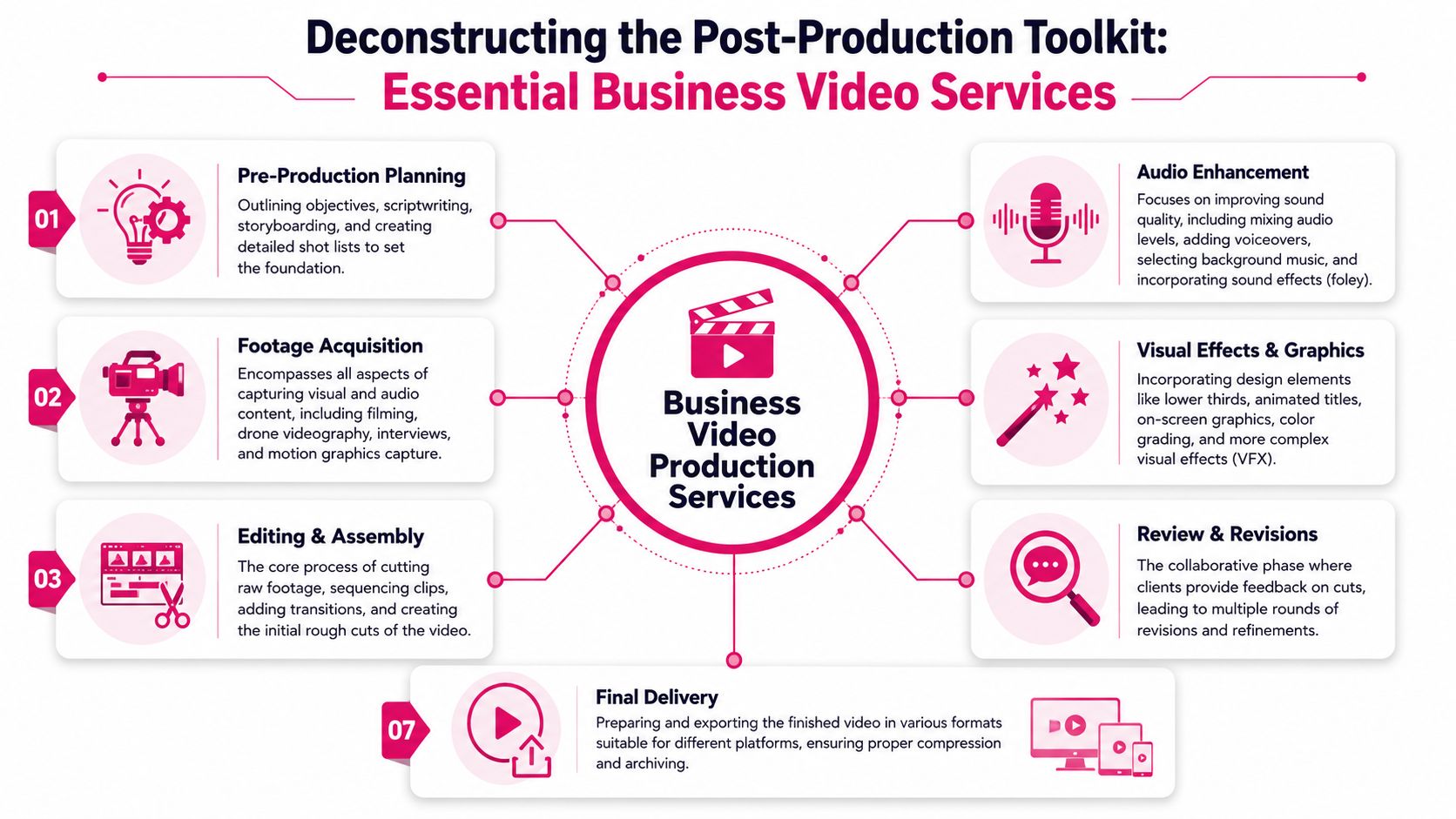
A marketing team can run a clean shoot, capture strong footage, and still miss the return if post-production is underspecified. That is where budgets leak. Files sit in review, editors wait on feedback, exports come back in the wrong format, and one planned video turns into one usable asset instead of ten. For teams buying business video production services, the toolkit matters because it determines content velocity, not just creative quality.
Editing is the Core Service
Editing and assembly carry most of the primary workload. Raw footage is transformed into content your team can publish, reuse, and adapt across channels. A webinar edit needs tighter pacing, clean slide swaps, chapter structure, and dead-air removal. A YouTube cut needs a faster opening, stronger visual rhythm, B-roll timing, and clear on-screen cues. Internal training usually needs accuracy, consistency, and easy comprehension more than flair.
Good vendors adjust the edit to the job. Great vendors build a repeatable system around it.
That distinction matters. A freelancer might deliver a strong one-off cut. A post-production partner like Your Video Editor is set up to process recurring workloads without your team rebuilding the brief each time.
- Long-form editing: Best for webinars, interviews, podcasts, demos, lessons, and explainers where structure and retention matter.
- Short-form editing: Best for Reels, Shorts, LinkedIn clips, and paid social where the first few seconds decide whether the viewer stays.
- Multi-cam editing: Best for panels, interviews, podcasts, and event coverage where camera switching affects clarity and perceived production quality.
The Supporting Services That Decide Whether the Edit Actually Works
Teams often ask for “editing” as if it covers every finishing task. In practice, post-production scope usually breaks into separate line items, and that is where confusion starts. If the proposal does not name the service, assume it is not included.
A practical toolkit looks like this:
| Service | What it does for the business |
|---|---|
| Motion graphics | Adds lower thirds, animated titles, charts, callouts, and branded transitions that make information easier to follow |
| Color correction and grading | Fixes exposure and white balance first, then shapes a consistent brand look across episodes or campaigns |
| Audio cleanup and mixing | Removes distractions, balances levels, and makes dialogue easier to understand |
| Thumbnail design | Improves click-through before anyone watches the video |
| Stock footage and music integration | Fills visual gaps and supports pacing without scheduling another shoot |
One trade-off comes up often. Teams want high-output editing at low cost, then realize the quote excludes graphics, caption styling, sound repair, or versioning for different platforms. The cheaper scope looks efficient until internal staff starts handling the missing tasks. At that point, the savings disappear. If you are comparing vendors, it helps to review a realistic breakdown of video editor pricing and what the cost usually includes before signing a package.
A useful distinction also gets missed in review calls. Color correction fixes technical issues. Color grading shapes the visual style. If footage is inconsistent from camera to camera, correction comes first. Paying for a stylized grade before the image is technically clean wastes time and usually creates another revision round.
Audio problems hurt watch time fast. Graphic inconsistencies hurt trust just as fast.
Delivery, Versioning, and Reusability Belong in the Toolkit
The last part of the toolkit is less glamorous and often more important. Delivery specs, file organization, caption exports, aspect-ratio versions, and archive handling decide whether a finished video stays useful after the first publish date.
A structured post-production partner's value becomes evident when your team knows what final files are included, whether source project files are retained, how social cutdowns are versioned, and how easy it is to reopen an asset for the next campaign. Your Video Editor stands out here because the service is built around repeatable business output, not just isolated creative edits. That makes it easier to turn one recording session into a full set of assets without losing time to handoff confusion.
If the toolkit only gets you to “final video delivered,” the process is incomplete. If it gets you reusable masters, platform versions, organized assets, and a faster path to the next publish cycle, it supports growth.
How Are Video Production Services Priced
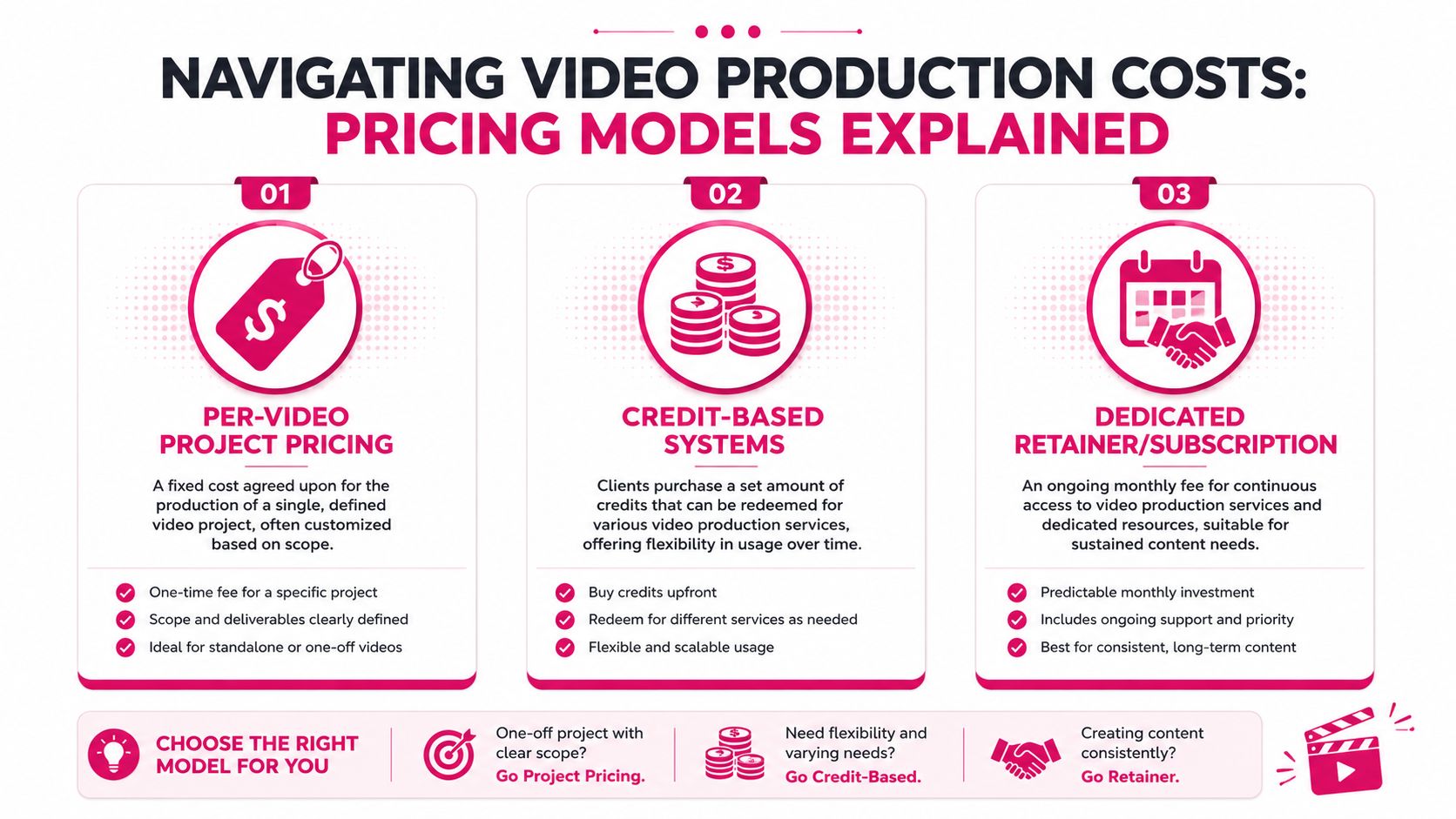
Pricing looks confusing because vendors package the same underlying labor in different ways. The cleanest way to compare options is to ignore the labels and ask one question: which model matches the way your team produces content?
The category is large enough that pricing models have matured around different workloads. IBISWorld's profile of the U.S. video postproduction services industry notes a $7.1 billion market size in 2026 with 3,754 businesses operating in the sector. That range of providers is why one quote looks like a creative project fee while another looks more like a subscription.
A quick visual helps sort the options.
Project Pricing Works for Defined Scope
Per-video or per-project pricing is the easiest model to understand. You define the deliverable, the vendor scopes the work, and both sides know what counts as done.
This works well when you have:
- One-off campaigns: A launch video, a single webinar edit, or an event recap.
- Stable creative needs: Few expected revisions and a clear brief.
- Limited internal complexity: Fewer stakeholders and fewer surprise requests.
Its weakness is change. If the scope expands after kickoff, pricing gets messy fast. A simple interview edit can turn into extra versions, social cutdowns, subtitles, graphics packages, and alternate exports. None of those are wrong asks. They just belong in the quote.
For a deeper look at how vendors calculate editing fees, this guide on video editor cost is useful background.
This walkthrough is also helpful before you compare proposals:
Credits Fit Uneven Workloads
Credit systems are better for teams with changing monthly needs. Instead of buying one specific output each time, you purchase a pool of usage that can be applied across different services.
That model tends to work when your workload is inconsistent. One month may need a webinar edit and several shorts. The next may lean on thumbnails, graphics, and a batch of social clips. Credits let the team shift spending without reopening procurement for each asset.
The practical question is whether credits expire and whether the service menu is easy to understand. If the system is opaque, forecasting gets harder instead of easier.
A pricing model should reduce planning friction. If finance needs a decoder ring to understand the invoice, the model isn't helping.
Dedicated Support Fits Ongoing Publishing
If your team publishes continuously, a retainer or dedicated editor arrangement is often the most operationally stable option. You're not buying isolated edits. You're buying ongoing production bandwidth, familiarity with your brand, and less reset time on every project.
This model usually fits:
- Weekly content schedules
- Multi-format publishing
- Teams with recurring review patterns
- Brands that need consistency across episodes or campaigns
The trade-off is commitment. If your output is sporadic, a dedicated setup may feel underused in slower periods. But if content keeps piling up, dedicated support often becomes cheaper than constant context switching and freelancer management.
From Raw Footage to Final Cut The Service Workflow
A good vendor relationship is won or lost in the workflow. Not in the pitch deck, not in the portfolio, and not in the kickoff call. Workflow determines whether your team can move quickly without creating confusion.
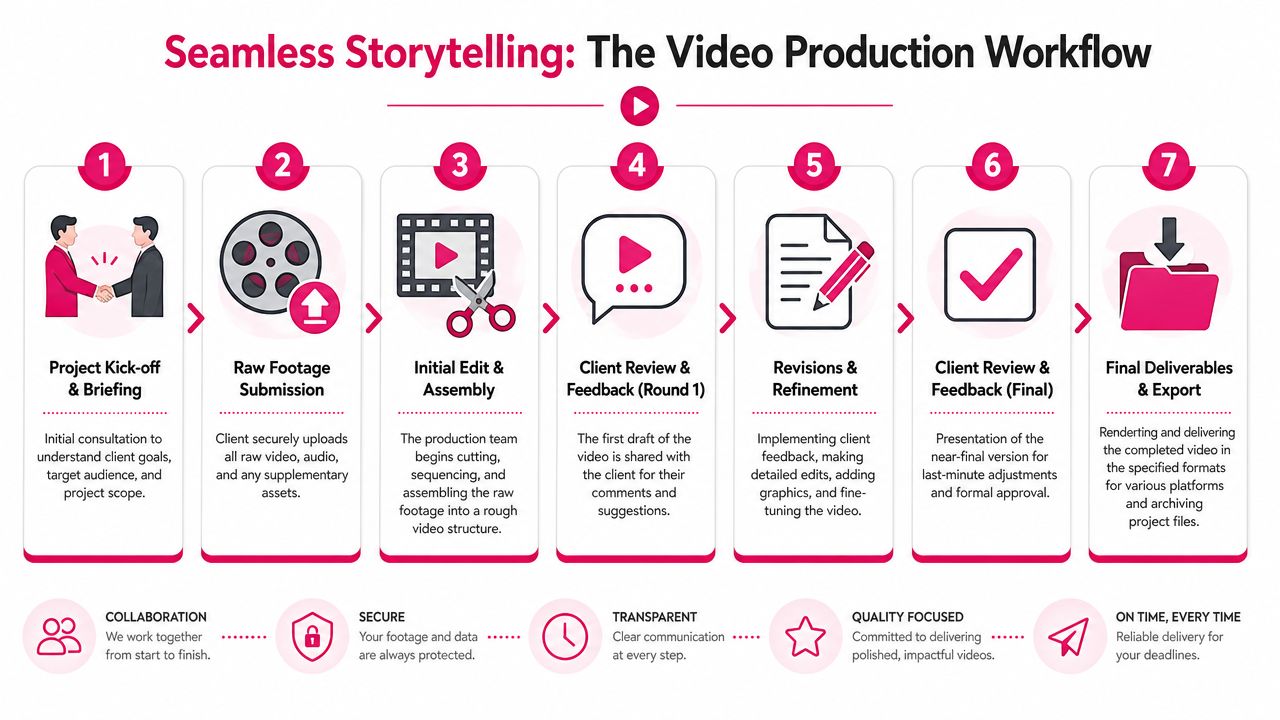
The basic production structure is consistent across the industry. LTX's guide to corporate video production describes a three-phase process of pre-production, production, and post-production, and notes that post-production is iterative and depends on frequent feedback with clear communication channels. That's the operational reality. Editing isn't a straight line. It's a controlled loop.
What a Clean Workflow Looks Like
The best service workflows are boring in the right way. Files go to one place. Feedback happens in one system. Version naming stays consistent. Everyone knows what's waiting, what's in review, and what's approved.
A practical post-production flow usually looks like this:
Briefing and asset handoff
The client uploads footage, brand files, scripts, logos, references, and any previous examples that define the target style.First assembly
The editor builds the rough cut based on the brief. During the rough cut, structure, pacing, and story logic get tested.Review with timestamped notes
Stakeholders comment directly on specific moments instead of writing “the middle feels slow” in email.Revision rounds
The editor addresses notes, clarifies conflicting requests, and tightens the cut.Final export and archive
The client receives platform-ready files and, when needed, retained masters for future use.
Where Teams Lose Time
The biggest delays rarely come from technical editing. They come from communication drift.
Here's what usually slows projects down:
- Scattered notes: Feedback across email, chat, text, and verbal calls creates missed changes.
- Unclear ownership: Nobody decides which stakeholder note wins.
- Weak briefs: The editor gets files but no context about audience, CTA, or platform.
- Late-stage strategy changes: A testimonial suddenly becomes a recruiting video after the first cut.
A client portal fixes more than convenience. It centralizes uploads, approvals, versions, and discussion. Timestamped comments are even more valuable. They cut the distance between “change this section” and “trim from this sentence to that sentence, replace the B-roll, and keep the lower third.”
That precision is what shortens revision cycles.
Your Vendor Selection Checklist
A weak editing partner rarely fails on the reel. They fail two weeks later, when your campaign is waiting on revisions, three stakeholders are giving conflicting notes, and nobody can tell you which version is current. If video is part of ongoing marketing, vendor selection is an operations decision as much as a creative one.
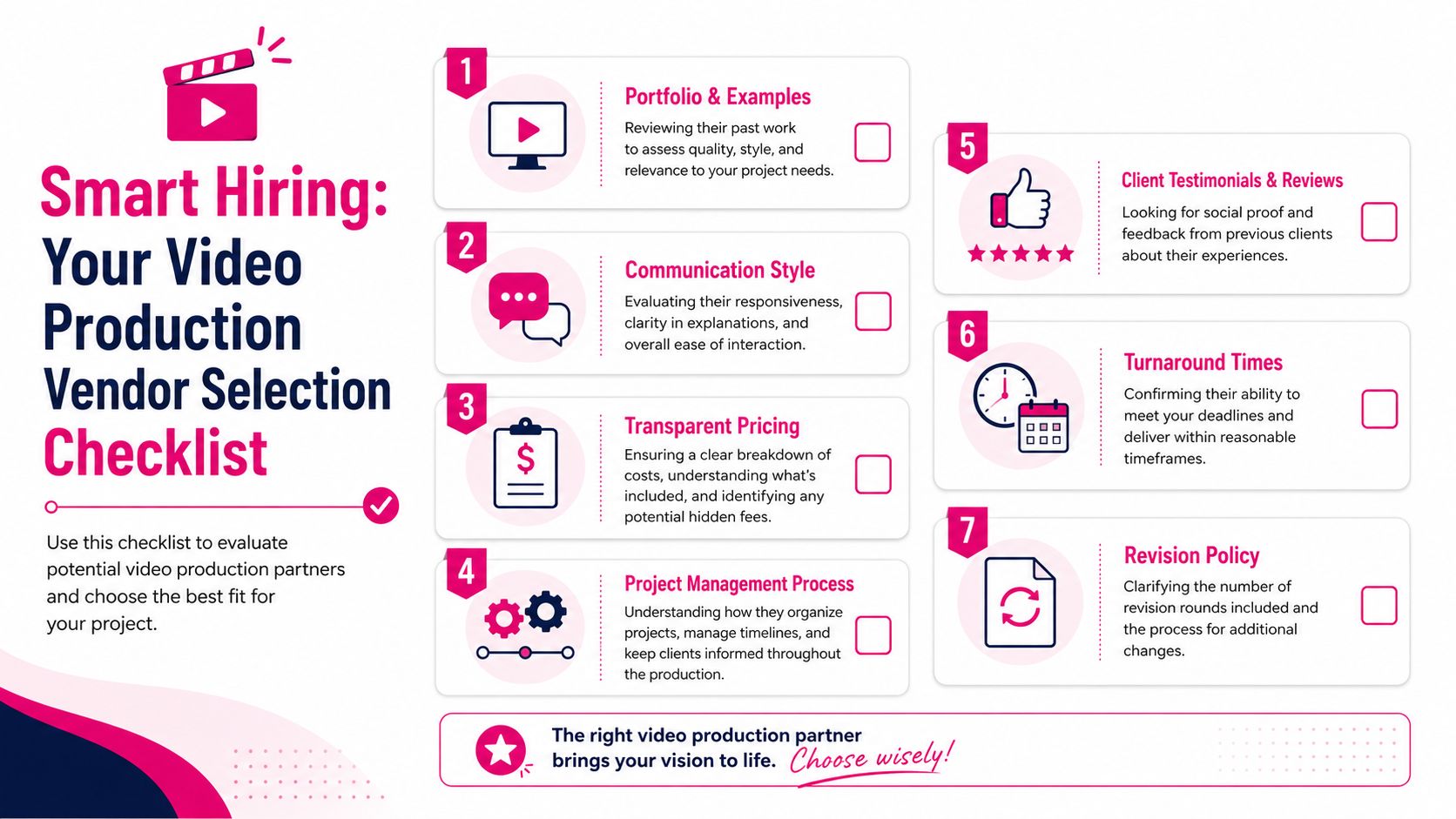
The question is simple. Can this partner help your team publish consistently without adding management overhead?
That standard changes how you evaluate providers. A polished montage proves taste. It does not prove they can turn raw footage into repeatable output across campaigns, cutdowns, formats, and review cycles. For teams trying to increase content velocity, post-production reliability is where ROI gets protected or lost.
Questions Worth Asking Before You Sign
Use the sales call to test working habits, technical judgment, and scope control.
- How is feedback handled? Ask where comments live, who consolidates them, and how revision requests are tracked. If the answer is vague, your team will spend time translating feedback instead of shipping content.
- What is included in the base scope? Clarify captions, motion graphics, thumbnails, aspect-ratio variants, short clips, music licensing, and archive delivery. Small omissions often become expensive add-ons.
- How do they edit for different channels? You need a vendor who understands that a webinar replay, a LinkedIn cutdown, and a vertical social clip need different openings, pacing, framing, and caption treatment.
- What happens to your source files and project files? Ask how footage is stored, how long assets are retained, and what you receive if you need another editor to pick up the work later.
- What turnaround times are realistic? Ask for draft timing by asset type, not broad promises like "fast" or "usually quick."
- How do they prevent scope drift? Good partners explain what triggers a change order and how they flag strategic shifts before they turn into unpaid rework.
Teams comparing ongoing editing support should review this framework on how to hire a video editor for long-term business content needs. It maps closely to how strong post-production partners structure communication, delivery, and accountability.
Technical fluency still matters. A vendor should be comfortable discussing frame rates, export settings, caption burn-in versus sidecar files, and whether you need publish-ready files, archive masters, or both. As noted earlier, common online delivery formats are straightforward. The problem starts when a provider cannot explain what they are exporting, why they chose it, or how that choice affects future reuse.
Ask vendors what they deliver for immediate publishing, what they retain for future revisions, and how quickly they can retrieve past project assets. Their answer usually reveals whether they are built for ongoing marketing work or one-off editing jobs.
Red Flags That Usually Lead to Delays
Some problems show up before the first invoice.
| Red flag | Why it matters |
|---|---|
| Ambiguous revision policy | Normal stakeholder feedback can turn into surprise charges or endless back-and-forth |
| No structured review system | Comments get split across email, chat, and meetings, which slows approvals |
| Portfolio with no process detail | Strong visuals alone do not show delivery discipline |
| No clear file-handling plan | Uploads, versioning, naming, and archives become your team's problem |
| Weak technical answers | Exports, captions, aspect ratios, and master files may be handled inconsistently |
| No path for repurposing footage | You get one finished edit instead of a reusable content library |
The best partners make the operation legible. Your Video Editor is a strong example because the value is not just editing skill. It is the combination of clear scope, practical turnaround expectations, organized feedback loops, and output built for repeat publishing. That is what helps a marketing team produce more from the same footage without creating a coordination problem internally.
Achieving Content Velocity for Business Growth
A common failure pattern looks like this. The team pays for a solid shoot, leaves with hours of useful footage, then waits three weeks for a first cut that only serves one channel. By the time short clips, captioned versions, and sales edits are requested, the campaign window has narrowed and the footage has lost momentum.
That is why content velocity is an operating issue, not a creative nice-to-have.
A key benefit from a good editing partner is schedule control. Marketing can plan around a dependable post-production cadence, sales gets fresh assets while the topic is still relevant, and paid teams have more variations to test without booking another shoot. The footage stays productive longer because the edit plan was built for reuse from the start.
A strong partner also changes the economics of each production day. One customer interview can support a homepage testimonial, paid social cutdowns, a case study clip for sales outreach, and an internal onboarding asset. The shoot cost stays the same. The return improves because more departments can use the finished material.
I have seen the difference in teams that treat editing as overflow work versus teams that treat it as production capacity. The first group tends to publish in bursts, then stall while files sit in review. The second group works from an asset pipeline, where each recording is tagged, cut into planned formats, approved on a schedule, and archived for later reuse. That is how a video program scales without adding internal coordination overhead every month.
Your Video Editor fits that model well because they are set up for repeat publishing, not just isolated edits. Their value is not limited to making footage look polished. They help marketing teams keep campaigns moving with organized workflows, reusable outputs, and delivery across the formats that matter most. For a broader practical view, their guide on how to market your business with videos is a useful reference.
Consistency matters here too, but not only for brand perception. Consistency reduces decision fatigue inside the team. When naming, graphics, caption styling, export specs, and review timing are already defined, approvals move faster and fewer edits bounce back for preventable reasons. That operational discipline is what turns video from an occasional win into a dependable growth channel.
Frequently Asked Questions
What's the difference between color correction and color grading
Color correction fixes technical issues like exposure, white balance, and shot-to-shot consistency. Color grading shapes the final look after correction is done.
Do I need to provide my own music and stock footage
Not always. Some vendors include licensed stock footage, music, and sound effects in their service. Others expect the client to source or approve everything separately. Ask before kickoff so usage rights are clear.
How much creative control does the client keep
The client should keep control of the brief, brand direction, messaging, and approvals. A good editor improves execution and pacing, but they shouldn't take ownership away from the marketing team.
What should I send with raw footage
Send the footage, brand files, logo assets, script or outline, examples you like, any required captions or title language, and a clear note on where the video will be published. The stronger the brief, the faster the first cut will be usable.
What makes review rounds move faster
Clear ownership and timestamped feedback. One consolidated set of notes beats five separate stakeholder messages every time.
If your team has footage piling up and your publishing schedule keeps slipping, Your Video Editor is worth a close look. They've built the kind of post-production system that supports content velocity: long-form and short-form editing, thumbnails, motion graphics, licensed assets, timestamped feedback, defined turnaround times, unlimited revisions within scope, and the option of a dedicated editor with an account manager. That combination helps marketing teams turn raw footage into a repeatable publishing engine instead of a growing backlog.