Creators on YouTube want to get rewarded for their efforts on the platform. YouTube understands the need for this extra incentive and that is why it set up the YouTube Partner Program.
Making videos and uploading consistently takes a lot of effort and time. Some creators have to do this full-time to meet up with uploading videos consistently.
The YouTube Partner Program (YPP) is usually the first monetization program many creators undertake. This program offers a share of the money YouTube makes from ads to the creators, helping them earn that. A mutually beneficial relationship where YouTube and creators share ad revenue.
However, you need to qualify to join the YPP and this guide will show you all about that. The requirements, the scope of YPP, how to join, potential rewards and so much more. But first, what is YPP?
Want to take your videos to the next level?
What is YouTube Partner Program (YPP)?
The YPP is a YouTube program that rewards creators on the platform by giving them a share of the ad revenue. But that’s not all, it always enables eligible creators to access fan funding features and other monetization options.
This program was created in 2007, 2 years after YouTube started. The aim has always been to make YouTube the most rewarding platform for video creators, with the YPP seeing lots of upgrades since then.
The most recent update is the expanded YPP system, where more countries and creators are eligible to get rewards.
To make monetization more accessible to creators, YouTube introduced a two-tiered YPP system.
The first tier lets you monetize your channel through audience-based systems, including membership and tipping, without ads. While the second tier gives you all the first-teir benefits plus ads and the revenue that comes with it.
While the monetary advantages of the YPP cannot be overlooked, there are other benefits beyond monetary rewards. The YPP also allows you to utilize several other features, including access to YouTube Studio analytics, Creators Support, and community resources.
Requirements for YPP

One recurring word when discussing YPP is eligibility, and this is because you have to be eligible to join the YPP. Even though the requirements are not the most difficult, many creators are still ineligible due to a lack of proper information.
The requirements vary based on the YPP tier. Here are the requirements to join the YouTube Partner Program and start earning for the two tiers:
Tier 1
To get access to features like YouTube shopping, channel membership, Super Chat, and Super Thanks, you need:
- 500 subscribers.
- 3 valid public videos in the past 90 days.
- Either 3000 hours of public watch time in the past 1 year or 3 million valid Shorts views in the last 90 days.
Tier 2
Tier 2 gives you access to all tier 1 features alongside monetization from YouTube Premium Revenue, and through ads on long-form videos and between Shorts. You need:
- 1000 subscribers.
- Either 4000 hours of public watch time in the last 1 year or 10 million valid Shorts views in the last 90 days.
What You Need To Join The YPP?
Aside from the basic requirements, here is a more detailed guide of all you need to join the YouTube Partner Program. Everything here must be in place before you can join this program and start enjoying its benefits.
1. Abide By The YouTube Channel Monetization Policies
To join the YPP, your channel must fully comply with YouTube’s Monetization Policies, including Community Guidelines and Terms of Service. This means creating original, ad-friendly content without copyrighted material, misleading thumbnails, or harmful content.
Regularly review policies in YouTube Studio to stay updated. Non-compliance can lead to rejection or demonetization.
You have to audit your videos for potential violations before applying to ensure a smooth review process.
2. Reside in a YPP Available Region
You must live in a country or region where the YPP is available, such as the United States, Canada, or Algeria (as of 2025).
Check YouTube’s official list of supported regions, as availability varies. If your country isn’t eligible, consider partnering with someone in an eligible region for AdSense setup, ensuring compliance.
Make sure to verify your location in your Google account settings to avoid application issues.
3. Have No Active Community Guideline Strikes On Your Channel
Your channel must be free of active Community Guidelines strikes to qualify for YPP. Strikes, issued for violations like inappropriate content or spam, last 90 days and block eligibility.
Start by reviewing your channel’s status in YouTube Studio’s “Content” tab and resolving any issues.
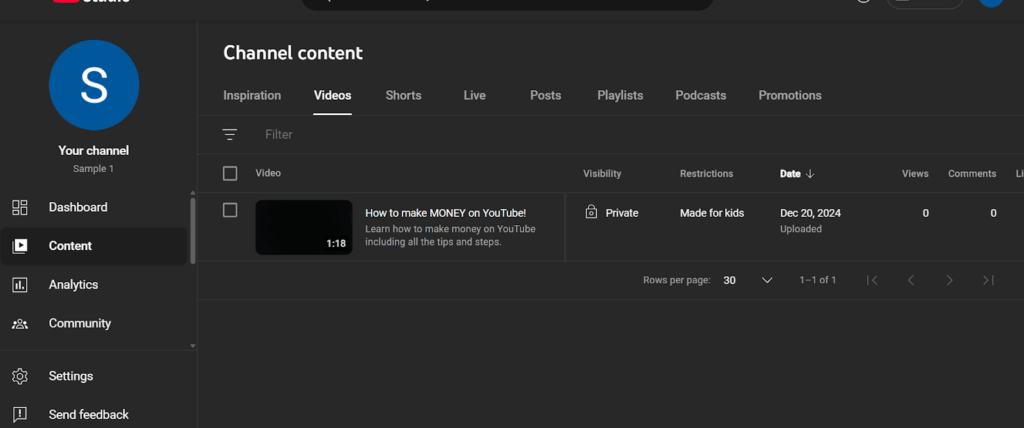
You have to maintain a clean record by avoiding copyrighted music or misleading titles to ensure a hassle-free application.
4. Have 2-Factor Authentication Turned on For Your Google Account
YPP requires 2-factor authentication (2FA) enabled on your Google account for security. Set it up via Google Account settings using an authenticator app or phone number.
This protects your channel and AdSense account from unauthorized access. Ensure 2FA is active before applying, as YouTube verifies this during the review.
You can’t afford to misplace your backup codes, so keep them safe in case you lose access to your 2FA method.
5. Have Access To Advanced Features
You need access to YouTube’s Advanced Features, automatically available when your channel meets basic eligibility for Tier 1. These include tools like channel memberships and YouTube Shopping.
Check your status in YouTube Studio under “Settings” > “Channel” > “Feature eligibility.”

Upload consistently to unlock these features faster, as YouTube prioritizes active channels during the YPP review process.
6. Get an Active AdSense Account Or Be Ready to Create One
An active Google AdSense account is mandatory for YPP to receive payments. You must link an existing account or create one during the application process via YouTube Studio.
Also, make sure your AdSense account is verified with a valid address and tax details. If you’re in a region with limited AdSense support, use a trusted partner’s account in an eligible country, ensuring compliance with AdSense policies.
Step-By-Step Guide To Joining The YPP
Want to join the YPP program and enjoy the many benefits? Use this simple step-by-step guide to join the YPP if you are eligible.
Joining the YouTube Partner Program (YPP) is a pivotal step for creators aiming to monetize their content. This guide breaks down the process into clear, actionable steps, with insider tips to accelerate your journey and avoid setbacks. Whether you’re a beginner or a growing creator, follow these steps to successfully join the YPP in 2025.
Step 1: Build Your Channel Foundation
Start by creating a Google account with 2-step verification enabled to secure your channel. Set up a YouTube channel with clear branding, including a professional banner, profile picture, and a niche-focused description to attract viewers.
Before you can think of YPP, you have to upload videos and 3-5 high-quality, original videos that comply with YouTube’s Community Guidelines is a good place to start. Always avoid copyrighted material.
A compelling channel trailer can hook new visitors and boost subscriptions. Audit your content for policy adherence to ensure a strong foundation for your YPP application.
Step 2: Meet YPP Eligibility Requirements
To join YPP, aim for 500 subscribers and 3,000 public watch hours or 3 million Shorts views for Tier 1, or 1,000 subscribers and 4,000 watch hours (or 10 million Shorts views) for Tier 2.
Promote your videos on social media and use engaging CTAs to grow subscribers. To meet your watch hours target quickly, you should create longer videos or attention-grabbing Shorts with trending hashtags.
Check progress in YouTube Studio and ensure all content is public and guideline-compliant to qualify.
Step 3: Apply for the YouTube Partner Program
Once you meet the eligibility criteria, submit your application through YouTube Studio. This step is straightforward but requires attention to detail.
- Navigate to YouTube Studio:
Log in to YouTube Studio (studio.youtube.com) and go to the “Earn” tab on the left-hand menu.

Check your eligibility status and select to be notified when you become eligible. If you’re already eligible, click “Apply” under the YouTube Partner Program section.

- Agree to YPP Terms:
Review and accept the YouTube Partner Program Terms of Service, which outline revenue-sharing agreements and content policies.
- Link a Google AdSense Account:
Create or link an existing AdSense account to receive payments. Ensure your account is verified with a valid address and tax information.
If you’re in a country with limited AdSense support, consider setting up through a trusted family member or partner in an eligible country, ensuring compliance with AdSense policies.
- Submit Application:
Click “Start” to submit your channel for review. You’ll receive a confirmation that your application is in progress.
Handling Rejections and Next Steps
YouTube rejects a fair share of YouTube Partner Program applications, even when most of the requirements have seemingly been met. This puts many creators in a state of confusion. Well, not anymore, as we have just the right guide for you.
If your application is rejected, don’t panic, as YouTube usually provides feedback to help you improve. Here’s how to address rejections and move forward.
Common Rejection Reasons:
- Duplicated Content: Reusing others’ content without significant original value like a reaction video without commentary.
- Policy Violations: Issues like misleading thumbnails, inappropriate language, or copyrighted material.
- Insufficient Content: Low video count or lack of engagement.
- Repetitious Content: Uploading similar videos repeatedly. Diversify your content to avoid this flag.
How to Respond:
- Appeal the Decision: If you believe the rejection was a mistake, submit an appeal within 21 days via YouTube Studio, providing evidence of compliance.
- Reapply: If the rejection is valid, address the issues and reapply after 30 days or 90 days for repeated rejections.
Document changes made to address feedback (e.g., edited videos, new uploads) to strengthen your reapplication. And make it easier to get accepted.
How Long Does it Take For YouTube To Accept an Application?
YouTube manually reviews each application to ensure compliance with the standards. This process can take days to weeks, depending on your channel’s complexity and content volume.
The time it takes for YouTube to review a YPP application in 2025 varies, typically ranging from a few days to several weeks. Simple channels with few videos may be approved in 3-7 days, while complex channels with extensive content or mixed formats can take 2-4 weeks.
To avoid delays, ensure no strikes, and maintain consistent uploads during the review. You want to avoid major channel changes during this period to expedite the process. While you check your application status in YouTube Studio’s “Earn” tab.
What YouTube Evaluates:
- Content Quality: Videos must align with Community Guidelines and have clear audio, visuals, and value to viewers. Using exceptional editing services like Your Video Editor will make everything easier.
- Policy Compliance: No active strikes or violations like copyrighted material, spam, or harmful content.
- Channel Activity: Consistent uploads and engagement signal a serious creator.
What Videos and Topics are Not Eligible For YPP?
Not all content types are allowed into the YPP program, which means if your channel is making a certain type of content, you may not be eligible for this. But which topics are no-go areas if you want to join the YPP?
All videos that violate any of YouTube’s advertiser-friendly content guidelines, community guidelines, and copyright policies are ineligible for YPP.
Repeated content, videos with acts of violence without context, explicit content, and content that discriminates.
Videos like YouTube Shorts, private, unlisted, or deleted content, ad campaigns, and livestreams that are not converted to video on demand are all ineligible for this program.
How to Avoid Strikes That Affect YPP?

Doing certain things can affect your chances of being approved or even make you lose your access to the YouTube Partner Program. This is why you have to pay extra attention to what you do on your channel so you can stay on the right side of YPP guidelines.
1. Use Original or Licensed Content
Avoid copyrighted material like music, video clips, or images without permission. Use YouTube’s Audio Library or royalty-free assets for safe content creation. Always credit or obtain licenses for third-party material. This prevents copyright strikes, which block YPP eligibility for 90 days.
2. Avoid Misleading Thumbnails and Titles
Ensure thumbnails and titles accurately represent your video’s content. Misleading clickbait, like exaggerated claims, can trigger strikes. Create engaging but honest visuals and descriptions to stay compliant. The best channels use professional thumbnail designing services to ensure they do not violate any guidelines.
3. Steer Clear of Inappropriate Content
Content with explicit language, violence, or harmful themes violates Community Guidelines, risking strikes. Review YouTube’s policies and keep videos family-friendly or clearly labeled for mature audiences to avoid issues.
4. Regularly Audit Your Channel
Check YouTube Studio’s “Content” tab for potential violations. Remove or edit problematic videos before applying for YPP. Regular audits help maintain a clean channel, ensuring no active strikes block eligibility.
4. Stay Updated on Policy Changes
YouTube’s Community Guidelines evolve, so review updates regularly via YouTube Studio or Creator Academy. Staying informed prevents accidental violations, keeping your channel YPP-ready.
Monetization Opportunities in YPP
There are different ways to make money from YouTube’s Partner Program, and you can exploit them with the right information. Monetization is more than just ad revenue. Here are all the options available to you:
1. Ad Revenue
Once approved for YPP, you can earn money through ads displayed on your videos. Creators typically keep 55% of the revenue, while YouTube takes 45%.
To boost earnings, focus on videos longer than 8 minutes so mid-roll ads can be included in your video. Tools like YouTube Studio help to track which content attracts high-paying ads.
You can also experiment with ad placements but avoid overloading viewers to maintain engagement.
2. Channel Memberships
Offer exclusive perks like badges or custom emojis through channel memberships to encourage your subscribers to join. Fans pay a monthly fee to access special content, such as behind-the-scenes videos or Q&A streams.
Set up tiered levels to appeal to different budgets. While you promote memberships subtly in videos to encourage sign-ups without pushing too hard, to maintain your audience’s trust.
3. Super Chats and Super Stickers
Live streams open the door to Super Chats and Super Stickers, where viewers pay to highlight their messages or send fun graphics. Host regular live sessions to connect with fans and encourage contributions.
A lively, interactive stream can spark more Super Chats, so engage with your audience in real-time to maximize this revenue stream.
4. YouTube Shopping
With YouTube Shopping, you can sell branded merchandise or affiliate products directly on your channel. Set up a store in YouTube Studio to showcase items like t-shirts or digital guides.
By linking products in video descriptions or pin them below videos, you send traffic directly to your merch. Highlight your merch naturally in content to drive sales without feeling overly promotional.
5. YouTube Premium Revenue
When YouTube Premium subscribers watch your videos, you earn a share of their subscription fee. This revenue grows as your viewership increases, especially for high-retention content.
For this, focus on creating engaging, longer videos to keep Premium viewers hooked, use the services of expert video editors like Your Video Editor. Check YouTube Studio analytics to see how Premium revenue contributes to your overall earnings.
Final Thoughts
You’ve got the roadmap to join the YouTube Partner Program in 2025, from building a solid channel to unlocking multiple revenue streams like ads and memberships.
It’s all about creating quality content, staying compliant, and engaging your audience. Services like Your Video Editor can polish your videos, making them stand out and boosting viewer retention to hit those watch hour goals faster.
Start applying these steps today, keep learning, and connect with your viewers. Your channel could soon turn your passion into a thriving career.
Take action today by auditing your channel, refining your content, and appling for YPP. The journey may feel challenging, but every video you create brings you closer to monetizing your passion