Getting a lot of views on videos you spent a lot of time putting together feels like a reward for your effort. But not many creators get to enjoy this because of a low click-through rate (CTR).
Improving your click-through rate on YouTube can help your video get recommended by the algorithm to others. Just getting your videos to appear in search or be recommended to viewers may not be enough, as it has to be clicked for it to even count.
The sheer volume of content uploaded on YouTube daily and rising competition make getting that click even tougher. Viewers see a lot of content that captures their attention, so you have to do even more to get them to watch.
No matter how good and helpful your content is, if viewers don’t click, they won’t know. But what is a good CTR on YouTube? It depends on a lot of factors, including niche and content type. And we’ll see all this in this guide while also showing how you can improve your CTR to get more engagement and grow your channel.
Want to take your videos to the next level?
What is Click Through Rate on YouTube?

Click-through rate on YouTube is simply the percentage of people who click on a video on YouTube after seeing it in Feed or on a list. When a video appears in Feed or is suggested by the algorithm, viewers see the thumbnail and title, but would have to click on it for it to count as a click-through.
To calculate the CTR of any video or channel: (number of views / number of impressions) x 100
So CTR = (Clicks ÷ Impressions) × 100
Impressions on YouTube are the times viewers see the thumbnail of that video. So if you get 1000 views from 15000 impressions, your CTR will be 6.67%.
The Science Behind YouTube CTR
Before you get all worked up by the term, you should know that the YouTube algorithm follows an established process when dealing with CTR. And in this section, we’ll discuss all about this connection so you understand how YouTube CTR works.
Algorithmic Role of CTR
CTR signals relevance to YouTube’s algorithm, driving more impressions. So when the CTR of videos are high, they are prioritized in recommendations. However, watch time and session time matter more after the click. A CTR of say 10% with poor retention may lose favor, while a 3% CTR with strong retention can thrive.
Impression Sources Matter
You should know that CTR varies by source. The CTR varies based on where the viewers find your video. Traffic from search results is from high-intent viewers, so a good CTR is usually higher. While those from homage and suggested videos are lower since they are from casual browsers.
YouTube Analytics’ “Traffic Source” report reveals these differences. Low search CTR may indicate weak keywords, while low homepage CTR suggests bland thumbnails. Tailor strategies per source for better results.

Psychology of Clicks
Thumbnails with expressive faces boost CTR by up to 30%, as humans respond to emotional cues.
It’s the same if your title sparks curiosity as it tends to outperform vague ones. But you have to be careful about misleading titles as they hurt retention. The trick is to balance intrigue with authenticity so you can maintain trust.
Contextual Influences
On YouTube, demographics also shape CTR. Younger viewers prefer bold thumbnails, older ones favor clarity, so you have to know your audience.
Top creators have also found that seasonality and trends also impact clicks. People are more likely to click on a trending topic than a generic one. Check YouTube Analytics’ “Reach” tab to spot patterns and optimize posting schedules.
Why is CTR Important?
Wondering what the fuss is all about? The click-through rate of your video just shows the effectiveness of your title and thumbnail. But that’s not all as you can learn a lot more from it. Here is why CTR is important and why you should take it seriously:
1. Drives Algorithmic Visibility
A high Click-Through Rate (CTR) tells YouTube’s algorithm your video grabs attention, prompting it to show your content to more viewers.
However, instead of focusing solely on views like generic advice would recommend, consider how a slight increase in CTR can lead to more impressions. Something as straightforward as a 1% CTR increase can lead to 20-30% more impressions, especially in competitive niches like tech reviews.
2. Signals Audience Relevance
CTR is simply how well your thumbnail and title match viewers’ interests. So it shows how well those thumbnails and titles match the audience seeing the video. The CTR is showing if you got your SEO right.
High CTR in specific sources (e.g., search vs. homepage) reveals audience intent, helping you tailor content. On the other hand, low CTR signals a mismatch, guiding you to tweak visuals or topics.
3. Boosts Channel Growth
You can even grow your channel by improving your CTR, as a strong CTR doesn’t just increase views, it accelerates subscriber growth. A high CTR rate often leads to longer watch sessions, with engaged viewers more likely to explore your channel further and subscribe.
You should focus on niche-specific CTR, while using tools like VidIQ to compare your CTR with competitors and set growth targets.
4. Enhances Monetization Potential
You can make more money from your channel and explore the many monetization mediums. A higher CTR means more clicks, views, and watch time, directly impacting ad revenue.
What many creators fail to realize is that videos with a consistent CTR of like 4-8% attract YouTube’s algorithm for ad-friendly placements, like mid-roll ads.
5. Guides Content Strategy
What better way to analyze the effectiveness of your content strategy than by using data? Data from CTR is helpful when checking what works.
You can see if your thumbnails or titles need adjusting from the data in the CTR graphs. Thankfully, there are many professional thumbnail design services that you can use.
Always analyze CTR by traffic source in YouTube Analytics to refine thumbnails for homepage viewers or titles for searchers, optimizing future videos for maximum impact.
Or even show you the type of content your audience loves. A 2% CTR on vlogs versus 6% on tutorials shows your audience prefers how-to content.
What is a Good Click Through Rate?

The benchmark for a good YouTube CTR is typically between 2 – 10%. The large range is because a good CTR is based on more specifics like the niche, content type, and even your target audience.
Different niches have unique CTR ranges due to audience behavior. Educational videos often hit 4-8% because viewers seek specific answers. Gaming content averages 3-7%, driven by eye-catching thumbnails.
Entertainment vlogs may see 2-5% since they are mostly from casual browsers. Tech reviews can reach 5-10%, reflecting high-intent audiences. You can get more insights by checking competitors’ CTRs using tools like VidIQ for niche-specific goals.
Other times, CTR depends on where impressions occur. Search results yield higher CTRs as viewers have clear intent. While homepage impressions, targeting broader audiences, often average 2-4% with suggested videos falling in between.
That’s not all, as context matters too. The audience demographics and seasonality affect the CTR. Bold visuals may boost CTR when the target is younger viewers, while holiday content spikes in December.
How To See Your CTR on YouTube?
Ready to see how you can improve your click-through rate and even go beyond the average of YouTube? Here is a detailed step by step process you can follow to see your click-through rate on YouTube.
Step 1: Head on to YouTube Studio and sign in to your account.
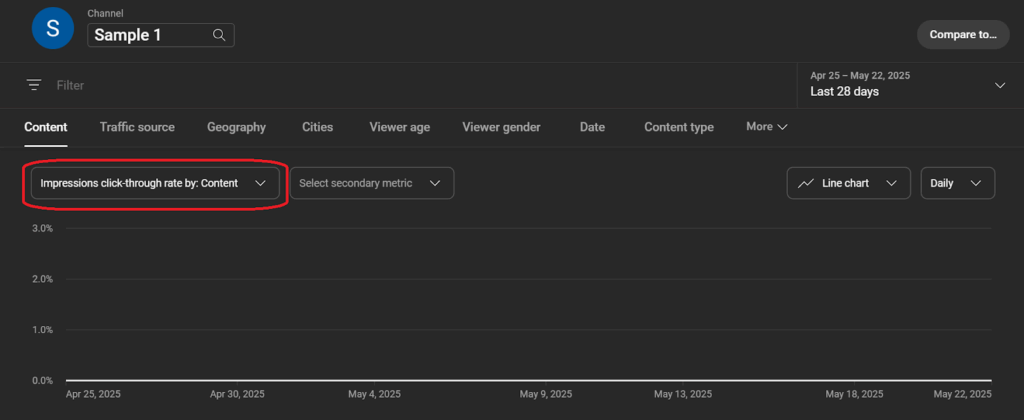
Step 2: Click on the Content tab from the list on the left-hand side of your screen to reveal all your videos.

Step 3: Select your chosen video and select Analytics.

Step 4: Switch to the reach tab from the options above.
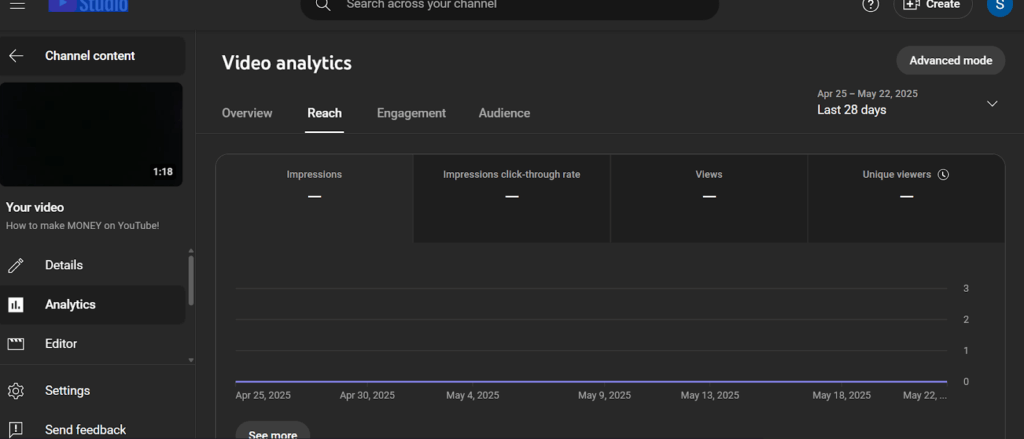
Step 5: You get access to a variety of information, including impressions, impressions CTR, views, and unique viewers.
How To Increase Your CTR?
If you’ve checked your CTR and noticed it is way below industry standards, you can do something about it. Here, we show you how you can improve your CTR and gain more views using different methods, from basic to advanced strategies.
1. Thumbnail Storytelling
Thumbnails must grab attention in seconds if you want to get that click. So instead of generic bright colors, create thumbnails that tell a story.
If you’re not a designer, you may be better off leaving it to the professionals, so you can enjoy quality thumbnails that ensure clicks. Test designs using TubeBuddy’s A/B testing feature to find what resonates. Ensure text is legible on mobile (360×640 resolution) since 63% of views are mobile.
2. Emotional Title Formulas
Titles should spark curiosity without misleading, that’s the only way to get the click and avoid a sharp drop-off immediately after. Use a “Promise + Twist” formula where you promise value with intrigue.
Contrary to popular opinion, avoid overused clickbait titles like “You Won’t Believe This!” Instead, incorporate niche-specific keywords to align with search intent. Always keep titles under 60 characters for full visibility in search results.
3. Niche Pain Point Targeting
To start out and get more clicks, choose topics addressing specific audience problems. So instead of a generic title like “Gardening Tips” with a low CTR, use one like “Why Your Tomatoes Won’t Ripen (And How to Fix It)” that targets a precise pain point.
With YouTube’s autocomplete feature you can identify niche queries. But make sure to analyze competitors’ top-performing videos to refine your topic selection.
4. Dynamic Posting Schedules
Do you know your schedule also affects your CTR? Post when your audience is active, using YouTube Analytics’ “When Your Viewers Are on YouTube” report as a guide.
Knowing the best time to post on YouTube will help you post when your viewers are active. Align content with cultural moments, like a Black Friday deal video in November, which can spike CTR. You can confirm peak times by scheduling tests over 30 days.
5. Shorts as CTR Experiments
YouTube Shorts often achieve 5-15% CTR due to their fast-paced nature. So what better way to test your thumbnails and titles than through Shorts?
Say a cooking channel testing a Short with a close-up dish thumbnail might find it outperforms text-heavy designs, informing main channel strategies. Ensure Shorts thumbnails use bold text overlays for the vertical feed.
6. Customizing Viewer Persona
By tailoring thumbnails and titles to your audience’s demographics, you can improve your click-through rate. Your audience will be able to easily relate to the thumbnails and will click on the video.
The idea is to create viewer personas using YouTube Analytics’ audience data to design targeted assets, potentially lifting CTR by up to 2-3%.
7. Iterative Testing
Testing has always been one of the best ways to get the right framework and the same can be said when trying to improve your CTR.
Develop a 30-day testing plan to optimize one element at a time. While tracking results in YouTube Analytics’ “Reach” tab. This systematic approach, unlike random tweaks, can increase CTR and provide you with confirmed data for future content strategies.
That is why you have to document findings in a spreadsheet to build a data-driven strategy, ensuring consistent improvement.
Common CTR Pitfall And How To Avoid Them

While trying to improve your CTR, you must also avoid some of the most common mistakes creators make that scatter their efforts and put their channels at risk. Here are some common pitfalls and how to steer clear of them.
- Misleading Clickbait: Exaggerated thumbnails or titles drive initial clicks but disappoint viewers, tanking retention and future CTR. Ensure thumbnails and titles match content, to maintain trust and a high retention.
- Ignoring Viewer Intent: Broad topics tend to miss specific audience needs, resulting in low CTR. Use YouTube’s search bar autocomplete to find intent-driven topics, targeting higher CTR.
- Poor Mobile Optimization: Cluttered thumbnails with tiny text are unreadable on mobile, where most views happen, keeping CTR low. You should design mobile-friendly thumbnails with bold, large fonts at 360×640 resolution to achieve the high CTR you crave.
- Neglecting Traffic Sources: Using the same thumbnails across search and homepage ignores different viewer behaviors and can lower your CTR. Instead, use YouTube Analytics’ “Traffic Source” report and create bold thumbnails for casual homepage viewers or keyword-rich titles for search to boost CTR.
Final Thoughts
Making good content and getting no views is demoralizing. With the major culprit being a low CTR which can be caused by a host of factors like weak titles, dull thumbnails, and lack of proper target audience understanding.
Some of the solutions include using powerful but related titles, thumbnail storytelling, and niche pain point targeting. The key is to test one thumbnail or title this week using YouTube Analytics’ “Reach” tab to track progress.
YouTube CTR is your gateway to growth. A good CTR ranges from 2-10% depending on niche, content type, and length. This CTR drives visibility, fueled by compelling thumbnails, targeted titles, and audience-aligned content.
However, just getting a good CTR is not enough if your content cannot keep them glued. Which is why the best also seek the help of Your Video Editor to deliver smart edits and even thumbnail designs. A two-in-one solution to not only get a high click-through rate but also a high engagement rate.