As YouTube continues to grow with even more content posted there daily, there are bound to be a few that break the content guidelines. These videos make using the platform difficult, from spam content to copyright infringement and harmful misinformation.
With YouTube evolving with automated content, there has been a rise in AI videos used wrongly to impersonate and harass people. When this happens, the community can help sanitize the platform and keep their feeds sane by reporting the content.
Reporting is the next logical step, but how do you report a channel the right way to ensure the right action is taken by the YouTube algorithm?
And this is what you’ll learn in this guide. The right way to report an erring channel or video on YouTube, no matter the device. YouTube’s latest algorithm updates have made spotting spam content even easier, so you can keep your timeline clean.
Bear in mind that reporting does not mean targeting rival channels or targeted harassment. But genuinely calling the attention of the algorithm to content that violates the guidelines. This is why you first need to know when you should be reporting a channel.
Want to take your videos to the next level?
When to Report a YouTube Channel?
While there is a clear means to report channels, abusing it and reporting channels for the wrong reasons is frowned upon by YouTube. This is why this guide showing you when to report a channel cannot be overemphasized.
The key is all about understanding YouTube community guidelines so you know when a channel crosses the line.
If a channel is simply producing content you’re not interested in, the best move is to unsubscribe or use the “Not Interested” option. Reporting should be reserved for situations where a creator is clearly breaking the rules.
You should consider reporting a channel if you notice:
- Harassment or bullying: Videos or comments targeting people with insults, threats, or intimidation.
- Harmful or dangerous content: Promotion of scams, self-harm, or unsafe activities.
- Hate speech: Content that attacks others based on race, religion, gender, or other protected attributes.
- Misinformation that causes harm: Such as health or election-related false claims.
- Repeated copyright or content theft: Channels built on stolen work without permission. This is common among reaction videos and others and similar niches.
- Spam and scams: Fake giveaways, phishing attempts, or repetitive low-quality uploads.
In 2025, YouTube has doubled down on keeping the platform safe, so these categories are taken seriously. By reporting responsibly, you help ensure that only content violating YouTube’s Community Guidelines gets flagged for review.
Things To Know Before Reporting

Now that you know when to report a channel, the next thing is gathering all the required information to ensure an efficient process. Here is a comprehensive detail of everything you should know before you report that erring channel:
- It’s completely anonymous: The person running the channel will never know you reported them. You don’t have to worry about awkward interactions or retaliation; your identity stays private.
- Reports go through a review process: YouTube doesn’t act on reports blindly. First, automated systems scan the report against their policies. Then, if needed, human moderators step in to review the case in more detail. This helps cut down on mistakes and ensures only genuine violations are acted on.
- False reports can backfire: Reporting should only be used when a channel is breaking the rules. If someone abuses the system by repeatedly flagging creators out of dislike or competition, YouTube can limit their account. In other words, misusing the tool hurts the reporter, not the creator.
- You won’t always get detailed updates: After submitting a report, YouTube might let you know that your report has been reviewed, but they usually won’t share the exact action taken. This is to protect user privacy, even when action is necessary.
- Timing varies: Some reports, like clear spam or impersonation, can be handled quickly. Others, especially those involving safety concerns or copyright issues, might take longer because they need careful review. Patience is part of the process.
Reporting isn’t meant to silence voices you simply don’t agree with. Instead, it’s a tool to keep YouTube safe, fair, and enjoyable for everyone. Using it responsibly makes your report more effective and ensures the system works as intended.
Step By Step Guide To Reporting a Channel
Reporting that channel that has broken one or more community guidelines takes a few steps, depending on the device and channel you choose. YouTube has simplified the process by providing clear steps to follow.
Here, we’ll make it easier by highlighting the steps based on your device.
Reporting a Channel on Desktop
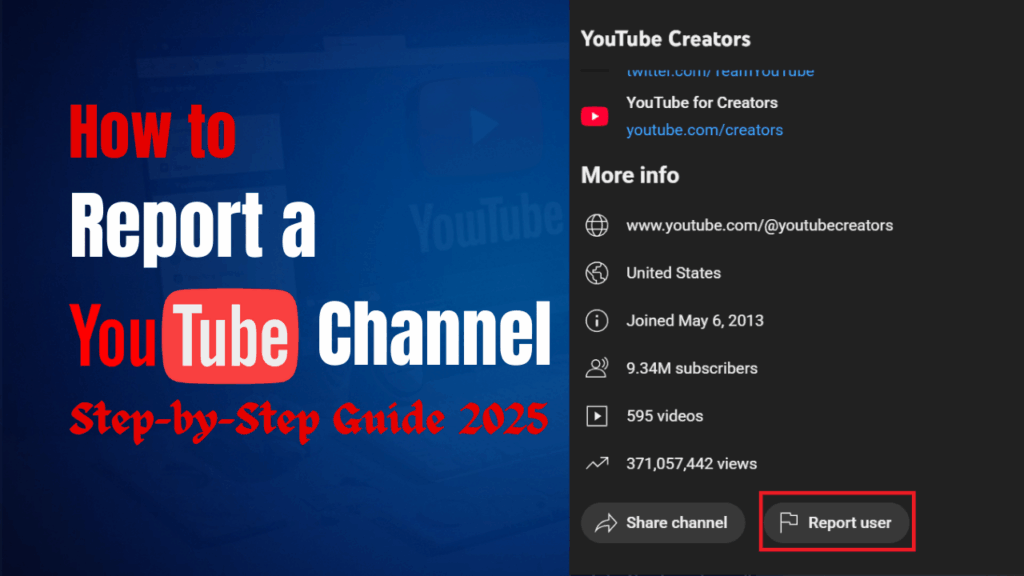
Step 1: Navigate to the channel’s page and click on More in the description.

Step 2: Scroll down and click on Report User.
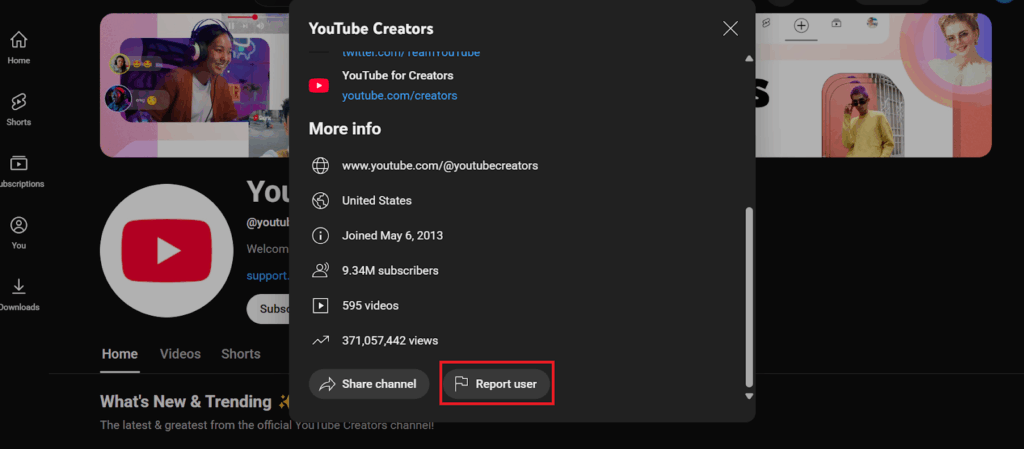
Step 3: Select the particular item to report.

Step 4: Select the infringement and click Next.

Step 5: Select the video(s) that broke the guidelines and click Next. Although this is optional.

Step 6: Provide additional information and click Submit.

Reporting a Channel on Mobile
Step 1: Navigate to the channel on your YouTube mobile app.

Step 2: Click on the three dots at the top right-hand corner of the screen.
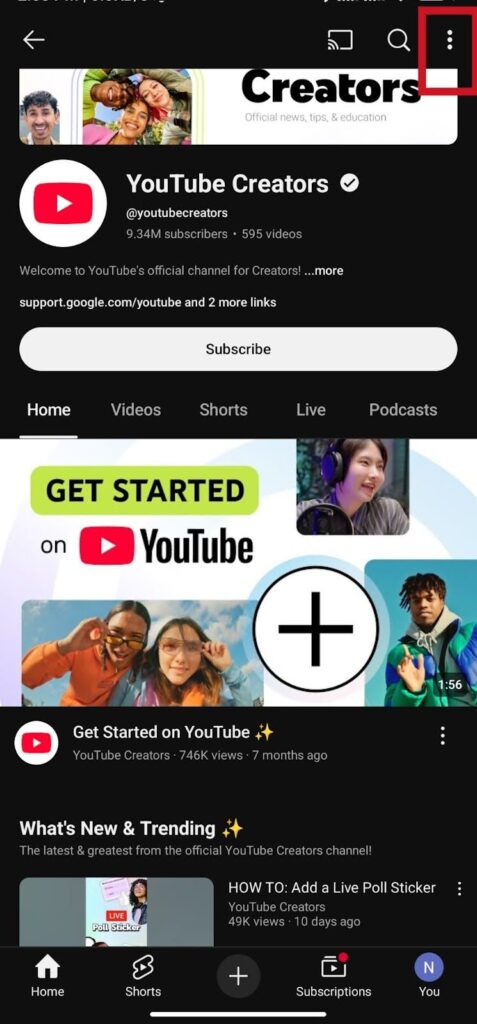
Step 3: Select Report User from the drop-down menu.

Step 4: Choose the infringement option from the list and click Next.
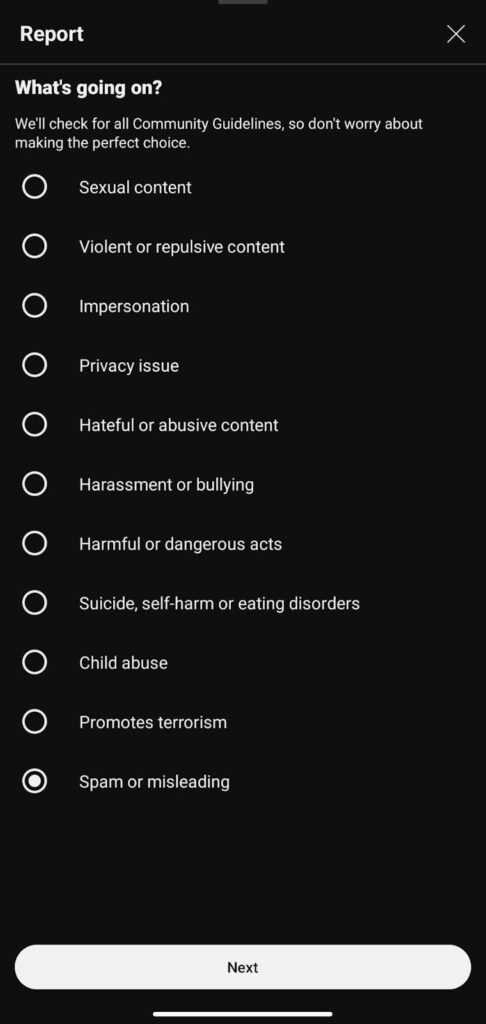
Step 5: Choose the type of content violating the rules and click Next.
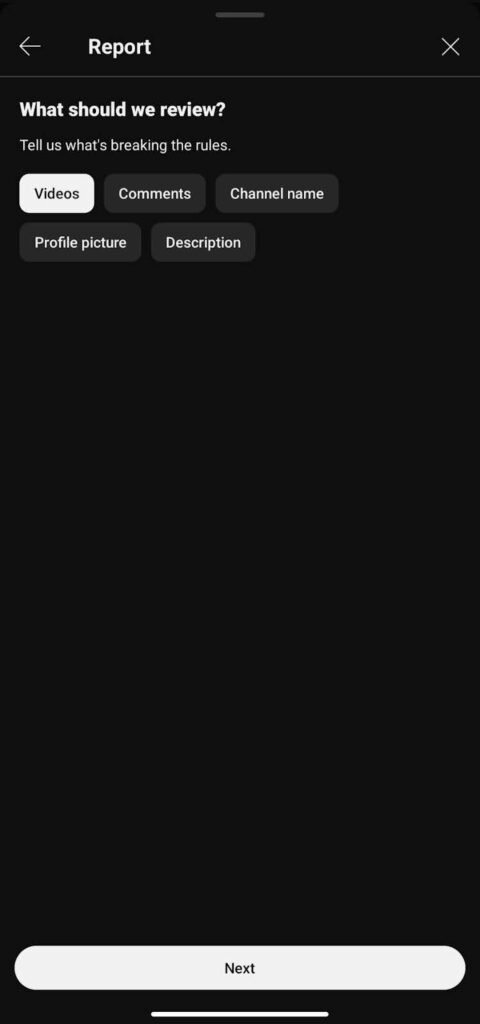
Step 6: Provide additional Information and click Report to complete the process.

What Happens After Reporting?
After submitting your report about a channel, what happens next? This section will highlight the process the system takes and possible decisions. The system here typically involves checks from the algorithm and human moderators to ensure quality and avoid mistakes.
The system takes the first look
Once your report is submitted, YouTube’s automated tools check the content against their Community Guidelines. If it is something straightforward like spam or clear scams, the system can sometimes catch and flag it right away.
Human moderators review complex cases
When the issue is more serious, such as harassment, hate speech, or harmful misinformation, YouTube’s team of human reviewers takes over. They look beyond a single video and may check for patterns of behavior across the entire channel.
Different outcomes are possible
Not every report leads to the same result. Depending on what the reviewers find, YouTube might issue a warning, add a strike, suspend features on the account, or permanently remove the channel. In some cases, if the content does not break the rules, no action will be taken.
Updates are limited
After your report is reviewed, YouTube usually lets you know it has been checked. However, for privacy reasons, they do not give detailed updates on what actions were taken against the channel.
Some cases take longer
Issues that involve safety concerns or legal disputes, such as copyright, often require more checks. These reports are escalated and may take longer for YouTube to resolve.
Alternatives to Reporting (When it is Not That Serious)

Sometimes the issues are not necessarily against YouTube guidelines, but you may still find them annoying. Reporting these cases may not lead to any punishment, but just increase the time of reviewing cases. Here are more appropriate solutions to annoying but not rule-breaking cases:
1. Block the Channel
If a channel keeps showing up in your comments or replies and you are tired of it, blocking is a simple fix. Once you block a channel, they can no longer comment on your videos, and you won’t see their interactions with you again. It is a clean way to cut off unwanted noise without going through the reporting system.
2. Use “Not Interested” or “Don’t Recommend”
YouTube’s algorithm pays close attention to your feedback. If you click on the three dots next to a video and choose “Not Interested” or “Don’t Recommend Channel,” YouTube learns to stop suggesting that type of content. Over time, this makes your feed more tailored to what you actually want to watch.
3. Manage Your Subscriptions
Sometimes the issue is as simple as being subscribed to a channel you no longer enjoy. Unsubscribing is a quick fix that clears up your subscription feed and reduces clutter. It is better than reporting a channel just because your interests have changed.
4. Adjust Notifications
If you like a creator’s work but find their uploads overwhelming, tweaking your notification settings can help. You can choose to get fewer alerts or turn them off entirely. That way, you stay in control of how often their content shows up in your space.
5. Dislike The Videos
By tapping on the dislike button below the video, you tell the algorithm you find the video annoying. This way, you get fewer recommendations. Even though you cannot see the dislike count, except you use specialized methods, the message can still be passed effectively.
Tips For Effective Reporting

There’s a right and wrong way to report a YouTube channel. One ensures more efficiency and saves the moderating team a lot of time, and the other is just cumbersome and stressful to all parties, with limited results. Here are a few tips to follow for more effective reporting:
1. Be Clear About the Reason
When you report, YouTube asks you to pick a reason. Take a moment to choose the one that fits best. If a channel is spreading scams, do not label it as harassment. Picking the right category makes it easier for moderators to review and act quickly.
2. Add Context When Possible
Some reports allow you to include extra details. Use that space wisely. A short explanation, like “This channel repeatedly copies videos from other creators” or “This video promotes a fake giveaway,” can help reviewers understand the bigger picture.
3. Don’t Report Just Because You Disagree
Not liking someone’s opinion or content style is not a valid reason to report. Reports based on personal dislike usually go nowhere and can even reduce the credibility of future reports from your account. Save it for actual violations of the rules.
4. Stay Updated on Policy Changes
YouTube updates its Community Guidelines regularly, and what counted as a violation two years ago might be handled differently today. In 2025, for example, policies around misinformation and AI-generated content have become stricter. Knowing the rules helps you report more effectively.
5. Remember That One Report Still Counts
Even though you might feel like a single report won’t matter, it does. Every report is logged, and if others flag the same issue, YouTube takes it more seriously. Your action adds to a bigger signal that can push a case forward.
Final Thoughts
Seeing videos that clearly violate YouTube’s community guidelines can be annoying, and reporting these channels is one of the best ways to keep your feed sane, but also help the general community.
YouTube has made reporting quite easy, whether you’re watching from a desktop or a mobile phone app.
However, reporting is not the only solution to annoying content that is not in violation of any rule. In this case, you can simply unfollow or even block the channel.
As a creator, getting your channel flagged for infringing on the guidelines can seriously affect the way the YouTube algorithm sees and prompts your videos. You may even lose your channel in severe cases.
This is why paying attention to the type of content you post is vital. From ensuring you avoid copyright infringements to employing fair policy usage. The key is following YouTube community guidelines and making videos that captivate your audience.
If you’re not an experienced video editing service, it may be best to leave all the editing to Your Video Editor, as they are a team of professionals who understand the algorithm and how to make videos that abide by all the guidelines while also remaining captivating.