Most jump cut advice is still stuck in one of two bad extremes. Either it treats jump cuts like a mistake you should hide, or it celebrates speed for its own sake. Both approaches miss the point.
A jump cut works when it gives the viewer a useful jolt. It can compress time, sharpen a punchline, intensify a thought, or strip dead air out of a monologue without losing clarity. It fails when the cut exists only because the editor got impatient. The difference isn't whether the edit is visible. It's whether the edit feels motivated.
That matters more now than ever. The jump cut started as an accident that Georges Méliès turned into a filmmaking tool in the late 1890s, then French New Wave directors like Jean-Luc Godard pushed it into modern film language decades later, especially in Breathless as outlined by Adobe's history of the jump cut. Today, creators use it for almost the opposite reason. Not to break cinema politely, but to hold attention in direct-to-camera, short-form, and platform-native video.
Below are 7 jump cut example styles worth studying. Not just as references, but as decisions. Each one solves a different editing problem, and each one comes with trade-offs you should understand before dropping the same trick into every video.
Table of Contents
- 1. Edgar Wright's "Shaun of the Dead" – Rapid Montage Sequence
- 2. Casey Neistat's Vlog Jump Cuts – Signature Style
- 3. Quentin Tarantino's "Pulp Fiction" – Dialogue Jump Cuts
- 4. TikTok Trend – Rapid-Fire Scene Cuts with Trending Audio
- 5. Documentary Jump Cuts – "Making a Murderer" Interview Technique
- 6. YouTube Essay – Video Editing by Creators like "Wired" Celebrity Interviews
- 7. Instagram Reels "Transformation" Jump Cuts – Quick Reveal Format
- 7-Style Jump Cut Comparison
- Mastering the Jump Cut: Your Next Editing Superpower
1. Edgar Wright's "Shaun of the Dead" – Rapid Montage Sequence
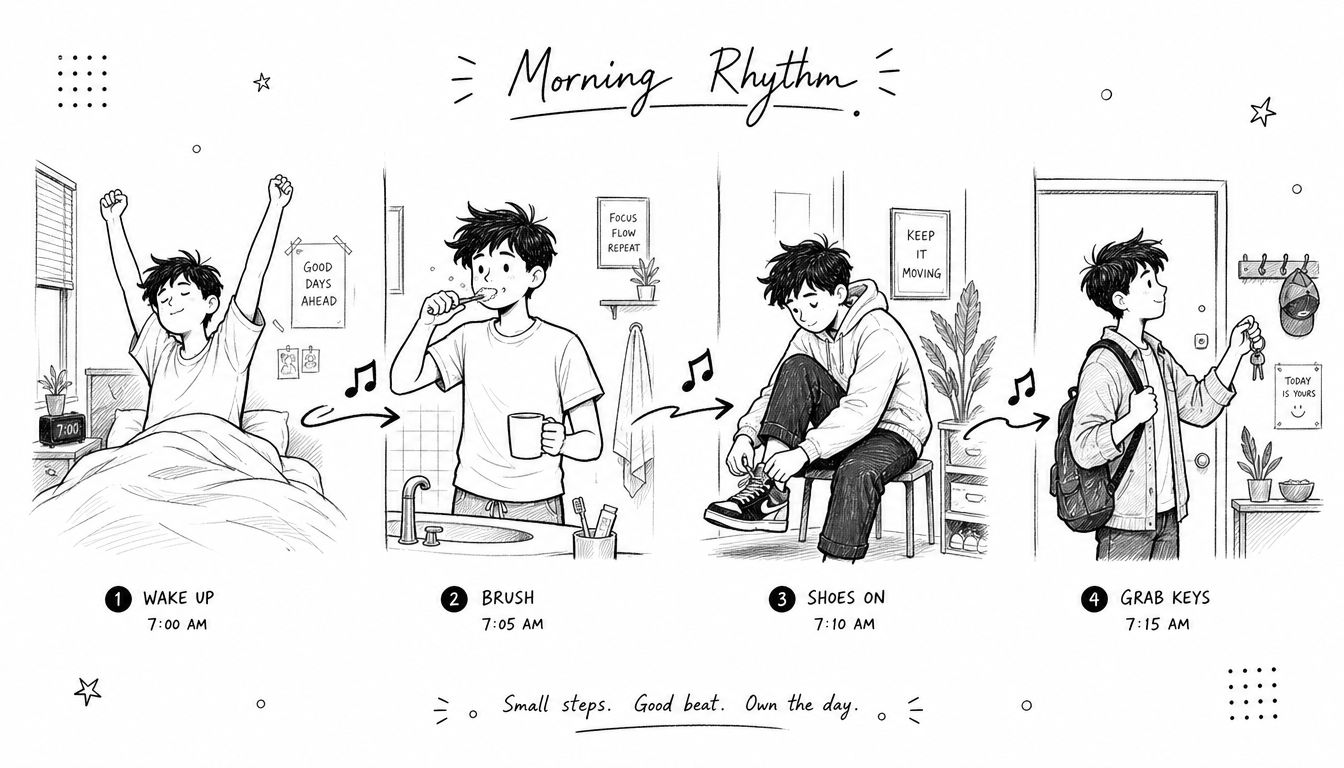
A great jump cut example doesn't always come from a talking head. Edgar Wright's fast routine montages in Shaun of the Dead show how a series of hard visual jumps can make ordinary behavior feel funny, efficient, and memorable.
The basic mechanism is simple. Keep the framing controlled, cut out the connective tissue, and let repeated actions smash into each other. Pour coffee. Open fridge. Grab keys. Exit door. The viewer fills in the gaps instantly, which is why the sequence feels faster than real time and sharper than a standard montage.
Why this jump cut example works
This style succeeds because the camera usually stays disciplined while the subject state changes aggressively. You're not asking the viewer to relearn the space on every cut. You're asking them to enjoy the contrast between near-identical framings and different moments.
That's also why it translates so well to creator content. Morning routine videos, desk setup sequences, cooking prep, gym bag packing, and "get ready with me" clips all benefit from compression with attitude.
Practical rule: If the action is boring in full length but satisfying in fragments, this is the right jump cut style.
How to apply it without copying the movie
You don't need elaborate production design to use this. You need repeatable framing and clear action beats. In practice, I get the best results when every shot has one dominant action and one dominant sound, like a zipper, mug tap, drawer close, or shoe drop.
A few editor notes matter more than people think:
- Lock the composition: Put the camera on sticks or keep handheld movement minimal so the jump reads as a designed rhythm, not a mistake.
- Cut on tactile moments: Hands touching objects, feet landing, and doors shutting give the eye a reason to accept the leap.
- Use sound as glue: A music bed or tight effects pass makes abrupt visual changes feel intentional.
- Go bigger for comedy: The more dramatic the change in body position or object state, the stronger the laugh.
What doesn't work is using this style on actions that don't change clearly enough between cuts. If every frame looks almost the same, the sequence feels mushy instead of punchy.
2. Casey Neistat's Vlog Jump Cuts – Signature Style
Casey Neistat didn't invent the vlog jump cut, but he helped define what audiences now accept as normal creator pacing. The style is less about flashy editing than about refusing to waste a second.
That shift mirrors a broader change in online video. Vlogging culture turned the jump cut from a continuity problem into a standard direct-address technique for removing dead air and compressing time while staying in the same visual setup, as discussed in research on the jump cut's evolution in vlogging culture by Murdoch University.
Why vlog jump cuts became the default
In a vlog, the viewer already knows the footage is edited. There's no illusion to protect in the same way there is in a narrative scene. That gives you permission to cut out stumbles, walking gaps, setup delays, and every sentence that starts strong but lands weak.
This is why so many YouTubers build their workflow around jump cuts in the first place. If you're comparing tools for that workflow, a breakdown of what video editing software YouTubers use is useful because the software shapes how fast you can trim, ripple delete, sync B-roll, and keep a posting schedule alive.
How to make them feel intentional
The big mistake is making every jump cut the same length. That creates a robotic edit. Good vlog pacing stretches and snaps. A thought lands, then a tighter cut clears the next beat, then a wider breath gives the audience room before the next sequence.
A few situations where this style works especially well:
- Daily vlogs: Cut travel gaps, repeated setup lines, and filler reactions.
- Business behind-the-scenes: Keep the narrative moving through meetings, transit, and setup changes.
- Podcast clips: Strip hesitation and redundancy without changing the speaker's message.
- Tutorial intros: Get to the promise fast, then slow down when the instruction starts.
The cleanest vlog jump cuts are planned during filming. Leave micro-pauses between lines, keep eyeline consistent, and record room tone so the audio doesn't tear.
What doesn't work is over-cleaning speech until the person sounds unnatural. If every breath disappears, the speaker starts to feel synthetic, even when the information is good.
3. Quentin Tarantino's "Pulp Fiction" – Dialogue Jump Cuts
Some jump cuts don't compress time much at all. They change pressure. That's where a Pulp Fiction-style reference becomes useful.
In dialogue-heavy scenes, abrupt cuts inside the same conversational space can sharpen attitude, isolate reactions, or make an exchange feel authored rather than invisible. The point isn't smooth continuity. The point is emphasis.
Use the cut to change pressure
This style works best when a line deserves a shove. A reaction lands harder when the edit arrives a fraction sooner than expected. A pause gets funnier when you don't smooth it over. A confrontation feels more dangerous when the visual rhythm stops behaving politely.
For creators, this translates well to interviews, commentary videos, and two-person setups where the emotion inside the exchange matters more than visual continuity. If you're building that kind of content regularly, a practical guide on how to edit videos for YouTube helps because the choices around reactions, dead air, and pacing usually matter more than the camera package.
When this style backfires
This is one of the easiest jump cut styles to misuse. If you cut aggressively without a dramatic reason, the scene just feels broken. Viewers can tolerate a visible edit. They won't tolerate confusion.
I use a simple filter when shaping dialogue with this approach:
- Cut on meaning: Land the edit on a reveal, a reaction, a contradiction, or a punchline.
- Preserve geography: Even stylized scenes need a readable sense of where people are.
- Let some pauses live: If every beat is punctuated, none of them feel special.
- Use audio overlap carefully: A light J-cut or L-cut can soften the visual shock without losing tension.
If you can't explain why the cut happens on that exact word or look, don't make it.
The strongest version of this jump cut example feels deliberate, almost literary. The weak version looks like you were trying to hide a bad take.
4. TikTok Trend – Rapid-Fire Scene Cuts with Trending Audio
TikTok made a lot of creators equate speed with skill. Editors know better. Fast cutting only works when the viewer can still read the joke, the reveal, or the product.
On this platform, audio usually sets the cut pattern before the visuals do. That shift matters. Instead of hiding dead space, you are building around beat hits, lyric turns, sound effects, and micro-pauses that give the next cut more punch.
Research supports that trade-off. A controlled 2×3 experiment with 242 participants reported that moderate, unobtrusive jump cuts increased liking more effectively than heavier pacing, while very frequent transitions reduced sustained engagement overall, as described in the Marketing Trends Congress paper by Dost and Huang.
Use this style when rhythm is part of the message
This jump cut approach works best when the format itself promises momentum. Trend edits, outfit switches, reaction chains, before-and-after clips, beauty routines, quick recipes, and product demos all benefit because the viewer expects compression and motion.
The mistake is treating every short-form video like a sprint. If the audience needs to compare details, read on-screen text, or follow a setup before the payoff, slower cuts usually perform better. I cut these sequences by asking a simple question: is the audio driving attention, or is the information?
A clip helps make the style concrete:
How to make rapid-fire cuts feel designed
Strong TikTok edits are usually won in prep, not saved in post. Shoot with cut points in mind. If the hand enters frame from the left in clip one, repeat that direction in clip two. If the body is centered in one shot and hard right in the next, make the shift feel intentional or it will read as messy.
My workflow stays practical:
- Pick the audio before you shoot: The soundtrack tells you where acceleration should happen.
- Mark timing anchors: Beat drops, lyric accents, breaths, and silence all create usable cut points.
- Change clip length on purpose: Three equal cuts in a row can work, but a whole sequence of them starts to feel automated.
- Keep one continuity thread: Match framing, motion direction, wardrobe, props, or lighting so the edit feels controlled.
- Leave one readable beat: A single slightly longer shot gives the viewer orientation and makes the faster cuts hit harder.
One more trade-off matters here. Trend-driven edits age fast. If the audio is carrying all the value, the video may die with the trend. If the structure still works with muted playback, you usually have a stronger piece.
5. Documentary Jump Cuts – "Making a Murderer" Interview Technique
Documentary jump cuts operate under a different rule set. You can compress speech, but you can't distort intent.
That makes this one of the most useful styles for creators and one of the most ethically sensitive. In interview-driven edits, the jump cut isn't there to show off. It's there to remove detours while preserving the speaker's meaning and credibility.
The cut has to protect credibility
Single-camera interviews almost always need trimming. People restart thoughts, search for words, and repeat themselves. A responsible editor cuts the clutter without changing the logic of the answer.
B-roll serves a purpose beyond mere decoration. It can hide a visual jump, add context, and give the viewer a visual reset while the speaker's audio continues. But the temptation is to use B-roll as camouflage for manipulative restructuring. That's where trust starts to break.
Documentary cuts should clarify what someone meant, not manufacture what they never said.
A good example is any long-form testimonial or founder interview where the raw answer rambles but the core statement is solid. Trim the false starts. Keep the qualifying language if it changes the meaning. Don't cut a nuanced statement into a slogan.
Best use cases for creators
This jump cut example works well in:
- Expert interviews: Tighten delivery while preserving authority.
- Podcasts on video: Remove circular phrasing and side tracks.
- Course content: Keep lessons concise without making the instructor feel rushed.
- Case-study videos: Focus on the client's actual point, not every warm-up phrase.
What usually fails is cutting too tightly around mouth sounds and breaths, then layering unrelated visuals to hide the damage. The result may look smooth, but it often sounds strained and feels less honest than a visible jump cut would have.
6. YouTube Essay – Video Editing by Creators like "Wired" Celebrity Interviews
Premium interview edits do not hide jump cuts. They control what the viewer notices.
That distinction matters in YouTube essays, celebrity Q&As, and expert formats built around a single face on camera. The raw footage usually has restarts, trimmed tangents, and tightened phrasing. The professional result comes from shaping those cuts around meaning, not just speed.
The real job of the cut
Editors in this format are usually solving two problems at once. They need to shorten the answer, and they need to preserve the speaker's authority. A jump cut works if it removes drag without making the person look edited into a different personality.
That is why strong creators rarely cut at random pauses. They cut on structure. End of a point. Start of an example. Shift in tone. The viewer feels momentum because each visual change matches a change in thought.
Graphics, captions, inserts, and punch-ins help, but they are support tools. They should reinforce the line that matters, not distract from a weak edit.
When this style works best
This approach is a strong fit for videos where the speaker is the product:
- Celebrity interviews: Keep the personality intact while tightening long answers.
- Expert explainers: Remove drift so the argument stays sharp.
- Founder or executive Q&As: Preserve confidence and clarity without sounding over-rehearsed.
- YouTube essays with a host on camera: Maintain pace while giving key points visual emphasis.
The trade-off is easy to miss. The more aggressively you compress speech, the more you risk making a smart speaker sound clipped, impatient, or overly managed.
Execution notes that make it feel expensive
A polished edit usually comes from consistency and restraint.
- Punch in only when the point gets stronger: A tighter crop should mark emphasis, not cover every cut.
- Use on-screen text selectively: Highlight the phrase worth remembering. Do not caption every sentence like a panic response.
- Match the camera treatment across cuts: Exposure shifts, white balance changes, and mismatched sharpness make even good trims feel cheap.
- Create a visual system before you start editing: Title cards, subtitles, quote frames, and lower-thirds should follow rules, not mood.
- Let a clean jump cut stay visible if the alternative feels forced: Viewers forgive an honest cut faster than a fake-looking cover-up.
One practical test helps. Mute the timeline and watch the cuts. If the framing changes feel rhythmic and intentional, the visual side is working. Then listen without looking. If the speech still sounds like one coherent thought, the edit is doing its job.
7. Instagram Reels "Transformation" Jump Cuts – Quick Reveal Format
Fast cuts do not make a transformation satisfying. Clear contrast does.
That distinction matters on Reels because viewers decide in a second whether the payoff is worth waiting for. The editor's job is to make the "before" readable, hold attention through the setup, and deliver an "after" that feels clean and intentional. The jump cut is only one part of that sequence.
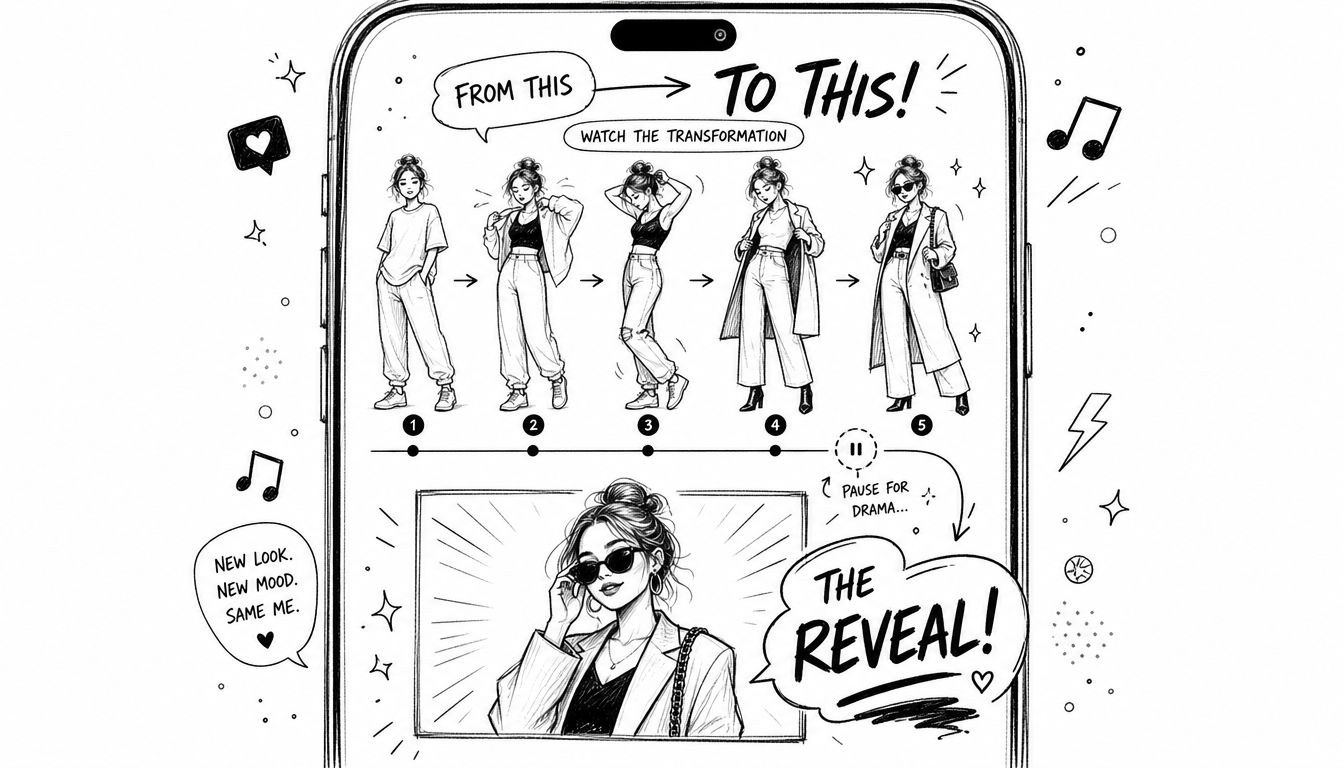
The reveal carries the format
This style works for outfit swaps, makeup reveals, room resets, plated recipes, workspace overhauls, and product styling. In each case, the cut signals elapsed time. The payoff comes from a visible change the audience can register instantly on a phone screen.
Short-form vertical video rewards that kind of clarity. If the viewer has to study the frame to figure out what changed, the reveal was weak, even if the cut itself was sharp.
When I edit transformation videos, I set continuity anchors before I worry about speed. Hand position, subject placement, camera height, and lighting consistency usually matter more than flashy transition presets. Good alignment makes the change feel bigger.
A practical shooting pattern usually looks like this:
- Open on a clean before: Show the starting state without clutter or ambiguity.
- Keep framing locked between stages: Matching composition makes the jump cut feel precise instead of accidental.
- Build a beat before the switch: A brief pause, gesture, or look to camera often creates more anticipation than another extra cut.
- Hold on the after: Give the audience enough time to process the result and, if needed, read the detail that sells it.
One trade-off shows up constantly. Creators often add process clips because they worked hard on the transformation and want to show every step. That can help if the process itself is interesting, such as a makeup technique or furniture build. It weakens the format if those middle shots blur the core promise. A transformation reel needs one question answered fast: what changed?
Transformation edits feel polished when the viewer understands the change before they admire the cut.
If the footage does not support a strong before-and-after reveal, a jump cut may be the wrong choice. A match cut, whip pan, or simple dissolve can communicate progress with less strain. Professional editing is not about forcing a trendy format onto weak material. It is about choosing the cut that makes the result obvious.
7-Style Jump Cut Comparison
| Technique | Implementation Complexity 🔄 | Resource Requirements ⚡ | Expected Outcomes ⭐📊 | Ideal Use Cases | Key Advantage 💡 |
|---|---|---|---|---|---|
| Edgar Wright, "Shaun of the Dead" Rapid Montage | Medium–High: precise framing & beat-based cuts | Moderate: consistent camera setup, music/sfx, editing time | High ⭐: energetic rhythm, efficient time compression | Routine montages, comedic prep sequences, short-form clips | Distinctive visual momentum; maintain consistent framing and sync to beats |
| Casey Neistat, Vlog Jump Cuts | Low–Medium: simple cuts, needs audio continuity | Low: single-camera, lots of raw footage, basic editing | High ⭐: improved retention, shorter runtimes | Daily vlogs, travel recaps, behind‑the‑scenes | Fast to implement for storytellers; plan continuous audio/voiceover |
| Quentin Tarantino, Dialogue Jump Cuts | High: requires coverage, clear intentionality | High: multiple takes, skilled editor, precise coverage | High ⭐: memorable stylistic emphasis, dramatic/comedic punch | Narrative dialogue, character-focused scenes, stylistic interviews | Author-driven style; cut on meaningful emotional or reaction beats |
| TikTok Trend, Rapid-Fire Scene Cuts | Medium: beat-synced timing, rapid pacing | Moderate–High: abundant footage, trending audio, quick edits | Very High ⭐📊: strong algorithmic reach, high engagement | Short-form trends, costume/location transitions, comedy skits | Maximizes discoverability; pre-select trending audio and time cuts to drops |
| Documentary, "Making a Murderer" Interview Cuts | Medium–High: ethical editing, careful pacing | High: long interview footage, B-roll library, editorial oversight | High ⭐: preserves authenticity while tightening narrative | Investigative docs, expert interviews, testimonial-driven pieces | Maintains conversational voice; cut at natural pauses and use B-roll to cover edits |
| YouTube Essay, Wired-style Interview Editing | Medium: structured QA cutting, beautification | Moderate: graphics, color correction, single/multi-cam footage | High ⭐: polished, scalable interview content | Celebrity/expert interviews, essay videos, podcast-to-video | Professional look on modest budgets; use consistent branding graphics and subtle B-roll |
| Instagram Reels, Transformation Quick Reveal | Low–Medium: template-based but ultra-fast cuts | High: many takes, consistent lighting, trend-aware audio | Very High ⭐📊: viral potential, high completion rates | Fashion/makeup reveals, before‑after transformations, product showcases | Highly shareable format; front-load hook, save a held final reveal for impact |
Mastering the Jump Cut: Your Next Editing Superpower
The jump cut isn't one technique with one purpose. It's a family of editing decisions. Méliès used it to create cinematic magic by accident and then on purpose. Godard used it to disrupt continuity and push editing into the foreground. Online creators use it to remove friction, tighten performance, and build pace that matches how people watch now.
That range is exactly why generic advice fails. "Use jump cuts to keep attention" is too blunt to help. A rapid montage cut, a vlog clean-up cut, a dialogue pressure cut, a TikTok rhythm cut, a documentary compression cut, a polished interview cut, and a transformation reveal cut are not interchangeable. They solve different problems, ask for different footage, and create different viewer expectations.
The practical question isn't whether jump cuts are good or bad. It's whether the cut matches the job. If you're compressing routine actions, lean into contrast and sound. If you're cutting a vlog, preserve voice and natural cadence. If you're shaping interviews, protect meaning before polish. If you're editing short-form trends, build rhythm without sacrificing comprehension. And if you're making reveal content, remember that the before-and-after logic matters more than raw speed.
Editors also need to remember the trade-off most creators learn only after over-editing a few projects. Visibility isn't the enemy. Pointlessness is. A visible jump cut with a reason feels confident. An invisible cut with no purpose still feels dead.
Applying these methods well takes repetition. You start noticing where a line should breathe, where a cut should hit early, and where a flashy sequence should be replaced by a simple hold. That's the difference between copying a jump cut example and understanding the language.
If you'd rather stay focused on scripting, filming, and publishing while experienced editors handle pacing, sound, graphics, and platform-specific polish, working with a team like Your Video Editor can make the process far more consistent.
If you want professional jump cuts that feel intentional instead of rushed, Your Video Editor can help. The team handles long-form YouTube edits, short-form vertical videos, graphics, audio cleanup, and review workflows built for creators who need reliable turnaround and clean execution without managing every frame themselves.