You're staring at a blank calendar. The next post is due, the last one underperformed, and every idea in your notes app suddenly looks weak. That feeling isn't a lack of creativity. Most of the time, it's a lack of structure.
The hardest part of content creation isn't coming up with one decent topic. It's building a repeatable system that keeps producing strong ideas when you're tired, busy, or buried in edits. That matters even more now because the creator economy is large, crowded, and still expanding. The digital content creation market was valued at USD 27.1 billion in 2023, is projected to reach USD 30.6 billion in 2024 and USD 34.5 billion in 2025, with an expected 12.8% CAGR over the next decade, according to digital content creation market statistics from Market.us. The same source notes that 72% of creators earned less than $500, while only 2% earned over $50,000. That gap tells you something important. Winning creators usually don't rely on random inspiration. They build formats they can repeat.
That's the shift this guide is built around. Not a giant brainstorm dump. Not a list of trendy one-offs. You'll find 10 content creator ideas that work better as series than standalone posts, because series reduce decision fatigue and make production easier to manage.
A second reality sits underneath all of this. Most advice on content creator ideas focuses on generating more topics, but gives far less attention to which angles are commercially viable for sponsors, affiliates, and product sales, as discussed in this creator monetization perspective on YouTube. Strong ideas don't just attract attention. They fit a monetization path and a production process you can sustain.
Table of Contents
- 1. YouTube Channel Growth & Optimization Guides
- 2. Short-Form Video Content Strategy
- 3. Video Editing Process Walkthroughs & Behind-the-Scenes
- 4. Creator Case Studies & Success Stories
- 5. Thumbnail Design Principles & Psychology
- 6. Audio Design, Mixing & Sound Effects Strategy
- 7. Multi-Camera Editing & Live Event Video Production
- 8. Motion Graphics, Animations & Visual Effects Tutorials
- 9. Color Grading, Color Correction & Cinematic Look Tutorials
- 10. Creator Workflow Optimization & Time Management Strategies
- 10-Point Comparison of Content Creator Ideas
- Turn Your Ideas Into High-Impact Assets
1. YouTube Channel Growth & Optimization Guides
Creators never stop asking the same questions. Why didn't this title land? Why are people clicking but not staying? Why does one video feel polished and the next feel rushed? That's why growth and optimization guides remain one of the strongest content creator ideas for educational channels.
This format works because it targets active pain. Someone searching for thumbnail advice, audience retention help, or channel structure tips is already trying to improve a result. They're not browsing for entertainment. They want a fix.
Teach what creators already want to fix
Good optimization content is specific. Break down title patterns, thumbnail hierarchy, first-30-second scripting, pacing, or retention dips. Think Media, VideoCreators, and Derral Eves all built authority by taking a problem that feels fuzzy and turning it into a visible process.
Professional editing fits naturally here because upload consistency and viewer experience are linked. If the creator records well but edits slowly, the strategy breaks down in execution. A polished workflow solves more than aesthetics. It helps creators keep publishing.
Practical rule: Don't teach “YouTube growth” as a giant abstract topic. Teach one lever at a time and tie each lever to a visible editing or packaging decision.
What works in practice
A useful series here might look like this:
- Retention teardown: Review one intro and explain where pacing slows, where visual reinforcement is missing, and where a cut should've landed.
- Packaging audit: Compare weak versus strong title and thumbnail combinations using the same video concept.
- Monetization alignment: Show how channel structure affects sponsorship readiness, affiliate integration, or product positioning.
One smart angle is showing how editing supports growth without pretending editing alone creates it. Fast, clean cuts don't save a weak concept, but they do reduce drag. Better B-roll placement, cleaner audio, and stronger opening rhythm make a strategy easier to feel on screen.
If you want a practical growth-focused example, this first 1,000 subscribers guide from Your Video Editor is the type of asset that can feed multiple follow-up videos, shorts, and audits instead of one isolated post.
2. Short-Form Video Content Strategy
Short-form is no longer a side project. It's a core publishing lane. Businesses have already moved in that direction at scale. According to video and content marketing statistics from Salesgenie, 89% of businesses use video as a marketing tool, 61% of marketers expect investment in video to increase in 2025, and 83% of consumers want to see more video content from brands in 2025. The same source says the broader content marketing industry is projected to grow from about $72 billion in 2023 to over $107 billion by 2026.
That matters because short-form strategy content solves an immediate need for creators and brands alike. They need more video, across more platforms, without rebuilding the wheel every time.
Build a repeatable short-form engine
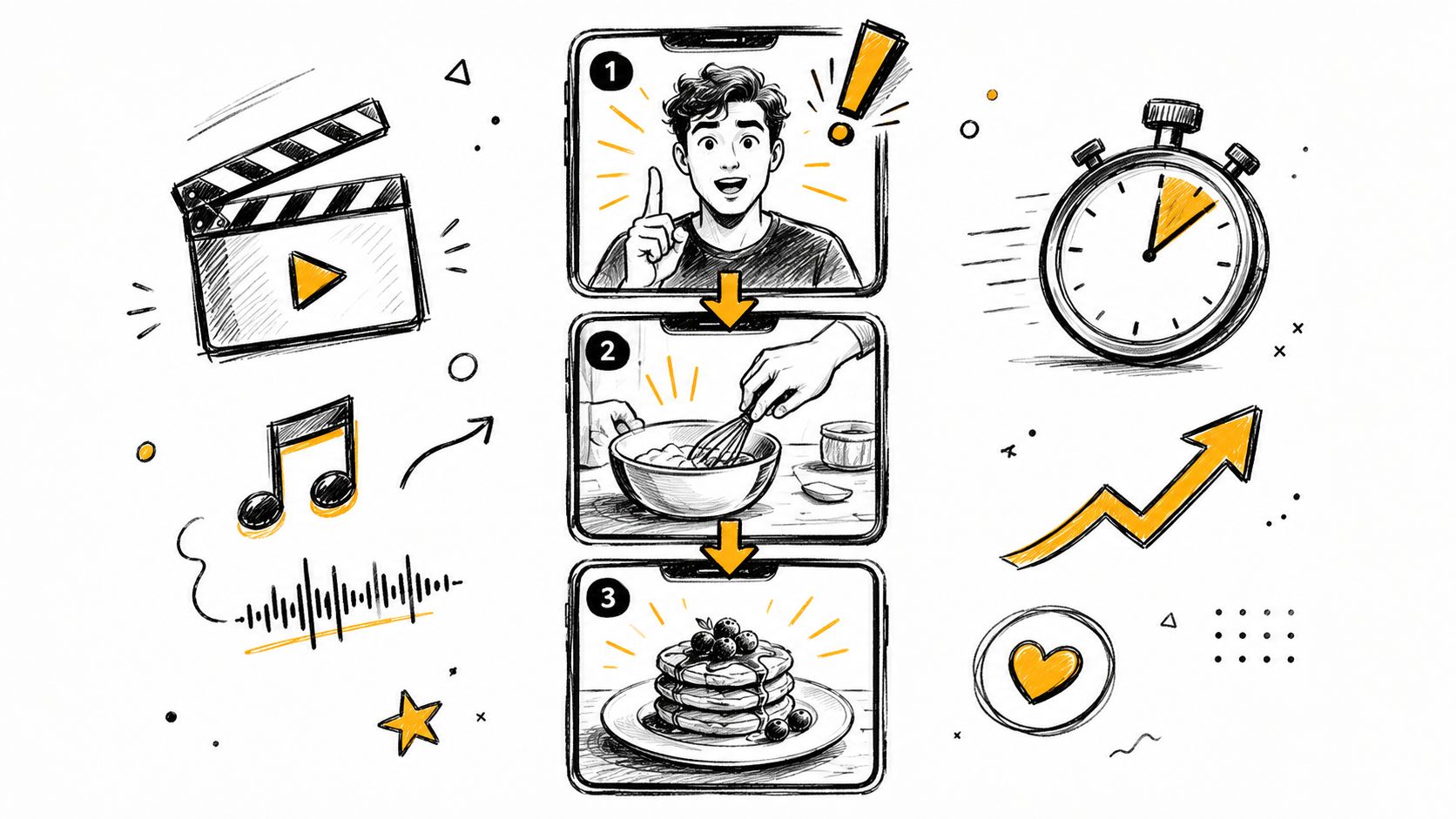
The mistake most creators make is treating every short like a fresh act of genius. That burns people out fast. Better short-form series come from reusable structures: hook plus payoff, myth plus correction, before plus after, reaction plus takeaway, or clip plus commentary.
MrBeast-style hook discipline, Khaby Lame's visual economy, and fast-cut commentary formats all prove the same point. Short-form usually wins through clarity and speed, not complexity. The more reusable the structure, the more sustainable the series.
Where editing changes the outcome
Short-form lives or dies on pacing. Dead space, slow captions, weak transitions, or a soft opening can kill a strong idea. That's why editing support matters more here than many creators expect. It's not just trimming. It's timing, text emphasis, visual rhythm, and platform-native polish.
A practical series could include:
- Edited versus unedited comparisons: Use the same raw clip and show what changed.
- Hook surgery: Rewrite and recut the first seconds of a Reel or Short.
- Platform adaptation: Take one topic and cut it differently for TikTok, Reels, and Shorts.
For creators building around YouTube specifically, this breakdown of the YouTube Shorts algorithm from Your Video Editor gives you a useful anchor for explaining why pacing, retention, and packaging matter inside a short-form system.
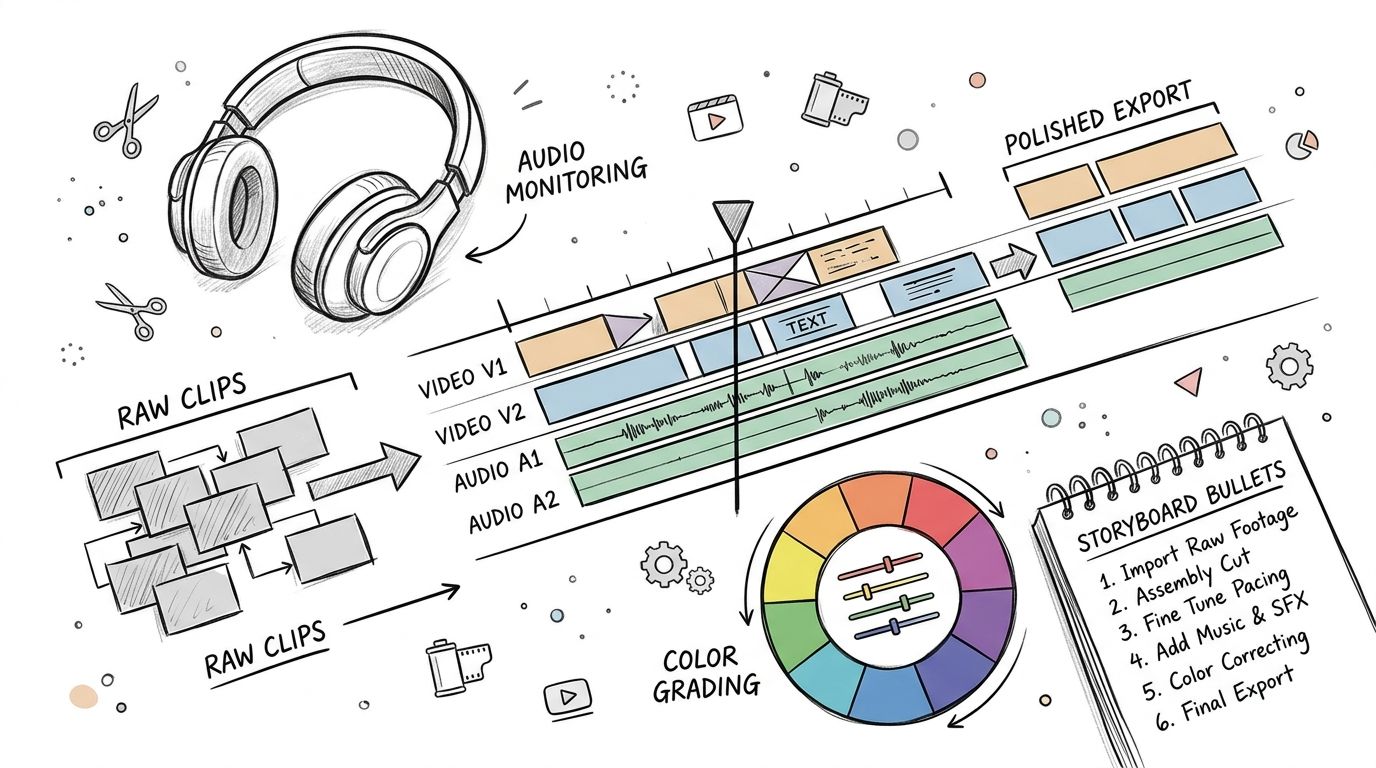
3. Video Editing Process Walkthroughs & Behind-the-Scenes
A lot of creators say they value editing, but audiences trust what they can see. That's why behind-the-scenes editing content works so well. It turns an invisible skill into visible proof.
This is one of the best content creator ideas if you want authority without sounding self-promotional. Show the timeline. Show the raw footage. Show the fixes.
Show the raw-to-final transformation
The strongest walkthroughs don't stay at the software-demo level. They explain decision-making. Why did this jump cut work? Why did this music cue start here? Why does this version feel faster even though the script barely changed?
Creators like Corridor Crew and Potato Jet do this well because they don't just say what button to press. They explain why the edit changes the story. That distinction matters. Audiences don't care about tools in the abstract. They care about outcomes.
A useful recurring series could revolve around the same source footage. Cut it as a vlog. Cut it as a talking-head tutorial. Cut it as a cinematic promo. That kind of format teaches style through comparison.
Turn process into trust
The other advantage of process content is that it humanizes the service side of editing. If you run a team or outsource work, show the actual workflow. Review comments, revision logic, color passes, sound cleanup, captioning decisions. That makes professional editing feel less mysterious and more operational.
Good process content doesn't glorify complexity. It removes fear. It shows creators that polished output comes from repeatable decisions, not magic.
A solid example format is a narrated timeline walkthrough. This video style works because people can watch the editor solve problems in real time.
Here's the kind of embedded reference that fits this approach:
4. Creator Case Studies & Success Stories
Case studies are often mishandled. They become shallow praise pieces with no tension, no problem, and no useful lesson. That's a waste. A strong creator case study should read like a business and production breakdown.
The most useful stories start with friction. A creator couldn't keep up with editing. Their quality was inconsistent. Their publishing stalled because every video took too long to finish. That's the story people recognize in themselves.
Use stories with tension, not fluff
Focus on the before-state in operational terms. Was the creator filming regularly but failing to publish? Were they strong on camera but weak in post-production? Did their long-form footage exist, but shorts never got repurposed?
That kind of framing makes the success story practical. You're not selling inspiration alone. You're showing a process change and the result it enabled.
The examples don't need exaggerated claims to be persuasive. A case study can be compelling when it shows:
- The bottleneck clearly: editing backlog, weak packaging, slow revisions, messy asset management.
- The intervention plainly: dedicated editing support, better review flow, standardized graphics, short-form extraction.
- The lesson: what changed, what didn't, and what still required the creator's own input.
Keep the case study commercially useful
A good recurring series uses creators from different niches. Education channels need different pacing than podcasts. Business creators need different lower-thirds than lifestyle vloggers. Webinar producers need a different editorial rhythm than entertainment channels.
That variety also helps you answer the question most advice misses. Which formats convert audience attention into actual business outcomes? A case study that includes sponsor-read placement, affiliate-friendly structure, or product demo integration is more useful than one that just says the content “performed well.”
When done right, creator case studies become one of the highest-trust content creator ideas you can publish because they connect strategy, production, and monetization in one format.
5. Thumbnail Design Principles & Psychology
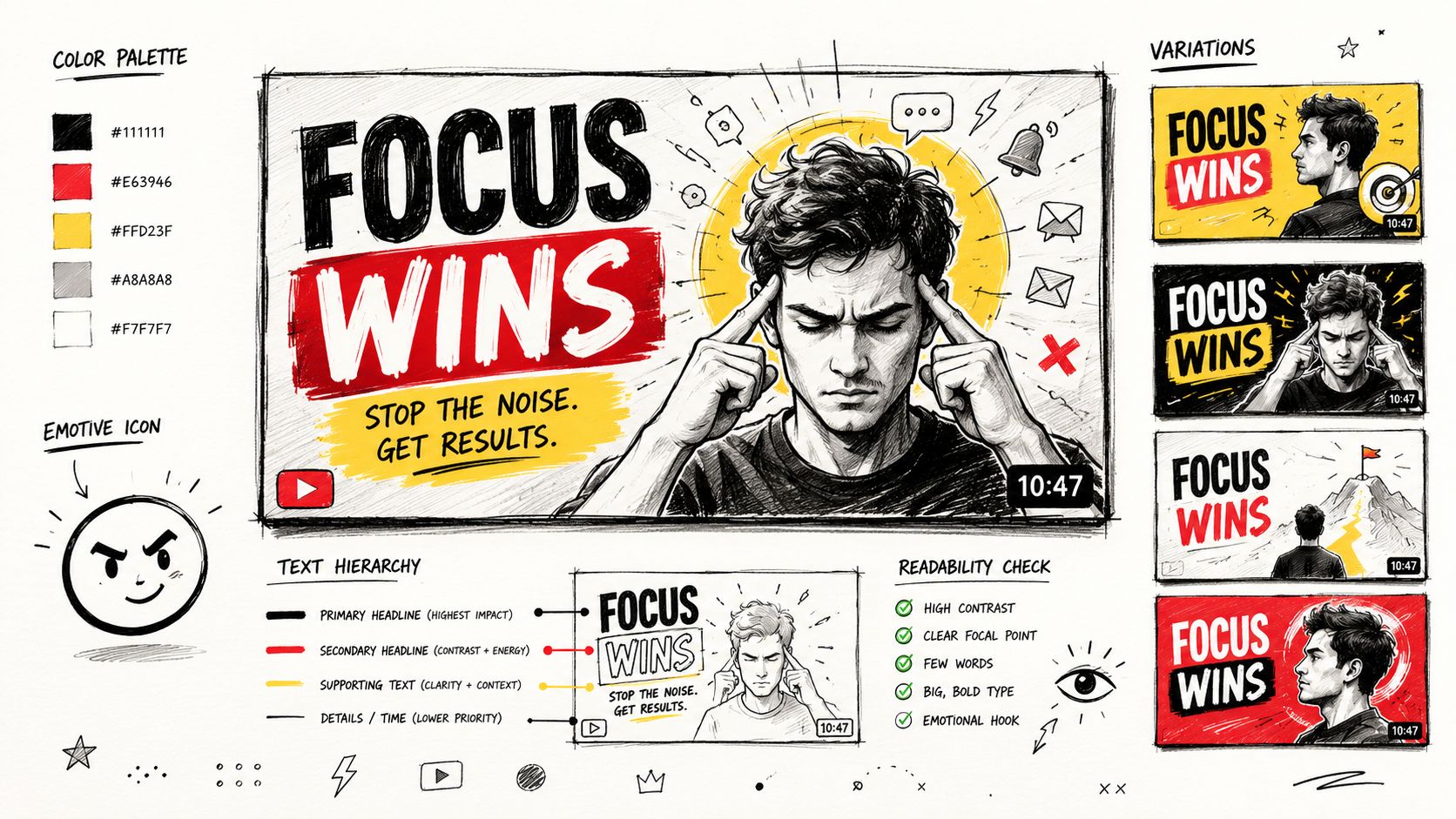
Creators spend hours on video production and then rush the thumbnail in twenty minutes. That's backwards. Thumbnails are packaging. If the packaging fails, the content doesn't get the chance it deserves.
This makes thumbnail education one of the most practical content creator ideas for YouTube-focused creators. It's visual, repeatable, and tied to a problem every channel feels.
Treat thumbnails like packaging
The best thumbnail breakdowns teach selection, not decoration. A thumbnail doesn't need more elements. It needs clearer hierarchy. Facial expression, contrast, focal point, negative space, and text restraint matter more than piling on arrows and glow effects.
Creators like MrBeast and Ali Abdaal have helped normalize the idea that packaging deserves intentional design. A thumbnail series can audit creators across niches and explain why one image creates curiosity while another just creates clutter.
Build a repeatable thumbnail series
A thumbnail content engine can run for a long time if you give it structure. Instead of publishing random advice, create recurring episodes around fixed themes.
- One-screen audits: Pull up three thumbnails and rank them on clarity, emotion, and scroll-stopping power.
- Redesign challenges: Rebuild a weak thumbnail while narrating each decision.
- Title-thumbnail fit: Show how good thumbnails fail when the title promises something different.
Design note: The thumbnail should create one strong question in the viewer's mind, not five smaller ones.
If you want to tie that education to a practical resource, this YouTube thumbnail size guide from Your Video Editor works well as a supporting asset inside a broader series on layout, cropping, and design workflow.
6. Audio Design, Mixing & Sound Effects Strategy
Poor audio makes content feel cheap faster than weak visuals do. Viewers will tolerate a less-than-perfect image. They won't stay long with distracting hum, uneven levels, harsh compression, or muddy dialogue.
That's exactly why audio strategy remains underused as a content series. Many creators know it matters, but few can explain it clearly. If you can, you instantly stand out.
Audio is where amateur content often breaks
This format works best when you make audio differences obvious. Use side-by-side comparisons. Let people hear untreated room tone versus cleaned dialogue. Let them hear what subtle background music does to pacing. Let them hear how sound effects guide attention during edits.
Podcastage, Film Riot, and creators who teach production craft understand this well. Audio education lands when it's sensory, not theoretical. Don't tell people compression matters. Play the clip.
A smart recurring series might cover mic choice one week, dialogue cleanup the next, and licensed music layering after that. The common thread is perceived professionalism.
The easiest series formats
You don't need complex sound design tutorials to make this useful. Start with the mistakes creators repeat.
- Noise cleanup demos: Remove background hum, echo, or plosives and explain each step.
- Mixing breakdowns: Show how voice, music, and effects sit together without fighting each other.
- Sound effect restraint: Demonstrate when a whoosh adds energy and when it just becomes noise.
This topic also connects naturally to outsourced editing. Many creators can cut video acceptably, but audio is where they struggle because the problems are technical and easy to miss until viewers complain.
7. Multi-Camera Editing & Live Event Video Production
Most creators avoid multi-camera and event editing content because the workflow feels messy. That's exactly why it's valuable. When a format feels hard, useful guidance gets easier to differentiate.
This category is especially strong if your audience includes webinar hosts, educators, interview channels, churches, event teams, or course creators. They all face the same challenge: a lot of footage, multiple angles, inconsistent audio, and very little time to clean it up.
Cover the messy workflows other creators avoid
The appeal here isn't glamour. It's relief. People want to know how to sync footage, choose camera switches, preserve narrative flow, and avoid timelines that become impossible to manage.
Show practical scenarios. A two-camera interview with separate lav mics. A webinar with slides, webcam, and host feed. A panel discussion where one camera failed and the backup shot is weak. That kind of specificity earns trust quickly.
The best episodes don't hide the chaos. They show how professionals organize it.
Make complexity look manageable
There's a lot of room for recurring formats in this niche.
- Timeline walkthroughs: Show the sequence layout for a real multi-cam edit.
- Switching logic breakdowns: Explain why the cut changes on a laugh, a question, or a slide transition.
- Event rescue edits: Take flawed source material and show how to make it publishable.
Multi-camera editing isn't about using every angle. It's about choosing the angle that protects clarity at that moment.
This is also where workflow systems matter. File handling, review notes, revision rounds, and brand assets become much more important when projects are long and collaborative. A service team with a client portal and timestamped feedback can remove a lot of friction from these high-file-size, high-stakes projects.
8. Motion Graphics, Animations & Visual Effects Tutorials
Motion graphics content can either build authority or scare people off. It depends on how you teach it. If every example looks like a blockbuster intro package, creators assume it's out of reach. If you teach motion as a practical storytelling tool, the topic becomes accessible.
That's why this category works best when it starts small. Lower-thirds. Title reveals. Callout animations. Screen annotations. Progress bars. Those are everyday assets, not flashy detours.
Teach motion with restraint
Good motion design education helps creators understand timing, spacing, and emphasis. The animation itself isn't the point. The point is directing attention and making information easier to follow.
Creators often overuse motion because they associate movement with energy. In practice, too much movement makes videos feel busy and less trustworthy. A recurring series that compares restrained graphics to overdesigned sequences would be useful because it teaches taste, not just software.
That's where examples from School of Motion or Corridor-style breakdowns can inspire the format, even if your own teaching stays grounded in creator workflows.
Turn templates into a content machine
One of the easiest ways to make this series sustainable is to build around reusable assets. Start with a branded intro package. Then make episodes on animated captions, statistic callouts, chapter cards, and end screens. Each asset becomes both a tutorial and a productized workflow.
A few practical sub-series ideas:
- One asset, three styles: Build the same lower-third for a business channel, podcast, and gaming creator.
- Fast wins in After Effects or Premiere Pro: Teach one simple animation per episode.
- Brand consistency: Show how motion templates keep a channel recognizable across formats.
This category also pairs well with service-based content because many creators don't need to learn advanced motion graphics themselves. They need enough understanding to brief an editor well and judge quality when they see it.
9. Color Grading, Color Correction & Cinematic Look Tutorials
Color content attracts creators because it promises transformation. Flat footage becomes polished. Mixed lighting becomes coherent. Skin tones stop looking off. The problem is that many tutorials blur correction and grading together, which confuses beginners.
That confusion gives you a better content angle. Separate the technical fix from the creative choice.
Separate correction from style
Color correction solves mistakes. Exposure issues, white balance shifts, and inconsistent shots belong here. Color grading shapes mood after the image is technically clean.
That distinction makes a strong recurring series because each episode can stay narrow. One episode on fixing green skin tones. Another on matching A-cam and B-cam shots. Another on building a warm lifestyle look versus a cooler documentary feel.
This niche works especially well with before-and-after comparisons because the value is visible instantly. You don't need hype. The image does the explaining.
What viewers actually notice
Most viewers won't describe your grade in technical language, but they will feel the effect. Clean color supports trust. Consistent skin tones make creators look more professional. A controlled look helps a brand feel intentional.
The strongest content in this category usually combines:
- Problem solving: white balance, contrast, mixed lighting, log footage confusion.
- Taste development: when cinematic grading helps and when it becomes distracting.
- Workflow realism: LUTs, scopes, shot matching, and export consistency.
A lot of creators chase “cinematic” before they've mastered “clean.” That's why educational content here can be both aspirational and practical without becoming vague.
10. Creator Workflow Optimization & Time Management Strategies
This is the category most creators need, even if it's not the category they search for first. Creative block often looks like an idea problem. In reality, it's usually a workflow problem.
Ideas dry up when production feels heavy. If every post requires starting from zero, editing alone, designing assets manually, and chasing feedback across messages, your brain learns to resist the whole process.
Solve the bottleneck, not the symptom
A major gap in most content creator ideas advice is that it tells people to reuse ideas, document their life, or post in series, but it rarely solves the operational side of publishing consistently. That gap matters because execution capacity often becomes the primary limit. The U.S. Chamber observation cited in this Backstage article on content creation ideas points toward AI-enhanced editing helping creators serve a growing market, which reinforces a bigger truth. The issue often isn't idea scarcity. It's production capacity.
The broader market supports that direction. The global digital content creation market was valued at USD 32.28 billion in 2024 and is projected to grow at a 13.9% CAGR from 2025 to 2030, according to Grand View Research's digital content creation market report. More demand creates more pressure to publish well and publish often.
Build a system you can keep running
Workflow content should be blunt and operational. Show batching. Show naming conventions. Show folder structures. Show what gets delegated first.
One practical angle is structured ideation. For example, Hootsuite's AI content ideas generator allows up to five input nouns plus a primary keyword and returns three results at a time. That's useful not because AI magically solves strategy, but because constrained inputs help creators test angles quickly instead of staring at a blank page.
The strongest workflow episodes usually tackle questions like these:
- What should stay with the creator: scripting voice, final approval, strategic direction.
- What should move to systems: editing, repurposing, thumbnails, asset management.
- What should move to specialists: motion graphics, audio cleanup, color work, complex revisions.
When creators outsource well, they don't become less authentic. They become more consistent. That's the difference between a hobby process and a scalable one.
10-Point Comparison of Content Creator Ideas
| Title | Implementation Complexity 🔄 | Resource Requirements ⚡ | Expected Outcomes ⭐📊 | Ideal Use Cases | Key Advantages 💡 |
|---|---|---|---|---|---|
| YouTube Channel Growth & Optimization Guides | Moderate, research + ongoing updates 🔄 | Analytics access, case studies, editorial time ⚡ | ⭐ Improved subscriber growth, CTR and retention; long-term inbound leads 📊 | Creators planning channel-scale strategies | Positions PRWiz as strategic partner; evergreen search demand |
| Short-Form Video Content Strategy (TikTok, Reels, Shorts) | High, rapid trend tracking and frequent updates 🔄 | Fast-turnaround examples, platform-trained editors, trend monitoring ⚡ | ⭐ Rapid engagement gains and direct leads for short-form editing 📊 | Creators prioritizing viral reach and frequent posting | Aligns with PRWiz 24–72h service; strong immediate lead generation |
| Video Editing Process Walkthroughs & Behind-the-Scenes | High, detailed technical demos and pacing control 🔄 | Skilled editors, capture of raw workflows, longer production time ⚡ | ⭐ Builds trust in expertise; justifies premium pricing 📊 | Prospective clients needing proof of craftsmanship | Demonstrates craft and quality; builds long-term loyalty |
| Creator Case Studies & Success Stories | Moderate, requires coordination and data collection 🔄 | Client cooperation, analytics screenshots, interview time ⚡ | ⭐ Strong social proof and higher conversion rates 📊 | Sales-focused content targeting new clients | Persuasive ROI evidence; evergreen credibility builder |
| Thumbnail Design Principles & Psychology | Low–Moderate, design theory + testing 🔄 | Design expertise, A/B testing data, templates ⚡ | ⭐ Immediate CTR improvements; measurable impact on views 📊 | Creators seeking quick CTR and impression gains | Directly drives CTR; natural lead for thumbnail services |
| Audio Design, Mixing & Sound Effects Strategy | Moderate–High, technical audio work and explanation 🔄 | Audio engineers, DAW software, before/after examples ⚡ | ⭐ Better perceived quality and improved retention 📊 | Creators valuing dialogue clarity and immersive sound | Strong differentiator; high perceived value for clients |
| Multi-Camera Editing & Live Event Production | High, complex sync and switching logic 🔄 | Multi-cam files, sync tools, experienced editors, storage ⚡ | ⭐ Professional event deliverables; supports premium pricing 📊 | Webinars, conferences, course creators, B2B clients | Targets higher-budget clients; recurring event revenue potential |
| Motion Graphics, Animations & VFX Tutorials | High, steep learning curve and software-heavy 🔄 | After Effects/comp tools, templates, design talent ⚡ | ⭐ Elevated brand perception and production value 📊 | Creators needing branded intros, transitions, VFX | Visually compelling; justifies premium editing fees |
| Color Grading, Color Correction & Cinematic Look Tutorials | Moderate–High, technical and equipment-sensitive 🔄 | Colorists, calibrated monitors, LUT packs, software ⚡ | ⭐ Cinematic look and consistent skin tones; improved professionalism 📊 | Narrative, lifestyle and cinematic creators | Timeless skillset; boosts perceived video quality |
| Creator Workflow Optimization & Time Management Strategies | Moderate, process mapping and economic framing 🔄 | Workflow diagrams, cost calculators, case studies ⚡ | ⭐ Increased output consistency and creator time savings 📊 | Creators facing burnout or scaling challenges | Frames PRWiz as infrastructure for scaling; shifts focus to ROI |
Turn Your Ideas Into High-Impact Assets
The best content creator ideas don't fail because they were bad ideas. They fail because they never became a system. A creator writes a promising topic in Notion, records half the footage, gets stuck in editing, misses the publish date, and starts over with another “better” idea next week. That cycle looks like a creativity problem on the surface. It's usually a production design problem underneath.
That's why these 10 formats matter more than a giant brainstorm list. Each one can become a repeatable series. Each one can be templated. Each one can support long-form content, short-form cutdowns, thumbnail variations, and platform-specific adaptations. That's the kind of structure that helps you publish when motivation is low.
The other reason this matters is economic reality. Earlier, we noted how uneven creator earnings are. Most creators aren't operating with giant teams or unlimited time. They need ideas that can do multiple jobs at once. A solid YouTube optimization guide can become a Short, a carousel, an email, and a client-facing portfolio piece. A case study can support sales conversations. A behind-the-scenes editing walkthrough can build trust while also educating your audience. Good formats compound.
You also need to judge ideas by their operational cost. Some ideas sound smart but create too much production drag. Others look simple and turn into your most durable series because they rely on a reusable outline, a stable edit style, and a consistent visual package. In practice, the best content creator ideas usually sit in that sweet spot where audience demand, monetization potential, and workflow feasibility overlap.
That's where professional editing becomes a growth lever, not just a convenience. If editing is the bottleneck, then the right support changes more than your timeline. It changes what kinds of content you can sustain. Suddenly long-form videos don't automatically kill your week. Shorts can be repurposed from existing footage. Motion graphics stop being a someday project. Audio cleanup stops being optional. Thumbnails stop getting rushed at the end.
A service like Your Video Editor is useful in that context because it's built around repeatability. Defined turnaround times, unlimited revisions within scope, timestamped feedback, and a client portal aren't glamorous features, but they solve the problems that delay publishing. They reduce back-and-forth, make review easier, and help creators maintain a brand-consistent output without rebuilding the process every time.
There's also a mindset shift here that matters. Outsourcing editing doesn't mean giving away your voice. It means protecting it. You keep the strategy, the perspective, the on-camera presence, the final judgment. The production system handles the parts that drain time and slow momentum.
If you're stuck right now, don't try to brainstorm your way out by listing fifty random post ideas. Pick one format from this article and turn it into a series. Define the recurring angle. Decide what gets templated. Decide what gets delegated. Build the workflow around the idea, not after it.
That's how creators get off the content treadmill. Not by becoming endlessly inspired, but by making good ideas easier to produce, easier to polish, and easier to repeat.
If you're ready to turn scattered ideas into a dependable publishing system, PRWiz can help. Your Video Editor handles long-form and short-form editing, thumbnails, motion graphics, audio cleanup, color work, and review workflows so you can stay focused on strategy and creation instead of getting trapped in post-production.